Object Pooling

Alright, it’s finally getting a little bit warmer around here as spring comes and goes, so let’s celebrate by jumping into the pool! That’s right, today we’re going to be talking about an ever-important pattern in game development, the concept of Object Pooling. Object Pooling is a design pattern which involves creating a set of objects – a ‘pool’ – and reusing those objects, rather than creating/destroying objects throughout a game.

pool

Object Pooling involves recycling objects

This is a very important concept in game development, and it’s the first topic we’ve reached that is almost entirely associated with the optimization of a game. For mobile game developers, resources are limited, so it’s important that we don’t waste anything. Object pooling helps us save resources, and is less of a mechanic, and more of a general design pattern. We used it in Where Shadows Slumber, but it isn’t even one of the more defining features of the game. However, it’s still an incredibly important concept.

So, without further ado, let’s dive in!


Why do we need Object Pooling?

Unity is a pretty cool system, and it gives you some pretty cool toys to play with. Two powerful toys it gives you are Instantiate() and Destroy(), which allow you to create a new instance of a GameObject, and to get rid of an instance of a GameObject, respectively. I assume that other game engines provide similar functions. If you’ve played around with some simple stuff in Unity, you might have seen how useful these functions can be.

The problem with Instantiate() and Destroy() comes when we try to use them a lot. You see, every time you call Instantiate(), Unity goes into your memory, finds a chunk of memory big enough to store the new object, and allocates it. Conversely, every time you call Destroy(), Unity finds that object in memory, clears it out, and marks that memory as ‘available’. This whole process is aided by the use of a garbage collector, which runs occasionally, making sure that deleted things were actually deleted.

Those of you familiar with computer science may see where I’m going with this. Basically, this isn’t great. Calling Instantiate() or Destroy() every once in a while is fine. But when you call them all the time, Unity starts to slow down. Memory allocations and deallocations are somewhat expensive, meaning the garbage collector will be running a lot, sucking valuable power away from your game! Every time the garbage collector runs, your game might lag a tiny bit. This is doubly true for environments where resources are limited (say, on a mobile device).

So, our clever brain gets to work. ‘Hmm’, it says, ‘if calling these functions is bad, let’s just not call them!’ Brilliant, brain, as usual! Surprisingly, in this case, the first idea that pops into our head is actually pretty good – we just won’t use Instantiate() or Destroy(). Problem solved!

The only remaining question is how to maintain the functionality we had before. We were, for example, using a gun, and every time we fired, we would instantiate a bullet. Every time the bullet hit something, we would destroy it. How can we get that same functionality without using Instantiate() or Destroy()?


Object Pooling

The answer to the above questions is, obviously, to use object pooling. The concept is pretty simple – rather than creating a new bullet every time we fire our gun, and then destroying every bullet individually, why don’t we just reuse the bullets? They all look the same, so no one will know the difference!
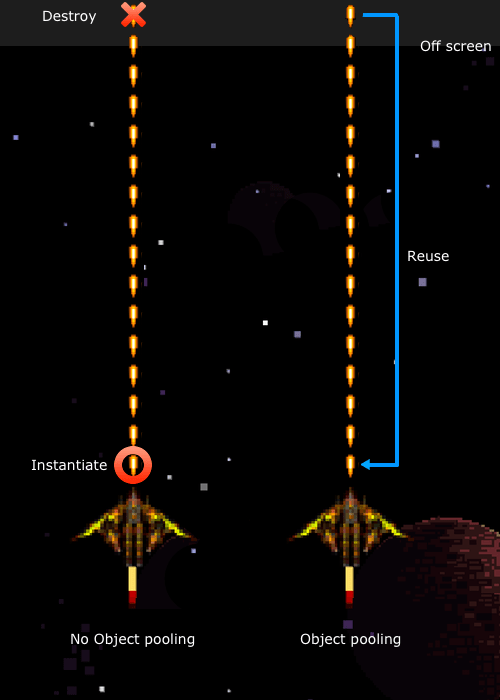
NonVsPooling

Object pooling in a space shooter (image credit: raywenderlich.com)

This is the idea behind object pooling. Rather than creating and destroying a bunch of bullets every frame, which can get expensive, we simply create a bunch of bullets at the beginning of the game, and reuse them. We store all of the bullets in a ‘pool’ – they’re all deactivated and unmoving, so they have no effect on the game. Then, every time we fire the gun, we grab a bullet from the pool, change its position and velocity so it looks like it’s coming from the gun, and enable it. The bullet flies through the air, and then strikes a wall, or moves off of the screen. At this point, we simply disable the bullet and return it to the pool to be used again!

If this seems a little weird, think of it like extras in a TV show or movie. In the first scene, we need a crowd, so we hire a bunch of actors to be people in the crowd. The next scene is in a different city, but still needs a crowd. Do we fire all of the extras we already hired, and then spend more time hiring different extras? Well, nobody was really paying too much attention to the extras in the first scene – let’s just use them again for the second scene! This is pretty common in TV and movies, and there’s no reason we can’t do the same thing here.

“I gave a very memorable performance as the nurse, and now, suddenly, I’m the waitress? That’s gonna confuse my fans!”
– Phoebe Buffay, Friends

Using object pooling, we can avoid the need for our expensive allocation/deallocation functions (other than at the beginning/end of a level, where slowness is more acceptable) by reusing all sorts of objects. There is a tradeoff here – using an object pool means that, whenever we need a bullet (or any object), we have to be sure that there will be one in the pool. This means that we actually need to store more copies of the object than we ever expect to use. While object pooling makes it easier for the CPU to keep up with what we’re doing, it uses up more memory.

This is called the space-time tradeoff, and it’s pretty common in computer science. The idea is that, in order to optimize for time (make your code run as fast as possible), it generally uses up more space (in the form of RAM). In this case, time refers to time spent in the CPU – saving time means less lag, which makes for a better game. In general, on mobile platforms at least, saving time it more important, so this is a tradeoff we’re happy to make by using object pooling.


Where Shadows Slumber

So, how did we use object pooling in Where Shadows Slumber? We don’t have any bullets, so what else can object pooling be used for?

Honestly, object pooling wasn’t incredibly important to the core game – all of our levels are pre-made and we don’t have any projectiles or anything else flying around. Where we did use object pooling was in ‘special effect land’. Every time the main character takes a step, a small sound plays, and in some levels you can see a puff of sand behind him. These are what we have taken to calling footfalls, and they’re one of the main things we used object pooling for.
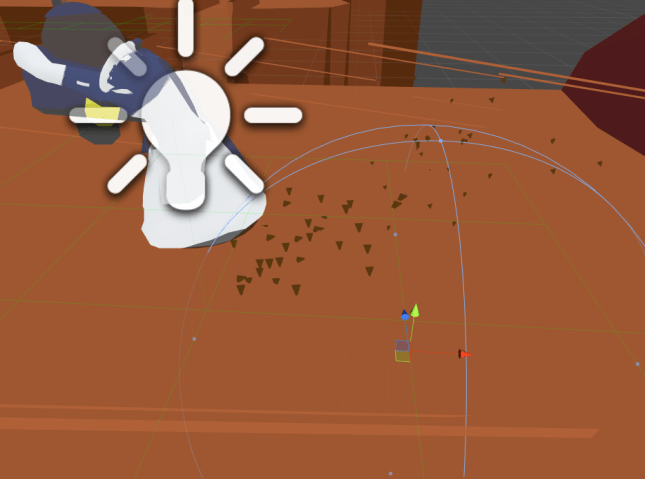
Footfall

This group of particles is a footfall, and was pulled from a pool rather than instantiated!

In fact, sometimes you may have used object pooling without even realizing it! You see, one of the primary uses for object pooling is within particle systems. A particle system may emit a burst of hundreds of particles at once. Imagine trying to instantiate that many object in the same frame – your game would lag for sure! However, if the particle system uses object pooling, it will simply enable all of those objects, and your game will keep running without a hitch. This allows you to get high-quality particle effects without having to worry too much about the impact on performance.

Hopefully this quick conceptual intro to object pooling helps you out, and saves you many CPU cycles! I should mention that I got an image from this blog post on object pooling, which coincidentally is a very good resource if you want to get a good look at an implementation of object pooling.


= = = = = = = = = = = = = = = = = = = = = = = = = = = = = = = = = = = =

If you have any questions or comments about object pooling (or anything else), you can always find out more about our game at WhereShadowsSlumber.com, find us on Twitter (@GameRevenant), Facebook, itch.io, or Twitch, and feel free to email us directly with any questions or feedback at contact@GameRevenant.com.

Jack Kelly is the head developer and designer for Where Shadows Slumber.

Time Tracking, When Done Wrong, Is Useless

My good friend, this week you are in luck.

For starters, I’m going to forego my usual wordy style and cut right to the chase. I’m typing this well in advance of the deadline, because I’ll be on vacation when this is posted. That means I don’t have time to blather incessantly about artwork and other such nonsense. (Really, who has the time?)

The other reason you’re in luck is because I’m about to save you about 14 months of hassling when it comes to proper time tracking. They say that good judgment comes from experience – and that experience comes from bad judgment. Well, let’s talk about my experiences with time tracking. Then we’ll get to my bad judgment near the end.


Jack

A sample time sheet from the veeeeeeery beginning of the Demo Phase.


Time Tracking: An Intro

Before we go on, a quick definition is in order. You’re probably wondering what time tracking is. (If you already know, you’ll save time by skipping this section.) Time tracking is the continuous project management process of collecting data on how members of a project are spending their time working on that project.

In theory, you’re supposed to do it for a few months and then look at the data. If you find out everyone is spending 5 times as long as they should working on some task (A), then you’ll change process (B) so that task (A) doesn’t take so long in the future. That’s the hope, anyway.

In practice, it means filling out time sheets (see above) like a madman every time you do anything related to your indie game. Done incorrectly, it will actually take time away from your project and give nothing back in return. Done properly, it gives you keen just-in-time insights that let you wisely cut features and move staff around before you hit that impending deadline.


Old Sheet

On the surface this time sheet may look good. However, on further inspection…

How To Do A Bad Job

I want to tell you how to do time tracking properly, but you won’t appreciate the correct approach until you see it done wrong.

For the entirety of our time working on the Where Shadows Slumber Demo, Jack and I tracked our time with a time sheet I devised. This Google Spreadsheet had an entry for every sprint (a period of 1 or 2 weeks, usually the time between team Skype meetings) with a bunch of headings: Day, Start, End, Total, and Task. Here’s what they meant:

  • Day – What day during the Sprint did you work on this Task?
  • Start – “Punch in” at a time to begin working on the Task.
  • End – “Punch out” at a time to stop working on the Task.
  • Total – The number of minutes you worked on the Task.
  • Task – What you worked on.

As you can see, this tells us a lot about how I spent my Sprint. But none of this information is relevant to project management in the long term. There’s no indication whether or not I actually completed the Tasks I worked on. (Some have percent complete markers, but those are just guesses anyway) Looking at this, I have no idea how the project moved ahead during the Sprint. Our only real metric is the number of hours I worked – nearly 19. But… who cares? It’s not like I’m charging anyone by the hour! Jack and I do this as a labor of love, with salaries to come from proceeds from the final game.

This time sheet makes the critical error of measuring the wrong metric. I must confess that some weeks, I tried to just work for a long time instead of working effectively so I could feel good about logging impressive hours. That’s a sign of bad project management. As a manager, you ought to offer incentives for behavior that gets the project completed on-time and at a high quality.

The results? Internally, we had a lot of arguments about this process as Jack felt it was unnecessary. Because I never returned to the data we created to analyze it, we got nothing for all our tedious efforts. Jack stopped tracking his time, and that was a warning sign that I needed to change things up. Our time tracking was costing us time to do, with no benefit to the team. Time for a change!


TimeSheet

Time Sheet: Version 2.0!


My Time Tracking Strategy

Here’s how I altered the process for the final project. Starting April 4th, I began tracking my time the way shown above. The headings this time are Task, EST, ACT, Error, and Status. Let’s deconstruct that jargon:

  • Task – One entry for the Task this time, no matter how long it takes.
  • EST – Short for “Estimate”, this is an educated guess about how many minutes this task will take to complete. You’re supposed to guess at the beginning of the sprint.
  • ACT – Short for “Actual”, this is the actual number of minutes this task took to complete. You’re supposed to fill this in as you go. It’s the only thing that requires active time tracking while you work.
  • Error – This is automatically calculated with an Excel formula. It’s the percentage of error between your guess (EST) and the actual time (ACT). You want to get 0%, meaning that your guess was perfect. The larger the number is, the worse your guess was. The formula I use here is =(ACT – EST ACT.
  • Status – The most important part! Each task is a discrete item within the larger project that is either done or not done. We want a full list of check marks at the end of this sprint. If a task is left incomplete, there had better be a good reason!

As you can see, now the spreadsheet is setup with the Task as the most important thing. We’re measuring whether tasks are complete ( ) or incomplete ( ) instead of measuring how many hours someone has worked. That’s important, because people tend to maximize whatever they’re being graded on if you observe them working.

It’s changing my behavior, too! Instead of acting like I need to fill my time sheet with useless “minute points”, now I feel the pressure to get my estimation right. Of course, I can only be right if I finish the Task. The incentive structure of this time sheet is way better! We begin with an incentive to make a good guess. Then we have an incentive to conform towards that good guess so we don’t get “mark of shame error percentages”. Finally, we have an incentive to finish each Task so it doesn’t remain a permanent “X of shame” forever. Perfect!

This will lead to actual progress on the project and helpful information about our estimation ability at a glance.


innovation-think-big-act-small-fail-fast-and-learn-rapidly-7-638

In all seriousness, though – I did fail.

The Lesson? Get It Right The First Time

To conclude… I have bad news. If you’re a project manager, listen up! You need to get this stuff right the first time. Putting your teammates through a tedious process of time tracking gets on their nerves after a while. People can only put up with that for so long, especially if they don’t get anything out of it.

I’m still doing time tracking, but Jack has become disillusioned with the process. I don’t blame him, but it’s still a shame. Had I gotten this right the first time, we might still be on the same page.

Don’t reinvent the wheel like I did on my first attempt. Use a proven method that works, read some software management books, talk to an industry professional, and communicate with your teammates during the early stages of the project. If you do, people will find time tracking fulfilling. Otherwise, they’ll fall by the wayside. And remember – you can never force anyone to do anything, you can only offer irresistible incentives!


= = = = = = = = = = = = = = = = = = = = = = = = = = = = = = = = = = = =

Thanks for taking the “time” to read this “clock”. Have a question about time tracking that was not answered here? You can find out more about our game at WhereShadowsSlumber.com, ask us on Twitter (@GameRevenant), Facebook, itch.io, or Twitch, and feel free to email us directly at contact@GameRevenant.com.

Frank DiCola is the founder of Game Revenant and the artist for Where Shadows Slumber.


Paradise Found

Now that artistic development of Where Shadows Slumber has begun in earnest, I have embarked on a long journey – creating each of the game’s Worlds. Up until now, we’ve been making demo levels strung together with a vague theme (Canyon, Aqueduct, Tomb) and worked backwards from design to find some kind of artistic through-line. But for the final game, Jack and I are taking a different approach. First, we planned out each of the game’s Worlds. Then, we designed Levels for those Worlds that fit their theme and orbited around a single mechanic. Now I’m at the part of the pipeline where it’s time to actually create modular art assets that can be used to create Levels inside each World.

Let’s unpack some of the jargon in that paragraph.

SPOILER WARNING: This blog post discusses the final World of “Where Shadows Slumber”, which is still in development. Although the game is subject to change, this can potentially ruin your experience if you intend to play the game without knowing where your journey leads. If you don’t want to have it spoiled, do not continue reading.

maxresdefault

What Are Worlds?

Call us old-fashioned, but Jack and I grew up playing games like Super Mario, which was organized around a World/Level paradigm. You had to beat each of the Levels in World 1 in order to progress to World 2.

Defining a Level is easy enough because our demo has 9 of them – a Level is a single screen of the game, with a large puzzle to complete. Often it is comprised of multiple smaller puzzles. Some Levels early in the game are designed to introduce Players to new concepts. Levels that come later serve as final exams, testing the Player. Can you put what you’ve learned to use in order to solve a really complex puzzle?

If Levels are just puzzles, Worlds are the aesthetic glue that bundles them together and gives the game a story. A game with 30 grey, silent puzzles is going to rapidly become boring and repetitive. How can you tell a story that way? By grouping our Levels into Worlds, we can indicate to our Player that your character is traveling on a journey. You start in a Forest World – eventually, you get to a City World. The developers are making a clear statement: this game exists in a physical space, and your character’s success in his journey is based on whether or not he reaches his destination.

Best of all, we don’t need to use a lot of words to communicate this during the game. Once you realize you’ve completed a World and moved on to a new one that looks radically different, there’s a sense of accomplishment. Even better, curiosity drives the Player’s engagement from this point onward. “What other Worlds did they put in the game?”, one wonders. “I have to beat this Level. It’s the last one in World 4, and I’m dying to see World 5!”

bermuda-after-xl

Inspirations For World 7 – “Paradise”

Now that we’ve defined what Worlds are, we can discuss my process for designing what each one looks like. For this blog post I decided to focus on my current project, World 7 – “Paradise”. Don’t get your hopes up here! I’m not working on these chronologically. I actually started with World 7. This is by no means an indication that I’m almost done with the game’s artwork. Not even close.

Most of the Worlds in our game are inspired by real life locations. The Forest World is obviously inspired by large wooded areas in temperate zones. Some Worlds have even more specific inspirations, however. World 7 is supposed to be a paradise – a floating garden in the clouds where your journey ends. I wanted to make it feel heavenly and relaxing without relying on tired mythological tropes like pearly gates and clouds. What to do?

“You go to heaven if you want to — I’d rather stay right here in Bermuda.”

– Mark Twain, during his final visit to the island shortly before his death.

I decided to use the unique architecture found on the island of Bermuda as a template. The tropical island is quite beautiful due to its crystal clear blue water, pink sand beaches, and lush vegetation. But in my many visits to the island (my family loves to travel there) I have found that the human architecture adds to the island’s beauty, rather than detract from it.

p532571176-3

Since Bermuda is an island in the ocean, fresh water is scarce. They must collect rain water from whatever storms pass by and hoard them in water tanks underneath their homes. Because of this technology, every single roof in Bermuda is made from white limestone and has a ridged pyramid-like shape, optimized for water collection. I’ve never seen it anywhere else, and I find the uniformity soothing – like small white mountains popping out amidst the island’s trees.

I’m not sure why, but home owners in Bermuda have also taken to painting their stone houses with bright pastel colors that really stand out. Everything from dark cerulean, pink, yellow, light red, teal, and even bright green can be found as you glance at a Bermudian city. It’s a welcome departure from the reddish brick of Hoboken, New Jersey – not to mention the grey steel glass of nearby Manhattan. The entire island of Bermuda is brimming with life, and the island’s human residents don’t mire the look of the tropical paradise one bit.

cherry-blossom-4

On a separate note, I’ve always found the Japanese cherry blossom to be both vibrantly beautiful and soothing. In full bloom, they have dazzling pink flowers at the tip of each branch. They fit better into this “Bermuda as heavenly paradise” design than palm trees do, so I’d like to include them as well.

bermuda-rooftops-houses-colorful

Picking Crayons – A Color Palette For Paradise

Once I decided that this tropical paradise would become our game’s final destination, I set out to capture the beauty in an organized fashion. I asked myself two important questions:

  1. If you could use no more than 10 colors, which ones best represent Bermuda?
  2. What is the best way to create a modular set of pieces that can be used to build similar architecture?

The result of the first question is found below. This is the color palette for World 7. It’s a bit like picking out only certain crayons from the box and sticking with them. Deciding on a color palette is a good way to rein in my creativity and make sure I’m not just picking random colors when it comes time to make the real game.

ColorPalettes_7_Paradise

I created this by using some images of Bermuda from Google Images and picking out colors with the eyedropper tool in Photoshop. It’s a good way of breaking out of my shell in order to use tones and hues I might otherwise not select from a color wheel. Snaking from top left, to bottom left, and then to the next row:

  • Limestone White: This white color will be used for rooftops in this World.
  • Limestone Blue: This blue is actually going to be used for when the limestone is in shadow, for a stark contrast.
  • Yellow, Purple, Green, Red: These four colors are going to be what houses are painted with. I picked the most Easter-ish ones I could find.
  • Sky Blue: Since this World is floating, you’ll be able to see the sky in the background. This solid color will serve that purpose.
  • Dark Green: The grass and trees in this World are a lush green.
  • Cherry Pink: I want to have cherry blossoms in full bloom in this World.
  • Cherry Brown: The cherry trees need to have a bark, after all. But not too dark!

There’s no way I’ll stick to just these colors, but it serves as a good baseline. You can tell just by looking at the grid of 10 above that this World is brighter and more peaceful than the ones preceding it. I hope it will be a welcome sight to Players who have reached the end of our game.

3DSMAX

Modeling Modular Members of Paradise

Say that 10 times fast.

Once we know what the final result will look like, and we have colors and reference images to guide us, it’s time to model some pieces in 3D. To build a Level in this grid-based puzzle game, we need 1×1 pieces that can snap together to form walkways, obstacles, and doorways.

As you can see from the Autodesk 3DS Max screenshot above, each piece is modeled separately and laid out in an organized manner. They are precisely the size they need to be, and their rotation is preset so that we don’t have to mess with them in Unity. With an organized set of tiles like this, even a non-artist member of the team can snap them together like jigsaw pieces.

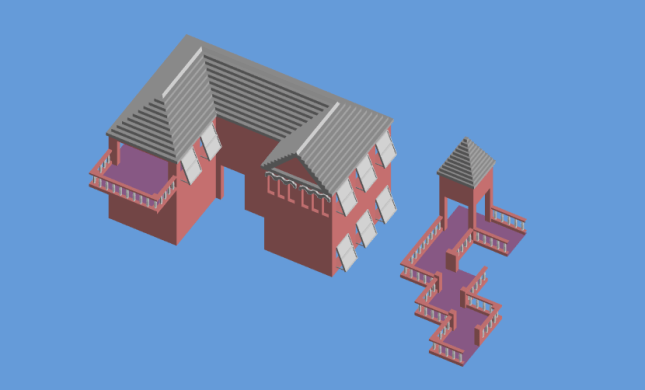
It might not look like much, but when they are combined together in Unity, they can form complete shapes that resemble Bermuda:

Bermuda

Assembled in Unity entirely from modular World 7 pieces.

This process is not yet complete, but I feel confident in the direction I’m heading. The floor tiles all have beautiful banisters on them. The roof tiles (purely decorative) mirror the strange step-like quality of Bermuda’s. The open shutters give a sense that the island is prepared for the worst, but enjoying the calm before the storm.

I’ll post more process pictures as I complete more 3D models. But until then, I hope you’ve enjoyed this in-depth look at how much work goes into designing a single World of the game. Hopefully this front-loaded design work makes it easier to create beautiful Levels later down the road.


= = = = = = = = = = = = = = = = = = = = = = = = = = = = = = = = = = = =

Got a picture of Bermuda you’d like to share? Have a question about aesthetic design that was not answered here? You can find out more about our game at WhereShadowsSlumber.com, ask us on Twitter (@GameRevenant), Facebook, itch.io, or Twitch, and feel free to email us directly at contact@GameRevenant.com.

Frank DiCola is the founder of Game Revenant and the artist for Where Shadows Slumber.
Mechanic Spotlight: Pathfinding

For a game like Where Shadows Slumber, the most basic interaction you have is to tell the character to move to a spot. If he’s a good boy, he’ll do what you say, deftly dodging pillars and chasms as he winds his way toward the destination. You don’t even have to tell him how to get there – he’ll figure it out!

This leads us to the topic of pathfinding, the process by which the character figures out where to move. Pathfinding is very common in game development, and can be summed up with a single question:

How do you get from point A to point B? Rather, what’s the best way to get from point A to point B?

This is the question that encapsulates the idea of pathfinding. In the real world, I tend to take whatever public transit is available, and walk the rest of the way. Some people open up their GPS, hop in their car, and follow the directions. You could even simply determine the direction you’re going, grab a compass, and just start walking.

Each of these is an example of a pathfinding algorithm. The algorithm is a set of instructions which determines exactly how to get somewhere. Pathfinding algorithms in games are a little different from the ones listed above, but the concept remains the same. Given a starting point, a destination, and some information about the surroundings, how should you get there?


Finding a Path in the Darkness

Pathfinding is a pretty common concept in computer science, even outside of gaming. It has received a lot of attention and study in the computer science world, so I won’t get into the intricate details and just stick to the broader points. If you want more details, there are plenty of pathfinding intros and tutorials out there.

silnxeb6eaey

The leading theory for the motivation behind Dijkstra’s Algorithm

Some number of years ago, a cool bro by the name of Dijkstra came up with a good pathfinding algorithm, appropriately dubbed Dijkstra’s Algorithm. Years later, a variant known as A* Pathfinding is still a favorite among game developers, and is the algorithm I decided to use for Where Shadows Slumber.

The basic idea behind A* is to divide your map into a set of areas, which I have taken to calling ‘nodes’. For each of these nodes, you determine which other nodes it’s connected to, and how hard it is to move between the nodes.

What do I mean by that? Imagine you’re standing in front of a fence, and you want to cross to the other side. In this case, the best path is probably just to climb over it. However, if there’s an open gate in the fence a few feet away, that might be the best route to take. Even though you’re travelling more distance, that path is faster, or at least easier. In the same way, each node has a ‘pathfinding cost’, indicating the difficulty to cross it. Our ground node might have a cost of 1, whereas the fence node could have a much higher cost of 10 or so, since it’s so much more difficult to cross.

Once you know what your nodes are, and how they’re connected, the A* algorithm will efficiently loop through and figure out which nodes you should travel over. After that, all you have to do is move the character from one node to the next, and you have pathfinding!


Nodes

I kind of glossed over the whole idea of nodes earlier. A node is a representation of a point in which the character can stand. He cannot stand anywhere where there isn’t a node, or in between two nodes, and he can only travel from node to node. Every path in the game is made up of nodes.

Pathfinding1

An ‘under-the-hood’ look at nodes in Where Shadows Slumber

A node consists of three parts:

  • The node position, shown as a dark sphere in the center of the node, indicates the position the character will be in when he is on this node. This position is usually the same as the node’s position, but there are some cases where it needs to be different.
  • The click detector, shown as a blue cube, is simply a big box with a collider on it. That way, we can detect when you click on the node, and start the pathfinding. Different types of nodes can have different colliders – a normal node has a cube collider, but a ramp node might have a triangular prism collider or something.
  • The boundaries, shown as small pink spheres, determine which other nodes this node is connected to. Since nodes are appearing and disappearing throughout the game, we need to be able to know which nodes should be connected. If two boundaries are in the same location, that means their nodes are connected. In the image, each node along the path is connected to the next, because their boundaries are in the same spots.

With these three parts, the nodes are able to fit together and provide all of the information necessary to, at any point, determine what path the character should take.


Follow the Path

Once we determine the path, then what? How do we follow it? A path is a series of steps: move from Node A to Node B, then move from Node B to Node C, and so on. To this end, the nodes each have another property: nextNodeInPath. Each node stores a reference to the next node in the path. In every frame, the character checks his current node. If it has a next node, the next node is still enabled, and the two nodes are still connected, then he starts moving there!

Pathfinding2

Using Debug.DrawLine to show the character’s path in light blue

In this way, the character will make his way along the path determined by the algorithm. If he comes to a node which he can no longer get to, then he’ll stop. This allows us to create a path, and we don’t have to think about it too much after that. The player will automatically follow the path, and, if the path somehow becomes broken, he’ll stop at the end of it.


Unity’s Pathfinding

If you’re familiar with Unity, you may have heard that, being a nice little game engine, Unity provides its own pathfinding. In fact, the earliest versions of Where Shadows Slumber used Unity’s pathfinding.

However, Unity’s pathfinding didn’t end up being what we wanted for this game. In the same way that Unity’s Standard Shader was too detailed for out game, we found that Unity’s pathfinding gave the player too many options. Where Shadows Slumber was designed to be grid-based, whereas Unity’s pathfinding allows the player to roam around within different areas.

navmeshcover

Unity’s pathfinding

While this isn’t too bad – it wouldn’t be hard to use Unity’s pathfinding, but restrict it to a grid space – there is a reason we decided against using it. One of my professors always told me that ‘you can never know how efficient – or inefficient – a piece of code is, unless you wrote it yourself’. This is a piece of advice I have carried with me ever since, as I find it to be fairly accurate. Therefore, unless Unity’s pathfinding provides exactly what I want, it makes more sense to implement my own pathfinding system. That way, I can know exactly what’s good or bad about my system, what sacrifices I can make, and how best to use it.

Don’t get me wrong – Unity’s pathfinding is pretty cool, and if it makes sense for your game, you should use it. It’s just not the exact solution we needed, so we decided to implement our own.

So, that’s how pathfinding is implemented in Where Shadows Slumber! As I mentioned, I skipped over a lot of the finer details, but I hope this was a good, quick intro to the way that we implemented pathfinding and some of the choices we made.

If you have any questions or comments about pathfinding (or anything else), you can always find out more about our game at WhereShadowsSlumber.com, find us on Twitter (@GameRevenant), Facebook, itch.io, or Twitch, and feel free to email us directly with any questions or feedback at contact@GameRevenant.com.


= = = = = = = = = = = = = = = = = = = = = = = = = = = = = = = = = = = =

Jack Kelly is the head developer and designer for Where Shadows Slumber.