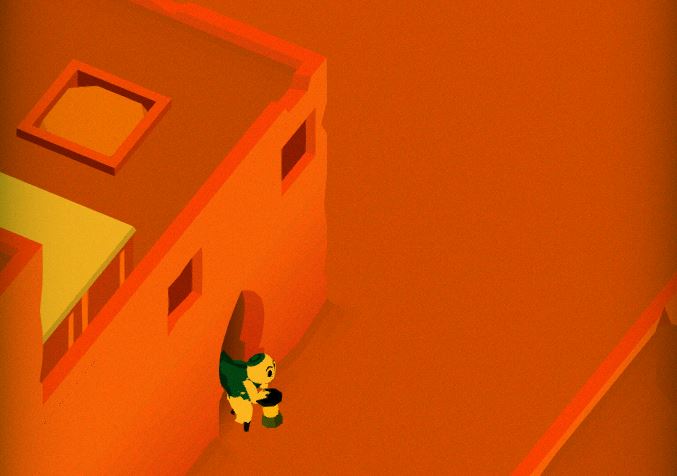
State of the Art – February 2018

Welcome to State Of The Art, February 2018 edition! This monthly* progress report is written by Frank DiCola and is focused entirely on how the game’s visuals have improved in the past month. If you are one of our beta testers, you’ve probably already seen this artwork firsthand. (Looking to sign up? Email me at contact@GameRevenant.com if you’re on iOS, or just go here to download if you’re on Android)

(*It’s been a while since I did one of these! We got so caught up in a bunch of year-end stuff with MAGFest 2018, I decided to wait until February to discuss the state of the game’s aesthetics. The good news is, this is a double helping of art updates!)

Without further excuses, let’s explore the major leaps forward we took since December!


Header-Forest

The Forest is Now Polished

Polish is a strange thing. You’re never really finished – you just keep making smaller and smaller increments towards perfection, never quite reaching it. Eventually you hit a point where the small changes aren’t worth it because they take too long and have very little payoff.

Check out this video of me walking through the game’s prologue:

The Forest is polished to the point where it’s worth polishing it! I only say that because there is an entire game still left to finish, so we can’t spend forever on the first few Levels. I will say though, I paid particular attention to these Levels because they are the first morsels of gameplay people will experience with Where Shadows Slumber. Leaving a bad impression here can permanently color people’s mental model of the game in a negative way, so it’s important to get it right.


Header-Jail

The Jail is Now Really Different

The next World in our “first time user experience” is a scary, lava filled jail where Obe has been taken prisoner. As he makes his escape, we teach the player about lights and the way they interact with shadows.

This World was quite difficult to get right. I still think some of it needs to be changed, but here’s where it’s at right now:

If you remember the blog post where I showed off the Jail World last time, you might be shocked to see that a lot has changed. I never liked the boxy, protruding walls I created for this World. It made it impossible to define complex shapes, and it cost a lot of polygons. As we polish the game, we also seek to optimize it, and that means giving your phones less information to compute each frame. Now the walls are much simpler, but still have a brutal “government building” quality to them.

Hopefully you support this drastic change! It’s the only World that’s undergoing such a dramatic shift, but I think it’s for the best.
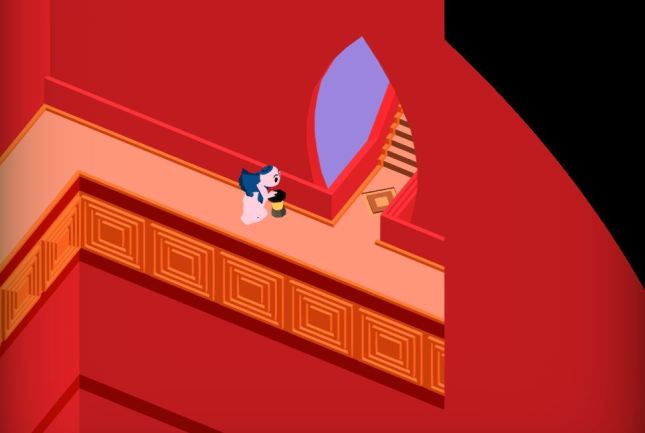


Header-City

The City is Still Unfinished

To my great shame, the City World is still not polished. Some Levels (one in particular) don’t even look passable. That’s a problem I’ll try to rectify immediately, as the World is already late, even by our newly revised schedule.

What I can show you are two Levels still in polish-development, because I would like feedback from the general Game Revenant fanbase! Here’s the first City Level, called “Slum”, which got a big overhaul:

City-Slum.JPG

And below is Level four in the City, called “Fountain”, which I don’t think I ever showed because it wasn’t in great shape. It’s still missing two key components that require very specific artwork: plants and statues for the fountain. Right now it looks very sterile, but this is supposed to be a luxury fountain / garden fit for a king! Check it out:

City-Fountain.JPG

This red color is a deep callback only diehard WSS fans will recognize [ ^_^]!

Comment below this post about these changes, please! This World needed a lot removed from it in order to look good. It had way too many colors before, as well as misleading stuff on the screen. It’s not done just yet, as I said, but it’s in way better shape.


Header-Spoilers.JPG

Spoilers Ahead

As we near the completion of the final game, I’m going to get a bit more secretive with these updates. I realize now that although some sections of the game look awesome, players may want to experience them for the first time inside the game instead of in a blog post. That doesn’t mean I’ll stop posting, but it does mean you can expect to see spoiler tags in these art posts from now on. I’m waiving that this time around since most of the updates are in the first 10 minutes of gameplay, but be warned!

In the future, read on at your own peril…


= = = = = = = = = = = = = = = = = = = = = = = = = = = = = = = = = = = =

We hope you enjoyed this update about the game’s artwork. Have a question about aesthetics that wasn’t mentioned here? You can find out more about our game at WhereShadowsSlumber.com, ask us on Twitter (@GameRevenant), Facebookitch.io, or Twitch, and feel free to email us directly at contact@GameRevenant.com.

Frank DiCola is the founder of Game Revenant and the artist for Where Shadows Slumber.


How To Test Mobile Games

This article will be constantly kept up to date with the most relevant information you need to become a mobile BETA tester. (Last updated February 2nd, 2018)


Hello, and thank you for taking part in our beta testing program. This is the period of the development cycle where we are sharing our video game with the general public. This public test is intended to get feedback about our product in the months leading up to its final release.

Our testers come from all walks of life. We have people testing our game of many different career paths, ages, and backgrounds. We understand that not everyone is a super nerd! Some of this stuff is difficult if you’ve never done it before. Please follow this step-by-step guide to downloading our game. Thank you for your patience!

Send Frank an email at contact@GameRevenant.com if you need any help! You can also tweet @GameRevenant, or contact us on Facebook at fb.com/GameRevenant.


First, what kind of phone do you have? Scroll down to the section below that describes your device: we support Apple and Android.


iphone-x-unboxing-09

Apple (iPhone or iPad)

Apple’s policies require that everyone receives a direct email invitation to test the game. That means you must have already been on our email list in order to test the Apple version. If you were not already on our list, reach out to Frank at contact@GameRevenant.com and you’ll be added.

Otherwise, proceed to these steps:

  1. An email will appear in your Inbox that says “Game Revenant has invited you to test “Where Shadows Slumber” – open it on your mobile device.
  2. Press the large blue button that says “View in TestFlight.”
  3. An invitation will appear that tells you to get TestFlight from the App Store and gives you a code to redeem. Follow those steps. Don’t worry, TestFlight is free.
  4. Now that you have the TestFlight app on your device, and the code has been redeemed, open TestFlight. Press the green Install button.
  5. The game will now take a few minutes to install.
  6. Once installed, the button will now be blue and say Open. Press it.
  7. Play the game and enjoy!

Don’t forget to fill out our survey!


istock-495277951-58de67055f9b584683605c93

Android (Google, Samsung, etc)

  1. On your Android device, click this link.
  2. (Alternatively, search Where Shadows Slumber on the Google Play Store on your Android device, and select the one that says BETA in red text)
  3. Now press the green Install button above the pictures.
  4. After the game has been downloaded to your phone, find it and tap it to open it.
  5. Play the game and enjoy!

Don’t forget to fill out our survey!


survey-stock-photo

The Most Important Part: The Survey

Thank you for your patience. We hope you enjoyed playing the game! Now, the most important part: open this Google Survey in your Internet browser and answer all of the questions there. We won’t ask for anything incredibly personal, so just give us your candid feedback about the game.

Your feedback will change the outcome of the final game. Thanks for taking part in our beta test!


= = = = = = = = = = = = = = = = = = = = = = = = = = = = = = = = = = = =

If you have any other questions about Where Shadows Slumber, feel free to contact us! You can always find out more about our game at WhereShadowsSlumber.com, find us on Twitter (@GameRevenant), Facebookitch.io, or Twitch, join the Game Revenant Discord, and feel free to email us directly with any questions or feedback at contact@GameRevenant.com.

Frank DiCola is the founder of Game Revenant and the artist for Where Shadows Slumber.

Unity 2018!

For those of you who haven’t been keeping up with current events in the indie game development space, there’s something really important that’s happened recently that you should probably know about.

It’s 2018!

Which leads me to another topic that we can spend some time discussing – Unity 2018!


Unity

Before we talk about Unity 2018, let’s discuss Unity itself. Unity is the game engine in which we’ve been developing Where Shadows Slumber for the past two and a half years, and even longer ago, when we were working on SkyRunner. Developing in a game engine makes things a lot easier for the little guys like us, because we don’t have to worry (as much) about things like platform-specific dependencies, rendering pipelines, mipmap implementations, etc. Without having to worry about that nitty-gritty stuff, we can spend our time focusing on the more grandiose parts of the development of WSS.

So the question is – how has working with Unity been?

1200px-Unity_Technologies_Logo.svg

Unity!

Overall, Unity is awesome. It has somehow managed to find the right balance between an engine that you could use to make a AAA game, and one that you can use in a small, bureaucratically-challenged team. This alone is a great reason to use Unity – compared to using more complex engines like Unreal, it’s much easier to get up and running from scratch.

Of course, there are trade-offs, and this is a particularly big one. In order to avoid inundating newer users with game development intricacies and high-level concepts, Unity does a lot of that stuff for you, behind the scenes. While this is awesome in a lot of cases, there are some cases where it can be more of an issue. Imagine you’re an experienced game developer, with a sizable team, who wants to do something very specific in the backend. There’s a decent chance that Unity will have hidden that part of the engine from you, or at least made it difficult to interact with.

This tradeoff is, at its core, the reason that you would or wouldn’t want to use Unity. The next most important feature is the ease with which Unity allows you to develop on multiple platforms. All of your development is platform-agnostic, and you only choose the platform as you’re compiling. Is your Android game a success, and you want to build it for PC? Simply hit a different button, and Unity takes care of the rest. I don’t have too much experience with other engines, but this seems to be a place where other developers give Unity a lot of credit, and I think it’s deserved. I can’t imagine having to go through all of the development we’ve done multiple times for different platforms.

Beyond these bigger points, there are a few other things that might sway you, though they’re probably a little less important:

  • Unity is very UI-based, which means that it might be a little annoying for a hardcore programmer, like myself, whereas this probably makes it easier for someone with less coding experience, like Frank.
  • Unity is a sort of one-size-fits-all solution, whereas some other engines are ready-made to create certain types of games. For example, Unreal has good support for creating FPS games. If I were to make an FPS game, using Unreal would probably give me a bit of a head start on Unity.
  • The only language Unity supports is C#. C# is a pretty awesome language, but for those of you who hate C#, or strongly-typed languages in general, it may take some adjusting.

Again, I want to say that Unity has been great for us, and I would probably use it again if I were to start another game. Frank and I wouldn’t have gotten to where we are with Where Shadows Slumber if it weren’t for Unity.


Unity 2018

I mentioned earlier that Unity does a lot of stuff for us, and I specifically brought up rendering pipelines. The danger of using a game engine (that you didn’t make yourself) is that other people are making decisions for you, and those decisions are set in stone to a certain degree. On one hand, we didn’t want to mess with the collision system, so we were glad to have it. On the other hand, we ended up in a position where we did want to mess around with the rendering pipeline, and we weren’t able to.

Enter Unity 2018.

image5_rs

The Unity UI, blatantly stolen from one of their blog posts.

I normally don’t pay too much attention to the ins and outs of the various updates that Unity makes. They’ve been marching out updates, both major and minor, for a while now, and we’ve just been going with the flow. Unity 2018, however, has managed to catch my eye. Unity recently released a blog post describing the updates they’ve been making to graphics and rendering in Unity 2018, and I have to admit that I’m pretty excited about it.

As I mentioned before, Unity does a good job of riding the line between too-complicated-for-new-users and not-powerful-enough-for-power-users, and the updates described for Unity 2018 somehow manage to play to both sides. If you’ve ever held a conversation with me about Unity and Where Shadows Slumber, then you know that I’ve been struggling with getting shadows to render the way I want, while also maximizing the efficiency of the rendering pipeline. Fortunately, Unity 2018’s focus on graphics and rendering has provided two huge features in this area, one for each of the two camps.

Scriptable Render Pipelines is the feature that I’m excited about, as it’s the feature aimed toward the entrenched coder. Rather than using the hard-coded rendering pipeline that we’ve been wrestling with for the past two years, we can create our own rendering pipeline that does exactly what we need it to.

“Programmers can now write custom renderers tailored specifically to their project.”

This is a huge boon to us, and to game developers everywhere. Rather than hacking together a shader that uses Unity’s shadow-mapping inefficiently, we can (hopefully) create a rendering pipeline that performs shadow-mapping exactly how and when we need it. This should result in more efficient rendering, along with less headache while writing shaders.

Shader Graph is the other great feature Unity 2018 will have, and is targeted toward less code-inclined users. Unity provides a standard shader with a bunch of options, so you can create the materials you want. However, if you need more customization than the standard shader provides (like we do), you’re suddenly thrust into the depths of shader-writing. With a masters degree in computer science, I’ve been just barely keeping up with writing our shaders, and there’s no way that Frank would have been able to do it. This is really a bummer, as the artist tends to know a bit more about the “look” they’re trying to get.

“[I]t’s simple enough that new users can become involved in shader creation.”

Unity 2018’s Shader Graph changes this – rather than writing complex shader code, Unity exposes a simple interface for creating shaders graphically. This would allow an artist with no coding experience whatsoever to build a custom shader to display things exactly as they want – giving the artist the control they need over the “look” of the game, and allowing the programmer to focus on the game itself.

shadergraph

A sneak preview of Unity 2018’s Shader Graph UI

I’m sure that Unity 2018 comes with quite a few quality-of-life updates, as well as some other new and interesting features. For me, however, it’s all about those rendering updates!


Beyond Where Shadows Slumber

A friend of mine recently asked if I would use Unity for my theoretical next project, and if I would recommend it to someone just starting on a game. The answer I gave him is one that applies to every question – it depends. In fact, it mostly depends on the factors described in the first section.

Overall, I’m inclined to say that I would use Unity again. After over four years, I’ve come to know it pretty well. It’s powerful, and allows you to create and iterate pretty quickly. That said, there are some exceptions; I would probably pass on Unity for my next project, or at least do some more research, if:

  • I had very specific backend/optimization requirements
  • I were working with people who had a lot of experience with a different engine
  • The scale of the game were much bigger
  • The game involved a lot of networking/server concerns

There are probably other factors that come into play – basically, it pays to do some research before you dive in. I would recommend Unity, but more than that, I would recommend knowing what you’re getting yourself into. There’s nothing worse for your game than getting halfway through it in an engine that won’t work for you in the end.

If you’re anything like me, at this point the word “Unity” no longer sounds like a word. I’m gonna take that as a sign and wrap this post up; I hope I was able to answer any questions you might have had about working with Unity, and that I got you pumped for Unity 2018!


= = = = = = = = = = = = = = = = = = = = = = = = = = = = = = = = = = = =

If you have any questions about working with Unity, or if you have any other questions about Where Shadows Slumber, feel free to contact us! You can always find out more about our game at WhereShadowsSlumber.com, find us on Twitter (@GameRevenant), Facebookitch.io, or Twitch, join the Game Revenant Discord, and feel free to email us directly with any questions or feedback at contact@GameRevenant.com.

Jack Kelly is the head developer and designer for Where Shadows Slumber.

Indies: You Are Your Game

Hello, everyone!

This is Frank DiCola of Game Revenant, here with another post on our blog. Typically we use this space to chronicle the development of Where Shadows Slumber, a mobile puzzle adventure coming to iOS and Android later this year. However, this week things will be different. We’re going to take some time to brag about how great we are, both as game developers and as Renaissance men.

Yes, you read that correctly. This blog is about the personal skills that accompany independent game development, and why we have them and you don’t.

We’ll get a chance to talk about how Jack and I first met, the importance of acting and public speaking classes, and how indies become inseparable from their games.


36156_1508785207492_3110837_n

FRANK: “Where are my EGGS???” / JACK: “Here, here are your EGGS!!”

Where It All Began – Off Center

This blog post is a good opportunity to answer some questions that people ask us.

How did you meet? Did you always know you wanted to work on games?

Jack and I both went to Stevens Institute of Technology, graduating just a few years apart. We actually met in the comedy troupe known as “Off Center” (pronounced “off-chenter”) that performed sketch comedy and improv shows. I had just gotten rejected from the main stage fall play Noises Off, which was a new experience for me. Coming from high school, I was used to being the big fish in a small pond. I felt really confused, and Off Center was there for me. I started going to their show planning meetings.

The club focused on running short, free comedy shows twice a semester. They would usually be in the largest lecture hall we could find on campus. It wasn’t exactly a stage, since the seats were raised in an amphitheater style. It was more like a Colosseum.

I remember being really impressed during the meeting where we were casting everyone into the various sketches for the show. Jack took on like, 12 roles or something insane. Just because the show needed him! His stage presence was (and is) undeniable as well. Whenever the director told people they needed to be louder, they would just say “try to be as loud as Jack.”

Of course, we didn’t realize we both wanted to make video games until we found ourselves in an Intro to Game Design class a few years later. By then, we were already friends. But we’re not here to talk about game development. Let’s talk about the skills acting provides and why you, an indie developer, absolutely need them.


20171025_140828

The Only Thing You Have To Fear Is Public Speaking

You never know when opportunity is going to strike. Often times, as an indie developer, you’ll be given the rare chance to “pitch” your game to someone important. It could be a potential publisher who doesn’t have time to play your demo but can spare 30 seconds to hear a quick description. Maybe it’s a spur of the moment pitching contest, like the one I got 3rd place in at GDC last year, where you have to come up with a verbal presentation with no prep time and deliver it five times in a crowded bar. Heaven forbid, it could be an actual stage presentation where you need to pitch your game in front of an actual audience with nothing but your own PowerPoint presentation to save you.

Are your palms getting sweaty yet? Now imagine you’re at a booth at a show like PAX East demonstrating your game. About a hundred people will walk by the booth every hour. Do you have what it takes to attract them to your game? Could you handle talking to that many strangers for such a long period of time?

If these “opportunities” feel more like nightmares, you aren’t alone. Public speaking is something that people rarely get to experience for themselves. As a result, when you’re “put on the spot”, you panic. It’s perfectly normal. Public speaking is a skill you have not honed, and now you need to do it for the first time ever in front of a real audience?! No fair!

The skills you need for the examples above are all things that Jack and I exposed ourselves to during the Off Center years. After performing more than 15 shows over the course of a few years, with a few main-stage productions thrown in there, you get the hang of it. You learn how to:

  • Speak slowly, confidently, and audibly
  • Be comfortable making up a script and then deviating from it if necessary
  • Say what you need to say without going over the time allotted
  • Communicate your message non-verbally with your body

It’s normal to be afraid of acting in a play, giving a speech, or improvising a scene. But as independent developers, you are the public face of your game! Like it or not, there’s no one else that can wear this marketing hat for you. You have to do it. And you can’t ignore important opportunities to win prizes or glory just because you neglected to put points into your Speechcraft skill. Should your game really suffer because you never learned how to project your voice? What if the future of your game depended on knowing what to do with your hands while you stand up on stage nervously? (Hint: don’t put them in your pockets)


blog-upright-citizens-brigade

We live right near Manhattan, where the UCB has a few teaching theaters.

3 Ways To Level Your Speechcraft Skill

Let’s get nerdy for a moment. Imagine this is nothing more than a role-playing game like Morrowind, and you’re a character with various skills and abilities. You have a Speechcraft skill, but it’s low. Very low. High enough that you can talk to your friends and family, but not much higher than that. You’re super nervous for the first 10 minutes you’re with a stranger, such as on a job interview. As for getting up on a stage and talking to a crowd, you’re level restricted from even trying that. What do you do?

If you were trying to level your Sword skill, you’d take fencing classes. If you wanted to level Lockpicking, you’d probably join a hobbyist group of (ethical) lockpicks who have a passion for locks and love to crack them for fun. To level your Speechcraft in real life, you need to make an actual plan to expose yourself to public speaking. It won’t just happen on its own. This is a skill, after all. Skills don’t just magically level with no effort on your part. Here are three things you can do:

Join the club: If you’re still in high school or college, I really encourage you to try out for the play or join any kind of drama club your school has. Larger schools may have a wide range of acting stuff – the most helpful thing will be improv. Improvisation is a school of comedy where the actors go on stage without a script and make everything up on the spot. You don’t need to learn how to be a hilarious comedian. What you need is the ability to go out on stage without a plan and do more than just survive — thrive!

Join a community theater: If you’re out of school, it would be weird to hang around your school like a weirdo. I would never do that. <_< So instead, see if your town has a local theater that puts on a few plays a year. Don’t worry about the competition, just audition and see what happens. Remember, you’re not training for Broadway. You just need to become a competent enough speaker to feel comfortable in your own skin.

Take improv classes: This one will cost money, but if you live near a city (especially a hip cool city where all the people are hip and cool and do hip, cool things) you should be able to find a comedy club that also offers classes. The best part about doing this is that they’ll treat you like a beginner instead of expecting you to already be good. Some of these classes also do shows at the end as a final exam / graduation. It’s a good way to test your skill. After all, if you can make up a bunch of silly jokes, you can certainly talk about something you know very well – your game!


The next time I see you at a convention, you better look me in the eye and shake my hand! Then, you better beat me for first prize in the game pitching contest.

See you in the Colosseum.


= = = = = = = = = = = = = = = = = = = = = = = = = = = = = = = = = = = =

Get out there and start acting! If you have any other questions about Where Shadows Slumber, feel free to contact us! You can always find out more about our game at WhereShadowsSlumber.com, find us on Twitter (@GameRevenant), Facebookitch.io, or Twitch, join the Game Revenant Discord, and feel free to email us directly with any questions or feedback at contact@GameRevenant.com.

Frank DiCola is the founder of Game Revenant and the artist for Where Shadows Slumber.