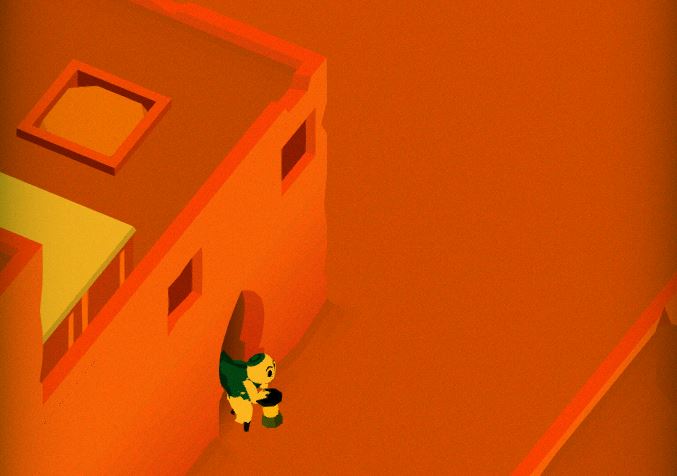
State of the Art – February 2018

Welcome to State Of The Art, February 2018 edition! This monthly* progress report is written by Frank DiCola and is focused entirely on how the game’s visuals have improved in the past month. If you are one of our beta testers, you’ve probably already seen this artwork firsthand. (Looking to sign up? Email me at contact@GameRevenant.com if you’re on iOS, or just go here to download if you’re on Android)

(*It’s been a while since I did one of these! We got so caught up in a bunch of year-end stuff with MAGFest 2018, I decided to wait until February to discuss the state of the game’s aesthetics. The good news is, this is a double helping of art updates!)

Without further excuses, let’s explore the major leaps forward we took since December!


Header-Forest

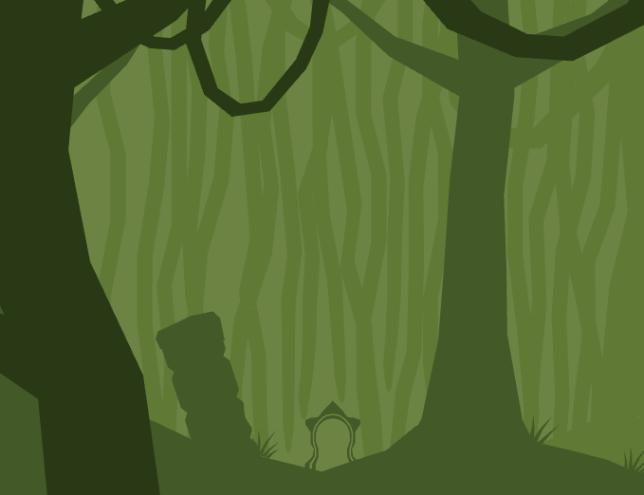
The Forest is Now Polished

Polish is a strange thing. You’re never really finished – you just keep making smaller and smaller increments towards perfection, never quite reaching it. Eventually you hit a point where the small changes aren’t worth it because they take too long and have very little payoff.

Check out this video of me walking through the game’s prologue:

The Forest is polished to the point where it’s worth polishing it! I only say that because there is an entire game still left to finish, so we can’t spend forever on the first few Levels. I will say though, I paid particular attention to these Levels because they are the first morsels of gameplay people will experience with Where Shadows Slumber. Leaving a bad impression here can permanently color people’s mental model of the game in a negative way, so it’s important to get it right.


Header-Jail

The Jail is Now Really Different

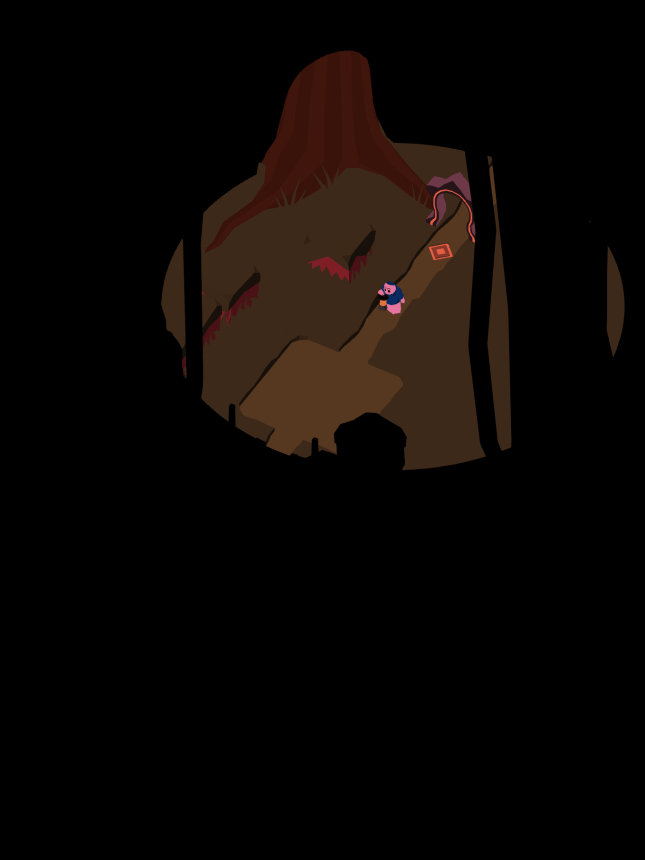
The next World in our “first time user experience” is a scary, lava filled jail where Obe has been taken prisoner. As he makes his escape, we teach the player about lights and the way they interact with shadows.

This World was quite difficult to get right. I still think some of it needs to be changed, but here’s where it’s at right now:

If you remember the blog post where I showed off the Jail World last time, you might be shocked to see that a lot has changed. I never liked the boxy, protruding walls I created for this World. It made it impossible to define complex shapes, and it cost a lot of polygons. As we polish the game, we also seek to optimize it, and that means giving your phones less information to compute each frame. Now the walls are much simpler, but still have a brutal “government building” quality to them.

Hopefully you support this drastic change! It’s the only World that’s undergoing such a dramatic shift, but I think it’s for the best.


Header-City

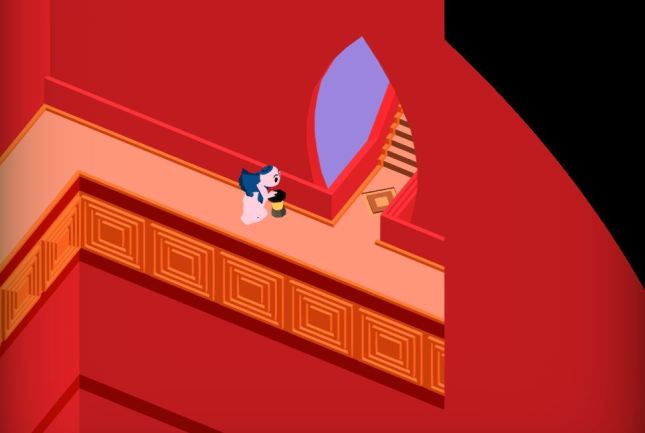
The City is Still Unfinished

To my great shame, the City World is still not polished. Some Levels (one in particular) don’t even look passable. That’s a problem I’ll try to rectify immediately, as the World is already late, even by our newly revised schedule.

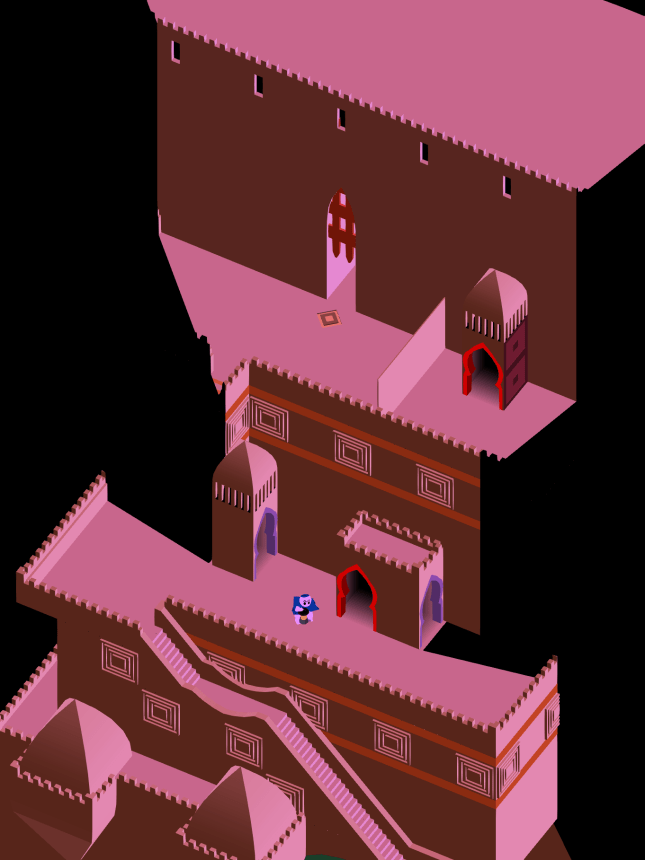
What I can show you are two Levels still in polish-development, because I would like feedback from the general Game Revenant fanbase! Here’s the first City Level, called “Slum”, which got a big overhaul:

City-Slum.JPG

And below is Level four in the City, called “Fountain”, which I don’t think I ever showed because it wasn’t in great shape. It’s still missing two key components that require very specific artwork: plants and statues for the fountain. Right now it looks very sterile, but this is supposed to be a luxury fountain / garden fit for a king! Check it out:

City-Fountain.JPG

This red color is a deep callback only diehard WSS fans will recognize [ ^_^]!

Comment below this post about these changes, please! This World needed a lot removed from it in order to look good. It had way too many colors before, as well as misleading stuff on the screen. It’s not done just yet, as I said, but it’s in way better shape.


Header-Spoilers.JPG

Spoilers Ahead

As we near the completion of the final game, I’m going to get a bit more secretive with these updates. I realize now that although some sections of the game look awesome, players may want to experience them for the first time inside the game instead of in a blog post. That doesn’t mean I’ll stop posting, but it does mean you can expect to see spoiler tags in these art posts from now on. I’m waiving that this time around since most of the updates are in the first 10 minutes of gameplay, but be warned!

In the future, read on at your own peril…


= = = = = = = = = = = = = = = = = = = = = = = = = = = = = = = = = = = =

We hope you enjoyed this update about the game’s artwork. Have a question about aesthetics that wasn’t mentioned here? You can find out more about our game at WhereShadowsSlumber.com, ask us on Twitter (@GameRevenant), Facebookitch.io, or Twitch, and feel free to email us directly at contact@GameRevenant.com.

Frank DiCola is the founder of Game Revenant and the artist for Where Shadows Slumber.


Unity 2018!

For those of you who haven’t been keeping up with current events in the indie game development space, there’s something really important that’s happened recently that you should probably know about.

It’s 2018!

Which leads me to another topic that we can spend some time discussing – Unity 2018!


Unity

Before we talk about Unity 2018, let’s discuss Unity itself. Unity is the game engine in which we’ve been developing Where Shadows Slumber for the past two and a half years, and even longer ago, when we were working on SkyRunner. Developing in a game engine makes things a lot easier for the little guys like us, because we don’t have to worry (as much) about things like platform-specific dependencies, rendering pipelines, mipmap implementations, etc. Without having to worry about that nitty-gritty stuff, we can spend our time focusing on the more grandiose parts of the development of WSS.

So the question is – how has working with Unity been?

1200px-Unity_Technologies_Logo.svg

Unity!

Overall, Unity is awesome. It has somehow managed to find the right balance between an engine that you could use to make a AAA game, and one that you can use in a small, bureaucratically-challenged team. This alone is a great reason to use Unity – compared to using more complex engines like Unreal, it’s much easier to get up and running from scratch.

Of course, there are trade-offs, and this is a particularly big one. In order to avoid inundating newer users with game development intricacies and high-level concepts, Unity does a lot of that stuff for you, behind the scenes. While this is awesome in a lot of cases, there are some cases where it can be more of an issue. Imagine you’re an experienced game developer, with a sizable team, who wants to do something very specific in the backend. There’s a decent chance that Unity will have hidden that part of the engine from you, or at least made it difficult to interact with.

This tradeoff is, at its core, the reason that you would or wouldn’t want to use Unity. The next most important feature is the ease with which Unity allows you to develop on multiple platforms. All of your development is platform-agnostic, and you only choose the platform as you’re compiling. Is your Android game a success, and you want to build it for PC? Simply hit a different button, and Unity takes care of the rest. I don’t have too much experience with other engines, but this seems to be a place where other developers give Unity a lot of credit, and I think it’s deserved. I can’t imagine having to go through all of the development we’ve done multiple times for different platforms.

Beyond these bigger points, there are a few other things that might sway you, though they’re probably a little less important:

  • Unity is very UI-based, which means that it might be a little annoying for a hardcore programmer, like myself, whereas this probably makes it easier for someone with less coding experience, like Frank.
  • Unity is a sort of one-size-fits-all solution, whereas some other engines are ready-made to create certain types of games. For example, Unreal has good support for creating FPS games. If I were to make an FPS game, using Unreal would probably give me a bit of a head start on Unity.
  • The only language Unity supports is C#. C# is a pretty awesome language, but for those of you who hate C#, or strongly-typed languages in general, it may take some adjusting.

Again, I want to say that Unity has been great for us, and I would probably use it again if I were to start another game. Frank and I wouldn’t have gotten to where we are with Where Shadows Slumber if it weren’t for Unity.


Unity 2018

I mentioned earlier that Unity does a lot of stuff for us, and I specifically brought up rendering pipelines. The danger of using a game engine (that you didn’t make yourself) is that other people are making decisions for you, and those decisions are set in stone to a certain degree. On one hand, we didn’t want to mess with the collision system, so we were glad to have it. On the other hand, we ended up in a position where we did want to mess around with the rendering pipeline, and we weren’t able to.

Enter Unity 2018.

image5_rs

The Unity UI, blatantly stolen from one of their blog posts.

I normally don’t pay too much attention to the ins and outs of the various updates that Unity makes. They’ve been marching out updates, both major and minor, for a while now, and we’ve just been going with the flow. Unity 2018, however, has managed to catch my eye. Unity recently released a blog post describing the updates they’ve been making to graphics and rendering in Unity 2018, and I have to admit that I’m pretty excited about it.

As I mentioned before, Unity does a good job of riding the line between too-complicated-for-new-users and not-powerful-enough-for-power-users, and the updates described for Unity 2018 somehow manage to play to both sides. If you’ve ever held a conversation with me about Unity and Where Shadows Slumber, then you know that I’ve been struggling with getting shadows to render the way I want, while also maximizing the efficiency of the rendering pipeline. Fortunately, Unity 2018’s focus on graphics and rendering has provided two huge features in this area, one for each of the two camps.

Scriptable Render Pipelines is the feature that I’m excited about, as it’s the feature aimed toward the entrenched coder. Rather than using the hard-coded rendering pipeline that we’ve been wrestling with for the past two years, we can create our own rendering pipeline that does exactly what we need it to.

“Programmers can now write custom renderers tailored specifically to their project.”

This is a huge boon to us, and to game developers everywhere. Rather than hacking together a shader that uses Unity’s shadow-mapping inefficiently, we can (hopefully) create a rendering pipeline that performs shadow-mapping exactly how and when we need it. This should result in more efficient rendering, along with less headache while writing shaders.

Shader Graph is the other great feature Unity 2018 will have, and is targeted toward less code-inclined users. Unity provides a standard shader with a bunch of options, so you can create the materials you want. However, if you need more customization than the standard shader provides (like we do), you’re suddenly thrust into the depths of shader-writing. With a masters degree in computer science, I’ve been just barely keeping up with writing our shaders, and there’s no way that Frank would have been able to do it. This is really a bummer, as the artist tends to know a bit more about the “look” they’re trying to get.

“[I]t’s simple enough that new users can become involved in shader creation.”

Unity 2018’s Shader Graph changes this – rather than writing complex shader code, Unity exposes a simple interface for creating shaders graphically. This would allow an artist with no coding experience whatsoever to build a custom shader to display things exactly as they want – giving the artist the control they need over the “look” of the game, and allowing the programmer to focus on the game itself.

shadergraph

A sneak preview of Unity 2018’s Shader Graph UI

I’m sure that Unity 2018 comes with quite a few quality-of-life updates, as well as some other new and interesting features. For me, however, it’s all about those rendering updates!


Beyond Where Shadows Slumber

A friend of mine recently asked if I would use Unity for my theoretical next project, and if I would recommend it to someone just starting on a game. The answer I gave him is one that applies to every question – it depends. In fact, it mostly depends on the factors described in the first section.

Overall, I’m inclined to say that I would use Unity again. After over four years, I’ve come to know it pretty well. It’s powerful, and allows you to create and iterate pretty quickly. That said, there are some exceptions; I would probably pass on Unity for my next project, or at least do some more research, if:

  • I had very specific backend/optimization requirements
  • I were working with people who had a lot of experience with a different engine
  • The scale of the game were much bigger
  • The game involved a lot of networking/server concerns

There are probably other factors that come into play – basically, it pays to do some research before you dive in. I would recommend Unity, but more than that, I would recommend knowing what you’re getting yourself into. There’s nothing worse for your game than getting halfway through it in an engine that won’t work for you in the end.

If you’re anything like me, at this point the word “Unity” no longer sounds like a word. I’m gonna take that as a sign and wrap this post up; I hope I was able to answer any questions you might have had about working with Unity, and that I got you pumped for Unity 2018!


= = = = = = = = = = = = = = = = = = = = = = = = = = = = = = = = = = = =

If you have any questions about working with Unity, or if you have any other questions about Where Shadows Slumber, feel free to contact us! You can always find out more about our game at WhereShadowsSlumber.com, find us on Twitter (@GameRevenant), Facebookitch.io, or Twitch, join the Game Revenant Discord, and feel free to email us directly with any questions or feedback at contact@GameRevenant.com.

Jack Kelly is the head developer and designer for Where Shadows Slumber.

State of the Art – November 2017

Welcome to State Of The Art, November 2017 edition! This monthly progress report is written by Frank DiCola and is focused entirely on how the game’s visuals have improved in the past month.

<Don’t forget to add in some lame excuse about Thanksgiving before you post this>

Without further excuses, let’s explore the major leaps forward we took in November!


0-1-Header

The Game’s First Level, “Fallen”

It took me a while to get around to doing this Level, because there’s a bunch of triggers I had to animate and I didn’t feel like doing those. For the longest time, Level 0-2 has been our de facto “first level.”

Dec-5-Blog-Forest

But the game really begins here, along this spooky Forest path, where Obe first encounters the Lantern. You can watch the entire Level in the video below, since it’s so short. (Just ignore the missing sound effects and animation polish, all of that comes later.) Jack and I have a rigid philosophical stance when it comes to game design: we don’t like using text to tell players what to do. That’s annoying! So this Level is designed so that people can learn how to walk. It’s impossible to avoid picking up Obe’s lantern because he automatically does that when you walk on the first open space in the clearing.

This Level didn’t take too long once I actually sat down and did it. Since Obe can only walk around the center of the Level, and his light radius is quite small, there’s a lot of art I can intentionally ignore. This may seem lazy, but there have been times in the past where the opposite has occurred! I’ve done beautiful artwork around the edges of the Level only to be dismayed to find the light never reaches there, and players will never see it. But I still see it. In my dreams.


Dec-5-Blog-City-Header

Level 4-3, “Ramparts”

One of the most ambitious Levels we planned for the game has you scaling the ramparts of a city wall as you climb to the palace on top. It’s a transition Level, which makes it super important for the story. The first two Levels in this World take place in the slums, and the final two Levels in this World take place in beautiful palace gardens. We need a bridge in between those two, otherwise the jump from one to the other will be too abrupt for the audience.

Enter Level 4-3, “Ramparts,” a vertical bridge between two different worlds separated by economic class and power. It’s easier to show you than tell you! We begin on the street, with the dogs.*

Dec-5-Blog-City-A.png

*Dogs not included

Then there’s the middle section:

Dec-5-Blog-City-B.png

On top, we can see the palace architecture more clearly:

Dec-5-Blog-City-C

This Level took forever for Jack to make and for me to decorate. Even now, it still needs an extra coat of paint! The puzzle isn’t difficult, but the vertical nature of it means we need to cover up a lot of the screen. I want to put more plants closer to the top, which I didn’t really have time to do yet. Plant life would indicate that even in this barren desert, the wealthy King who lives in the castle gets to be surrounded by beautiful foliage.


Dec-5-Blog-Paradise-Header.PNG

Paradise Begun

The game’s final World is a beautiful island paradise floating in the sky. This is somewhat of a story spoiler, but we’ve blogged about it before so I’m not too concerned. Read on at your own peril, I guess?

It’s taken me a while to return to this beautiful setting. Anything that comes last in a video game usually gets the least attention. It’s regrettable, but understandable. After all, if you see a movie in theatres, you often see 100% of it.  Unless you leave in the middle for some reason, you’ll experience the beginning, middle, and ending. But video games are different. Only a fraction of players make it to the end of the game, but by definition anyone who plays a game experiences the first 5 minutes. That’s why those first 5 minutes are so crucial and get so much special treatment.

I’d like to break the chain, if I can. I want people to feel rewarded for getting to the end of this difficult puzzle experience. Here’s the current progress on World 7, which I just started last week. They’re in rough shape at this stage, but you can get a sense of where I’m going with these.

Dec-5-Blog-Paradise-A.png

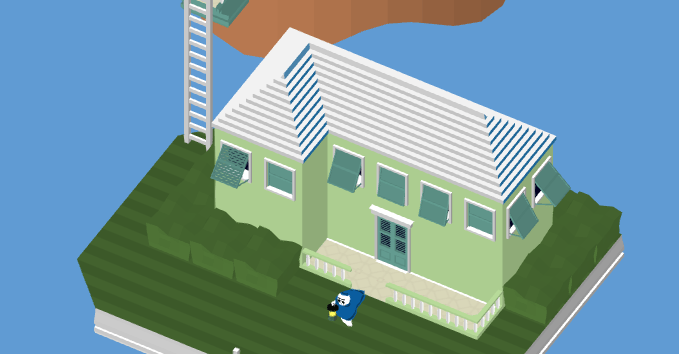
Level 7-1, “Ladder” is all about compiling a ladder from a bunch of broken pieces. The ladder comes together using the shadows from that conveniently specific rotating object. It’s harder than it looks! I designed this one and I forgot how to solve it. Good luck!

On the first landing, we get a chance to show off that majestic Bermudian inspired architecture I love so much. If I have time, I’ll even include a cool dude relaxing on a chair just to show how far removed this World is from everything below.

Dec-5-Blog-Paradise-B.png

Level 7-2, “Pond” is due for somewhat of a re-do. The major thing I forgot to include here was a pond in the center where that button is. We want some kind of a sacred grove with a sacred button because that’s how you solve this Level – you need to use the center piece in order to drag boxes around and cast the shadows you need to fix the ending staircase.

This is where design and aesthetics conflict. The pathways we need are very specific and jagged, but the “look and feel” we want is uniform and symmetrical. It’s a tough compromise. I’ll return to this one and remove that weird green rock path (a placeholder) and try to do something closer to my original “Toolkit” Level I posted so long ago:

World-7-Paradise

(This isn’t a Level in the game, but rather spec work I did a few months ago when I was beginning each World’s “Toolkit.” But that center pond is making a comeback, just wait for it!)

Dec-5-Blog-Paradise-C.png

Level 7-3, “Tower” isn’t very far along, but it’s such a cool design I thought I would tease it here. You need to see a video of it in action to really grasp what’s going on, so no more for you just yet! Be patient [ ^_^]!


UI-Header.PNG

User Interface Sketches

Generally I prefer not to show off drawings that are not part of the game. But Jack and I just started on the user interface design, so it can’t hurt to show you a tiny bit of what I’m working on…


It may seem late in the game to handle this, but we decided long ago that we don’t want a complicated user interface. Above, you can see that our Levels contain all the features that a Main Menu would normally have. We don’t really like having a separate menu detached from the game, so you can access all the key stuff just by “pausing” the game.

Note: this is just a Photoshop design. We haven’t coded this in yet, and not all of the buckets you see above are necessarily being included in the final game. For example, being able to take a picture of the Level is an important social feature, but it’s not essential for the game’s launch and may fall by the wayside.

Interacting with phone features is a big pain and it’s one of the toughest things about game development. Making your game work on every single tablet, flip-phone, e-reader and seashell Kindle out there is a nightmare. Maybe we’ll write a blog about that topic once we get more into the weeds of cross-platform development…


christmas2012_alternative_santa_onlycoke_flexible

See You Next Year!

The next time you read this particular blog series, it will be 2018 and I’ll be recapping December. Man, where does the time go? This year has gone blazing by!

This month, I hope to finish World 7 and move on to polishing up each Level. That work is highly specific, which is why it was left until the end.

Polishing the Levels will intersect with working on the game’s cutscenes. That’s because some of these Levels have animated characters in them. I’d like to be sure that the animated characters I create work well in both settings, to save myself time later. So don’t be surprised if next month’s update is a bit of a mixed bag. That’s the way it’s going to be from now until the game launches!


= = = = = = = = = = = = = = = = = = = = = = = = = = = = = = = = = = = =

We hope you enjoyed this update about the game’s artwork. Have a question about aesthetics that wasn’t mentioned here? You can find out more about our game at WhereShadowsSlumber.com, ask us on Twitter (@GameRevenant), Facebookitch.io, or Twitch, and feel free to email us directly at contact@GameRevenant.com.

Frank DiCola is the founder of Game Revenant and the artist for Where Shadows Slumber.

Problem Solving: Design and Complexity

Game design and development is a complicated process. Creating an intricate tapestry of player interaction, incentive, and reward can be quite difficult, and you will no doubt run into trouble along the way. This is a simple fact of game development – in fact, this phenomenon represents most of the time you’ll spend working on your game. Therefore, you shouldn’t worry about it when that trouble finds you! However, an important part of how polished your game ends up, how long it takes to make, and whether or not you even get a chance to finish it is how you handle the issues you run into.

At its core, a game can be described by a set of rules which govern gameplay, and a starting game state. A match-three game, for example, can be described by the following rules:

Simple match-three rules

  1. The game starts with a grid of colors.
  2. Any three or more adjacent cells of the same color disappear, granting points to the player.
  3. If there is an empty cell, the cells above it slide down to fill in the space, generating a new cell at the top.
  4. The player may switch the colors in two adjacent cells.
  5. The game may end when the player reaches a certain number of points, or when they make a certain number of moves, or if there are no available moves, etc.

Obviously, these rules don’t encompass everything that happens in a game, and the rules get much more complicated very quickly for more complex games. These simple base rules define your gameplay, but they very quickly become more intricate as you add features and functionality. Let’s look at a few updates to our match-three example:

  • If we want to add a type of cell which can’t be moved, we would have to change rule #4 to “The player may switch the colors in two adjacent cells unless either of those cells is unmovable”.
  • If we want to add an “exploding” cell which eliminates nearby cells, we would have to change rule #2 to “Any three or more adjacent cells of the same color disappear, granting points to the player, and if one of them is an exploding cell, adjacent cells also disappear”.

The base rules handle 90% of the gameplay situations, but we have to add special provisions for exceptions of those rules. In game development (and computer science in general), these exceptions are called edge cases, and, as necessary as they are, they’re super annoying. Your code will include edge cases, and it should, but you have to be careful with them (edge cases may be considered a type of hack, which I discuss in one of my previous blog posts), and you should avoid them when possible. One of the primary ways to do that, depending on your game, is through design – rather than complicating your codebase, you can try to design your game and/or levels in such a way that you don’t need to change your code.


An Example from Where Shadows Slumber

Let’s take a look at the inspiration behind this post – a case I ran into in Where Shadows Slumber where I faced such a decision.

1-1 goal

Ominous!

At the end of each level, there’s a ‘goal’ space. When Obe steps on it, it triggers the end-of-level sequence to begin – the lights fade, Obe walks out of the scene, and then the next level loads. The question is, given the game rules, how can I make this happen? I could have added a specific code path for this case, but I realized that I could use some already-existing mechanics to create this effect:

  • The machinery behind buttons can already handle “trigger something when Obe steps on a space”, including a delay for ending the level.
  • The machinery behind Obe walking in at the start of the level allows us to redirect his movement.

This is one way of handling an edge case – try to reduce it into an example of something you already have, thus changing it from an edge case into a normal case. Now we’ve changed the ‘goal’ space into a different-looking button with a redirect space.

Now, there’s another situation involving the goal space where I was given a similar choice. In some levels, there’s a space both to the left and to the right of the goal space. This enables a situation in which the player moves onto the goal space, and then away from the goal space. This creates a problem: the end-of-level ‘button’ will trigger, the lights will dim and the next level will load, but Obe hasn’t left the scene – he’s still just standing there!

ezgif.com-video-to-gif

Well that’s not quite right…

This is a problem I can solve by changing the rules, or by changing the design. The rules for redirecting Obe’s movement only apply when he doesn’t already have a destination. In order to handle this situation, I could add a case that says “if the current node is the goal node, do the redirection”. This requires that I add code to mark a node as the goal node, and to check if the current node is the goal node. While this code would be pretty small and easy to write, it still adds to the overall complexity of the codebase. Is there a way to avoid doing so?

There is, in fact, and it’s quite easy. If we simply remove all of the places where this could happen, then we don’t have to worry it! We’re not “solving” the problem in a conventional sense – if the configuration of spaces were to come up again, the problem would still occur. However, by changing the level design, we remove any chance of that happening.

1-1 goal with boxes

I’ll have Frank make something more on-theme to fill that space

This is another way of handling an edge case – by making a small change to the level design, we’re able to avoid making changes to the codebase. This prevents our code from becoming needlessly more complex, making it easier to understand and maintain. While not every problem can be solved in such a simple way, there are many that can, and keeping an eye out for them is a great way to avoid unnecessary code complexity.


Living on the Edge

I keep talking about edge cases and code complexity like they’re bad things. But an entire game is a very complex thing – doesn’t it make sense for the codebase behind it to be complex as well?

There’s nothing inherently wrong with complexity in your code; a well-implemented cache invalidation algorithm is a beautiful thing, complex as it is. What isn’t beautiful is needlessly complex code. The logic in this code is usually hard to follow, makes assumptions, and leaves a lot of small bugs that you’re unlikely to notice right away. This is a recipe for disaster, because every time you try to make a small change, you have to wade through a swamp of half-thought-out code paths, and you end up adding more complexity just so that you don’t have to deal with the complexity that’s already there!

The biggest problem is that it’s very hard to tell the difference between code that’s complex because it has to be (good) and code that’s complex when it doesn’t have to be (bad). The way I deal with this is to try and realize when the code I’m writing is starting to become very complex. Even though I might only be fixing one bug or working on a specific part of the implementation, I try to take a step back and look at the problem that I’m trying to solve, and how I’m solving it. If the problem is a complex one (cache invalidation), then I accept that it’s gonna be a complex algorithm, and keep writing it. If it’s not a complex problem (sorting), I take another look at my code and see if there’s a better way to do what I’m trying to do. In this way, I continuously re-evaluate the complexity of my code, and whether or not I need it.

Hack

Six while loops isn’t too many, right?

I know that “I just know when it’s too complex” might not be the most satisfying answer for those of you who often run into issues of complexity. That feeling is something that you pick up as you do more and more coding, and especially as you revisit your own code – “wow, I can’t believe I wrote such stupid code”. For those who want a more concrete answer, here are some of the ‘red flags’ that I try to keep an eye out for when assessing the complexity of my code:

  • A lot of ‘if’ statements – If your code has a lot (and I mean a lot) of random ‘if’ statements (especially nested ones), then you might want to take another look at the design.
  • “I don’t know…” – If you can’t quickly and easily determine what each piece of your code is meant to be doing, your design might be too complex.
  • Guessing – If you ever find yourself just “trying things” and “seeing if they work”, it’s a clear sign that you don’t understand your code well enough. Take some time and get to know it!
  • Duplicated code – If you have the same block of code copied into a few places, you should revisit your design. Either that block belongs in a helper that you can reference, or the control flow of your code needs to be reconsidered.
  • Asynchronicity – If you’re doing anything asynchronous, you should give your code another look. I know you probably did it right the first time, but asynchronicity is one of the most difficult parts of computer science, and it’s always worth double-checking.

There are a lot of other things that you might notice about your own code and its complexity – these are just a few quick guidelines off the top of my head. Hopefully they help!


But Game Development is Fun!

Anyways, I hope I didn’t scare you away from computer science. If anything, I wanted to instill a healthy fear of needless complexity, and I hope that you’ll do what you can to reduce that complexity – whether by redesigning your code or redesigning your levels!


= = = = = = = = = = = = = = = = = = = = = = = = = = = = = = = = = = = =

If you have any questions about code complexity and how to design around it, or if you have any other questions about Where Shadows Slumber, feel free to contact us! You can always find out more about our game at WhereShadowsSlumber.com, find us on Twitter (@GameRevenant), Facebookitch.io, or Twitch, and feel free to email us directly with any questions or feedback at contact@GameRevenant.com.

Jack Kelly is the head developer and designer for Where Shadows Slumber