How To Test Mobile Games

This article will be constantly kept up to date with the most relevant information you need to become a mobile BETA tester. (Last updated February 2nd, 2018)


Hello, and thank you for taking part in our beta testing program. This is the period of the development cycle where we are sharing our video game with the general public. This public test is intended to get feedback about our product in the months leading up to its final release.

Our testers come from all walks of life. We have people testing our game of many different career paths, ages, and backgrounds. We understand that not everyone is a super nerd! Some of this stuff is difficult if you’ve never done it before. Please follow this step-by-step guide to downloading our game. Thank you for your patience!

Send Frank an email at contact@GameRevenant.com if you need any help! You can also tweet @GameRevenant, or contact us on Facebook at fb.com/GameRevenant.


First, what kind of phone do you have? Scroll down to the section below that describes your device: we support Apple and Android.


iphone-x-unboxing-09

Apple (iPhone or iPad)

Apple’s policies require that everyone receives a direct email invitation to test the game. That means you must have already been on our email list in order to test the Apple version. If you were not already on our list, reach out to Frank at contact@GameRevenant.com and you’ll be added.

Otherwise, proceed to these steps:

  1. An email will appear in your Inbox that says “Game Revenant has invited you to test “Where Shadows Slumber” – open it on your mobile device.
  2. Press the large blue button that says “View in TestFlight.”
  3. An invitation will appear that tells you to get TestFlight from the App Store and gives you a code to redeem. Follow those steps. Don’t worry, TestFlight is free.
  4. Now that you have the TestFlight app on your device, and the code has been redeemed, open TestFlight. Press the green Install button.
  5. The game will now take a few minutes to install.
  6. Once installed, the button will now be blue and say Open. Press it.
  7. Play the game and enjoy!

Don’t forget to fill out our survey!


istock-495277951-58de67055f9b584683605c93

Android (Google, Samsung, etc)

  1. On your Android device, click this link.
  2. (Alternatively, search Where Shadows Slumber on the Google Play Store on your Android device, and select the one that says BETA in red text)
  3. Now press the green Install button above the pictures.
  4. After the game has been downloaded to your phone, find it and tap it to open it.
  5. Play the game and enjoy!

Don’t forget to fill out our survey!


survey-stock-photo

The Most Important Part: The Survey

Thank you for your patience. We hope you enjoyed playing the game! Now, the most important part: open this Google Survey in your Internet browser and answer all of the questions there. We won’t ask for anything incredibly personal, so just give us your candid feedback about the game.

Your feedback will change the outcome of the final game. Thanks for taking part in our beta test!


= = = = = = = = = = = = = = = = = = = = = = = = = = = = = = = = = = = =

If you have any other questions about Where Shadows Slumber, feel free to contact us! You can always find out more about our game at WhereShadowsSlumber.com, find us on Twitter (@GameRevenant), Facebookitch.io, or Twitch, join the Game Revenant Discord, and feel free to email us directly with any questions or feedback at contact@GameRevenant.com.

Frank DiCola is the founder of Game Revenant and the artist for Where Shadows Slumber.

Join The Conversation

Everyone has an opinion on everything. If that’s true, then why is it so hard to get people to talk to us about Where Shadows Slumber?


My name is Frank DiCola, and along with my friend Jack Kelly we’ve been maintaining this blog and developing our game Where Shadows Slumber together for a while now. The game is launching soon, but we’re not announcing a specific release date to the public yet. Regardless, now is the perfect time to get feedback on our game. We’re “landing the plane,” so to speak.

It’s too late for broad sweeping changes, but now is the perfect time for you to nitpick all of the tiny details in our game. If you tell us to fix it, we’ll fix it before we launch the game on the App Store – and that might save us from getting a negative review from someone else who notices the same problem!

If you tested the game at any point during the last year, you probably heard us wave away from criticism because we’d “handle it later.” Well, now is later! We appreciate your broad feedback then, and we could really use your specific feedback now.

OK, now that I convinced you to join our fan club, let’s talk about how you can join the conversation! This blog post is dedicated to discussing the various channels we’ve setup for feedback. No matter where you make your home on social media, there’s an avenue for you to use to contact us!


maxresdefault

The Game Revenant Discord Channel

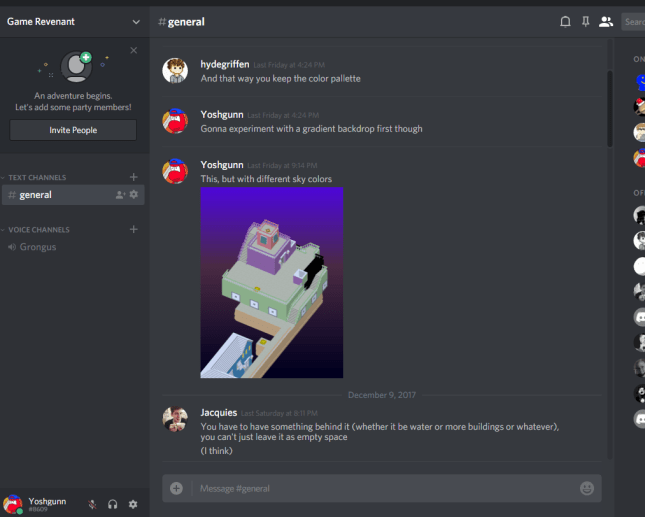
This one is pretty recent. If you have the app Discord on your computer or phone you can join our public channel. We’re still getting in the habit of posting screenshots, videos, and blog posts in the chat. But we’ll use it more if more people join!

Link to the Game Revenant Discord Channel: (link)

Blog-DiscordPic.PNG

Discord’s chat system, as we discuss how best to decorate one of the game’s Levels.

I plan to use this Discord for future projects even after Where Shadows Slumber launches, but it’s safe to say that this will be dedicated to this game for at least the next two years or so. Feel free to join or leave anytime, just be sure to introduce yourself when you jump in the chat! Obviously, I retain the right to kick you out if you’re being rude to the other people in the chat. But I promise not to remove anyone for criticizing our game – that’s the whole point! It’s hard to offend me and Jack, so don’t worry about that.

Although Discord supports voice chat, we usually just use the text chat. A voice consultation in a private channel with Frank is available upon request.


FacebookCover-ChamberOfJudgment

Facebook: The Chamber of Judgment

We’ve had this private Facebook group up and running for a while, but it’s difficult to get in the habit of posting to it. We haven’t quite hit the critical mass of people yet needed for this to work. So, join the conversation!

Link to the Chamber of Judgment Facebook Group: (link)

Similar to Discord, this is a space dedicated purely to discussing the game and giving feedback to developers. Anyone with Facebook can join for free! If you live on Facebook, this is the best way to give us feedback.


logo_primary

Cartrdge, an Artistic Community

Our Cartrdge page is one of the online communities where we have the least control over the conversation, but we’d still appreciate it if you check it out! Yes, I spelled that right. Cartrdge is a super cool website for game artists to post their work. You’ll find everything there from super awesome shaders to physics demos to entire voxel cities.

Link to the Where Shadows Slumber Cartrdge Project Page: (link)

I love scrolling through the home page there just to see what everyone’s working on. It’s one of the best designed portfolio websites I’ve seen, and we’ve been selected by their Editors once or twice so far. You can also leave comments on posts, so make an account with them and be on the lookout for our stuff. Give each one a Like and then share your opinion with us!


Blog-RMGPic.PNG

Roast My Game

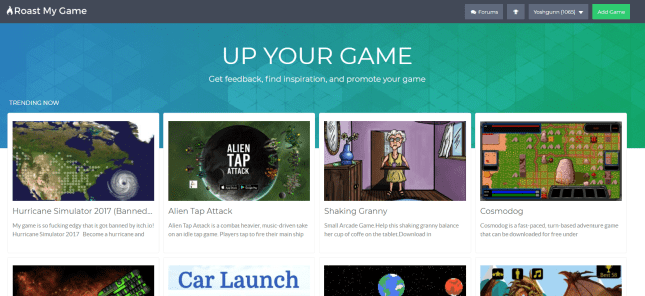
This poor website seems to be on its last legs. But the concept is so genius, I wish it would stick around. It’s a website for indie developers to post their projects, get feedback, and climb the Leaderboard to the top! You should sign up there and give them a morale boost. They explain the concept better than I could:

“One of the biggest problems that a game dev faces as they create a game is gaining a sort of “mothers love” for their game. This prevents them from being able to properly determine its flaws. Friends and family members tend to sugarcoat their feedback to avoid from being discouraging but this actually harms more than it helps. Roast My Game is a site created to help game developers gather ‘sugarfree’ feedback on games they are working on and to inspire other game developers by sharing development progress. [emphasis theirs]

Link to our Roast My Game page: (link)

Blog-RMG.PNG

A typical comment in response to our Demo, and a reasonable reply in progress.

We posted our Demo to that site last year and got some good feedback. Tragically, there just aren’t enough people using Roast My Game. My suspicion is that everyone on there is like me – they want feedback, but they don’t want to play other people’s indie games. Too bad!


20171212_133505

“Ceiling… what are YOU doing here?”

What Did We Miss?

This is super important so I’ll close with this – what have we missed so far? Are you angry that there is no Where Shadows Slumber Subreddit? Perhaps you feel like we’re neglecting TouchArcade, Instagram, Pinterest, or some other online community you love?

I’ll be pretty frank here (ayyy) and just let you know that if there’s a guaranteed community out there, we’ll come to you. I know nothing about Pinterest. But if you know of 1,000 people out there who love indie games and would boost us on Pinterest, I will learn and become the Pinterest master. We don’t care, we just want to promote the game and get honest feedback from you before our game hits the cruel, unforgiving free market.

Leave a Reply under this post with a community you’d like to see us join. We hope to see you on the interwebs!


= = = = = = = = = = = = = = = = = = = = = = = = = = = = = = = = = = = =

Hey! Join the conversation using the links above this. What are you doing reading this blurb? You can find out more about our game at WhereShadowsSlumber.com, ask us on Twitter (@GameRevenant), Facebookitch.io, or Twitch, and feel free to email us directly at contact@GameRevenant.com.

Frank DiCola is the founder of Game Revenant and the artist for Where Shadows Slumber.

Hacks Versus Designs

I remember back in the day, when computers and programming were first becoming somewhat ‘cool’. Back then, the coolest thing you could be in the computing world was a ‘hacker’. Hackers were awesome renegades who could tear down opposing systems using nothing but their superior intellect. Being able to hack was one of the best skills you could have. Now, after studying and working in computer science for a while, the term ‘hack’ has taken on a very negative connotation.

When you’re writing code, there are several things that you’re aiming for. The two broadest and most important of these are:

  1. The code works – it does what you intend for it to do.
  2. The code is good – it’s efficient, understandable, and easy to use/improve.

It seems like these two things would go hand-in-hand, and for well-designed code, that is often the case. However, the road to that ‘well-designed’ code is often fraught with terrible, terrible code. So, what’s the intrinsic difference between these two goals, and how does it lead to bad code?


boolean

Hack First, Ask Questions Later

When you’re working on a large, intricate system, and you need to add something or make a change, these two goals lead to two different types of results – a hack, or a design:

  • A hack is a piece of code with only the first goal in mind – you’re just trying to ‘make it work’. You don’t want to put a lot of thought or time into the implementation, you just want it to work.
  • A design has both goals in mind – you’re spending time to come up with a good solution. You’re willing to work a little harder to end up with a more robust, long-loving solution.

Designing a solution to a task leaves you with good code. It’s easy to understand, easy to use, and easy to update. The algorithm makes sense, not just in terms of “does it do what I want”, but also in terms of “does it make sense with the theory behind it”.

Looking at these two descriptions, it’s pretty easy to see – designs are better than hacks. So why would anyone ever want to use a hack to get something done? There are a few reasons.

Designs take more time. You have to come up with a solution, consider its long-term viability, consider how it will interact with every part of your system, present and future, tweak it accordingly, and make sure that it still matches the theory of your application. A hack, on the other hand, involves simply coming up with a quick and dirty solution, and implementing it.

Designs require deeper understanding. In order to fully understand the impact of your newly-designed code, you have to completely understand the current state of your application, remember all of the assumptions you made when coding it, and ensure that your new stuff won’t interfere with any existing stuff (Note that this is much harder to do on a larger team, as there are areas of the code you may not be as familiar with).

Designs are often much larger in scope. When designing a solution, it will often involve creating a ‘system’ or ‘engine’ of sorts. Not only does this take longer to think through and implement, but it also opens the door to a lot of subtle interactions between systems. Hacks are (usually) much more localized – “I’m gonna make this hack here, but I won’t use it in other places”.

You don’t want to spend a lot of effort on code that will be replaced eventually. This is really just a combination of the above points, but it’s an important reason why hacks exist. If you have to update a small piece of code, but you know that you’re going to come in and change the whole thing next month anyways, why would you put a lot of time and effort into designing a solution when a quick, hacky fix will do the trick?

Looks about right Cropped

This is what happens when you leave hacks in your code!


Here’s An Example

Let’s say you’re you’re working on a pretty simple game in a pretty simple game engine, using a pretty simple programming language (hint: this means I’ll be using pseudo-code rather than real code). You’ve got your character on the screen, and you want to make him move back and forth along some flat ground whenever you hit an arrow key. You might start out with something like this:

if (keys.leftArrow) {
  dudeGuy.position.x -= 10;
}

if (keys.rightArrow) {
  dudeGuy.position.x += 10;
}

Pretty simple and straightforward – if you’re pressing the left arrow key, move your dudeGuy to the left, and if you’re pressing the right arrow key, move him to the right.

So, you use this code for your movement, and it works, and you continue working on your game. Then, suddenly, you have an epiphany – what if your dudeGuy could jump? You add a variable and hook it up:

int jumpingTimer = 0;

...

if (keys.spaceBar && jumpingTimer == 0) {
  dudeGuy.position.y += 30;
  jumpingTimer = 3;
}

if (jumpingTimer > 0) {
  dudeGuy.position.y -= 10;
  jumpingTimer--;
}

As you continue making your game, you design some levels where you realize that you want the gravity to be less strong, so you have to account for that:

float gravity = 10;

...

if (keys.spaceBar && jumpingTImer == 0) {
  dudeGuy.position.y += 30;
  jumpingTimer = 30 / gravity;
}

if (jumpingTimer > 0) {
  dudeGuy.position.y -= gravity;
  jumpingTimer--;
}

Then you realize that your back-and-forth movement looks pretty choppy, so you decide to add some ‘smoothing’, so your dudeGuy speeds up and slows down:

int movingLeftTimer = 0;
int movingRightTimer = 0;
int jumpingUpTimer = 0;
int jumpingTimer = 0;
float gravity = 10;

...

if (keys.leftArrow) {
  if (movingLeftTimer < 3) {
    movingLeftTimer++;
  }
} else if (movingLeftTimer > 0) {
  movingLeftTimer--;
}

if (movingLeftTimer > 0) {
  dudeGuy.position.x -= 10 / (4 - movingLeftTimer);
}

if (keys.rightArrow) {
  if (movingRightTimer < 3) {
    movingRightTimer++;
  }
} else if (movingRightTimer > 0) {
  movingRightTimer--;
}

if (movingRightTimer > 0) {
  dudeGuy.position.x += 10 / (4 - movingRightTimer);
}

if (keys.spaceBar && jumpingTimer == 0) {
 dudeGuy.position.y += 30;
 jumpingTimer = 30 / gravity;
}

if (jumpingTimer > 0) {
 dudeGuy.position.y -= gravity;
 jumpingTimer--;
}

And,  before you know it, with only a few changes to what we were trying to do, we end up with a piece of code that’s incredibly messy, almost impossible to understand, and prone to bugs and off-by-one errors. Honestly, I just wrote this thing, and I have no idea what it’s supposed to be doing.

Now, this example is a bit of an esoteric one, just to prove a point. However, it is definitely not the worst code I’ve ever seen (or written), and that’s saying something. What should we have written instead? Well, if you couldn’t guess, the above code is an example of a hack (or a number of hacks put together). Rather than examining what it was we needed in the long run, we repeatedly implemented something that did the job in the short term. So, let’s make a design for this use-case, and think about what we need overall.

We want to be able to move left/right, jump, have different values for gravity, and have smoothing on our movement. This sounds a bit like actual physics, so lets steal some important concepts from them – acceleration and deceleration. We’ll determine some rules that match our design, modify the dudeGuy’s acceleration in each direction based on those rules, and then move his position all at once:

float maxSpeed = 10;
float acceleration = 3;
float jumpAcceleration = 10;
float gravity = 3;
float friction = 5;
float minY = 0;

float vx = 0;
float vy = 0;

...

// If the left arrow key is down, accelerate to the left
if (keys.leftArrow) {
  vx -= acceleration;
}

// If the right arrow key is down, accelerate to the right
if (keys.rightArrow) {
  vx += acceleration;
}

// If the spacebar is down and the dudeGuy is on the ground, accelerate upwards
if (keys.spaceBar && dudeGuy.position.y == minY) {
  vy += jumpAcceleration;
}

// Accelerate downwards for gravity
vy -= gravity;

// Decelerate for friction
if (vx > 0) {
  vx -= friction;
} else if (vx < 0) {
  vx += friction;
}

// If we're going to fast to the right, slow us down to the max speed
if (vx > maxSpeed) {
  vx = maxSpeed;
}

// If we're going to fast to the left, slow us down to the max speed
if (vx < -maxSpeed) {
  vx = -maxSpeed;
}

// Update the dudeGuy's position based on our current velocity in each direction
dudeGuy.position.x += vx;
dudeGuy.position.y += vy;

// If the dudeGuy is below the ground, move him up to ground level
if (dudeGuy.position.y < minY) {
  dudeGuy.position.y = minY;
  vy = 0;
}

While we have a similar number of lines of code here, it’s much clearer what’s happening on each line. Every block serves an easy-to-understand purpose, and making changes to the ‘rules’ of movement is very easy. There are a lot of different ways to improve this code, depending on your game’s overall design, but this is a decent, and most importantly simple, place to start.

Another important feature of this piece of code is that it is well documented. Every block is pretty small, but it still has a comment describing the purpose of the block. This is an extremely important part of programming in the context of larger systems – you want to make sure that you (or anyone else) can quickly understand what your code is doing, especially in complex cases. Even though some complex logic might seem simple to you, it’ll definitely seem more difficult when you come back to it in 6 months!


A Necessary Evil

Unfortunately, hacks are a necessary evil. While I would love to only ever have to deal with and implement beautifully-designed code, that world doesn’t exist. There’s always a timeline, there are always changing assumptions and new features, and there’s always someone who wants it to be finished yesterday. Inevitably, you’re going to have to write some code quickly, implement a feature that’s likely to change, or come up with a simple ‘solution’ to a difficult problem. In cases like this, you’re forced to use a hack.

Hack

I mean, it works… technically…

It’s not all bad, though. While hacks in general are pretty bad, they can be manageable if you make sure to use them correctly. In fact, I would be willing to bet that any system currently in production (of a certain size) contains quite a few hacks. There are certain qualities that hacks can have which make them a little bit more manageable, and you should try to aim for them whenever you find yourself implementing a hack:

  • Understandable – It’s important that, whatever your hack is, anyone else looking at the code can understand what you were trying to do, and how your hack works. This means leaving a lot of comments around your hack, as well as simplifying the logic as much as possible.
  • Localized – If you have to hack something in, you want it to only be in one place. Every time that code path is used, there’s a chance that something will go wrong. If your hack only touches a small part of your system, then its negative effects will be much less noticeable. This means that frequently-used code paths should never really have hacks in them, while hacks in rarely-used code paths are more acceptable.
  • Known – This is, to me, the most important part of making a hack. If you hack something in and then forget about it, when your system starts failing, you won’t know where to look. If you make sure you remember it (by writing it down somewhere and then telling every person you know), then you’ll know where to look if something goes wrong. On top of that, you’ll always have that hack in the back of your mind, so you’ll be more likely to think of a good design to replace it.

If you follow these guidelines and make sure to try to go back and fix them, then putting hacks into your code won’t end up destroying you.

I hope this was helpful to those of you just starting out in game development – or anything which involves designing complex systems! For those of you who already know a little something about computer science, I hope this at least reinforced your burning hatred of hacks!


= = = = = = = = = = = = = = = = = = = = = = = = = = = = = = = = = = = =

If you want to know more about how to deal with hacky code, or what kind of hacks are in Where Shadows Slumber so that you can exploit them, feel free to contact us! You can always find out more about our game at WhereShadowsSlumber.com, find us on Twitter (@GameRevenant), Facebookitch.io, or Twitch, and feel free to email us directly with any questions or feedback at contact@GameRevenant.com.

Jack Kelly is the head developer and designer for Where Shadows Slumber.

Level Design

We’ve put a lot of work into designing, building, and testing our levels. In particular, now that we’ve got a lot of the other pieces in place and a good amount of user-testing done, we’ve been focusing quite a bit on level design. After all, as a puzzle game, the most important part of our gameplay is the puzzles themselves. An incredible game can end up flopping due to bad puzzle design, and a mediocre one can actually do really well, if the level design is good.

But how does level design actually happen? We have a bunch of levels, but how did we come up with them? What’s the process?


Design Process

4-3 design

Design of an upcoming level, Fountain!

The problem with level design is that it’s an inherently creative endeavor. I’ve always had trouble with this type of task – if I sit down and work on something for an hour, I want to see some measurable progress. But if I try to work on level design for an hour, I could literally just be sitting there thinking the whole time, with nothing to show for it. This (at least for me) is one of the reasons that level design often gets pushed to the proverbial back burner. I always want to work on game features, because I know I can make some progress on them, so I opt to do that rather than level design. However, this can be a dangerous prospect, as this is a great way to end up scrambling for levels, putting too little thought into their design, and releasing a great game with bad puzzles.

You can’t just say “I’m gonna go design a level!” I mean, you can (and sometimes I do), but that’s not the best way to go about it. Unfortunately, you’re really at the whim of your own brain – you have to be struck with inspiration. The best levels I’ve designed didn’t happen during a ‘level-designing brainstorm’. They happened when I was walking down the street, or sitting down at dinner, or pretty much anywhere, when I noticed something that made me think of a cool level. Inspiration isn’t something you can schedule, work hard at, and then just do. It has to come to you, which, for me at least, is terribly annoying.


Designing for Where Shadows Slumber

All of this gets even more difficult when it comes to designing puzzles specifically for Where Shadows Slumber. Any innovative puzzle game has a sort of quirky concept, a hook to get users to take notice and to make the puzzles more unique and interesting. For us, of course, it’s the shadows and the ever-changing nature of the world, and those aspects of the game are what make it the hardest to design for.
So you sit down and design a level. It looks pretty cool, it’s got a nice flow, it seems challenging and fun. You show it to your team, or you start to implement it, and suddenly you realize – it just doesn’t work. There’s one small thing that prevents the level from working, whether it be a light in the wrong place, an object that should cast shadows but can’t, or maybe it’s just too difficult for a user to get. These aren’t great examples, but this type of situation comes up all the time. We designed around 30 levels for Where Shadows Slumber at the beginning of the year, and now we only have around 15. What happened to the other half? There was something small that prevented them from being good levels – and it’s hard to notice any of these issues until you implement the level and test it out.

The other difficult part of designing these intricate levels is actually communicating them to each other. Every level design, no matter how great, needs to withstand the feedback of its peers. The problem is – how can we show these crazy levels to each other?

IMAG0625

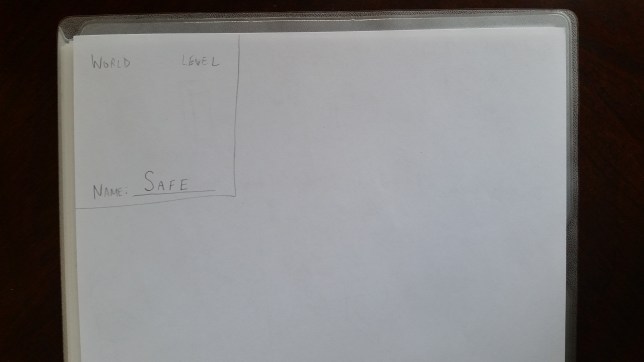
Notice how my drawing style is a more clinical, overhead view than Frank’s (above)

We’ve tried drawing them and sending them to each other, but they’re often too intricate to really ‘get’ from a drawing. In the end, the only process we’ve found for sharing levels is to sit down in the same room together and talk through what the level consists of, along with the drawings. Even this isn’t good enough for a lot of the more complex levels – sometimes the only way to show your team the level is to build it! This is very frustrating, especially when you build a level that’s no good, and you have to throw it out, but sometimes it’s a necessary part of the process.


Taking the User into Account

Of course, the real judge of level design is the user. It doesn’t matter if every one of your levels is a masterful blend of elegant design and game mechanics if your users don’t enjoy playing it. This is a pitfall that I continually see people falling into, and, as I recently realized, one in which I lived for a good portion of the development of Where Shadows Slumber. But no longer! Throughout our testing, the users have spoken, and we are listening!
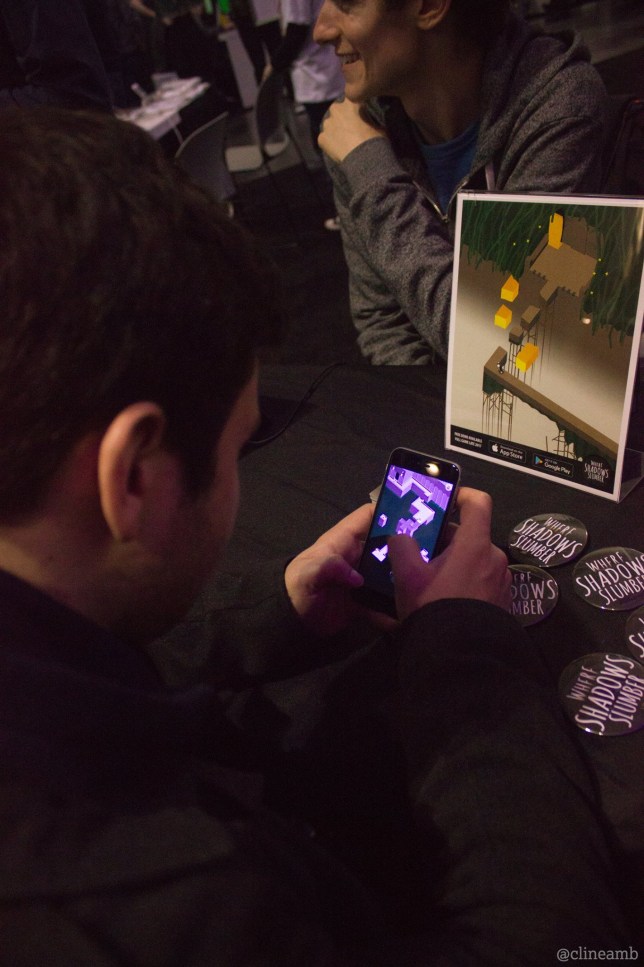
feedback

Getting some feedback on level design!

What does it meant to design for the user? How do we know what they will and won’t like? That’s a difficult question without an easy answer, but I will share some of the tips that I try to stick to.

Listen to your users. This should be obvious, but sometimes it’s not. You have to get your game in the users’ hands, get them playing the game, hear their feedback, and actually listen to it! You’ll never know that users don’t like one of your levels unless you let them test it out, and your level design won’t be good if you disregard their feedback.

Difficulty/learning curve. If your game has a crazy mechanic or concept, the user isn’t going to know how it works – it might seem intuitive to you, but that’s because you’ve been working on the game for so long! You have to make sure that you gently introduce them to the mechanic, in a way that shows how it works while also keeping them hooked. And you have to make sure the difficulty ramps up before too long, or they’ll just get bored of your everlasting tutorial.

Remember that the user doesn’t know what you know. Some people phrase this rule as “treat the user like they’re stupid”, but I think that’s an overstatement. Your users aren’t stupid, they just don’t understand the subtleties of your game the same way you do. They will never do exactly what you expect, and they will never understand the level as well as you do. You need to keep that in mind, examine your level design with an objective eye, and make sure that the experience is enjoyable for the user no matter how they go about solving your puzzles.

Users want to feel smart. The people who pick up and play a puzzle game are usually pretty smart people, and they want to feel smart. This leads to an important design philosophy – make your levels hard, but not too hard. The user doesn’t want to just play an endless parade of easy levels – they won’t feel any satisfaction from beating them. On the other hand, the user doesn’t want to hit a near-impossible level – that’s just frustrating! Beating a level should be easy enough that your users will beat it without getting frustrated, but hard enough that they feel accomplished when they do.

Iterate and Re-use. Sometimes, your users won’t like a level – it happens. In this case, you shouldn’t simply throw the level out. An important part of design is iteration – if your users don’t like a level, figure out why. Figure out what you can do to improve the level. There are parts they don’t like, that you’ll probably end up taking out, but there are most likely some good things about the level, and you don’t want to waste them. Try to fix what the users disliked, and then head back to them and get another opinion.


If I Had to Skimp on Level Design…

Creating a game takes a long time, and there’s a lot to do. Sometimes, you just don’t have the time to pour your heart and soul into every level you design. Sometimes, you just have to put in a few ‘filler’ levels. When is it okay to do that, and what’s the best way to go about doing it?

20170627_124251

“Okay, hear me out: we open on a completely blank screen…”


As much as I’d like to say “all levels are created equal”, I can’t, because it’s not true. Frankly, there are some levels that are a lot more important than others. Which levels are most important? The early ones.

One of the biggest hurdles for a game is what I call the barrier to entry. If I pick up a new game, and the second level is really annoying, there’s a chance I’ll just put it down and never play it again, even if the rest of the game is phenomenal – I have no way of knowing that, and I assume the rest will be just as annoying. However, if I play the exact same game, but it’s the seventh level that’s really annoying, I’ve already played through six awesome levels. The game has earned some credit with me, so I’m willing to let one annoying level slide.

This is doubly true for puzzle games where the user has to learn the mechanics. If you don’t teach the user your mechanics very well in the first few levels, they’re not going to enjoy the rest of the game, because they won’t have learned how to solve the puzzles.

The third argument for this is simply a mathematical one. Every user who plays your game will play the first level. No matter how good your game is, there’s some rate of falloff – some people just stop playing. That means that almost every user plays level two, and most users play level three, and so on. So, the levels that will see the most playtime overall are the first levels, hands down (for any statistics nerds out there, this is basically the same premise as Benford’s Law).

So, if you’re running out of time for level design and you need to skimp on some levels, you should make it levels later in the game. Anyone who has gotten that far already likes the game (presumably), so you don’t need to sell it to them, and they’ll give you a little more leeway.

Now that we’ve tested some of our levels, we’re ramping up into more level design, and I though it would be a good opportunity to show you a little bit of our process. Hopefully you learned something about our level design process, and maybe you can even use it in your own projects!


= = = = = = = = = = = = = = = = = = = = = = = = = = = = = = = = = = = =

If you have questions about our game design process, feel free to contact us! You can always find out more about our game at WhereShadowsSlumber.com, find us on Twitter (@GameRevenant), Facebook, itch.io, or Twitch, and feel free to email us directly with any questions or feedback at contact@GameRevenant.com.

Jack Kelly is the head developer and designer for Where Shadows Slumber.