Where Shadows Slumber: Testing

This week marks the deployment of our first batch of test levels, assuming I haven’t totally screwed up and delayed them. Throughout the past few months, we’ve been building a list of testers, and it is finally time to put it to good use!

If you’re on the list and you have an iOS device, you should have received an invitation to our TestFlight over the weekend. If you’re on Android, you can expect a similar email later this week. If you’re not on the list (or don’t know if you are), just let us know! We haven’t hit the limit on testers yet, and every pair of eyes helps us make a better game.

Frank already wrote about our testing, and why we’re doing it. This post touches on a lot of the same things, but I want to delve a little bit more into the benefits of testing.


Mommy, look what I made!

A child returns home, an exuberant look on her face. “Mommy, look what I made!” she exclaims, holding up a piece of construction paper covered in marker lines and dried macaroni. Her mother reaches down and takes the paper. “Isn’t it great?”

“Why, yes, darling, it’s the most beautiful piece of art I’ve ever seen!”

macaroniwithjack

The original concept art Frank made for Where Shadows Slumber

Now, you and I know that the mother in this story is not telling the truth. Obviously, Where Shadows Slumber is the most beautiful piece of art she’s ever seen. But her daughter doesn’t know that – her daughter planned out the art, decided exactly how she would approach the task, and executed flawlessly.

Frank and I are the daughter in this metaphor, and Where Shadows Slumber is the macaroni masterpiece. We look at our game and we see something beautiful – but who knows what it actually looks like?

You do! You, our adoring public, are our mother. However, we need you to tell us the truth! We will never grow up to be a wonderful artist if you tell us that our macaroni levels are beautifully designed when they’re not.

This is the concept behind a lot of what we have been doing over the past year. We created a demo for the sole purpose of showing it to people and getting feedback about the game. We’re sending out test levels to get feedback about our level design. We even write this blog, in part, to get feedback about our process!

We use all of this feedback to help make Where Shadows Slumber a better game. That is the benefit of testing.


The Power of the POC

If you’re a game developer, and your friends and family know you’re a game developer, then there is a phenomenon I’m sure you’re quite familiar with. If not, allow me to explain.

Most people don’t understand the amount of time and effort that goes into the development of a game. Therefore, if someone thinks of a half-decent game idea, they come to you with it. If I had a dollar for every time someone has said “Jack, listen to this idea for a game – you’ll be a millionaire!”, I actually would be a millionaire.

So, you end with a lot more game ideas then you can possibly make. Some of them might actually be pretty good, but you’re just one person – how can you tell if an idea will end up working out? Do you have to just pick a concept, make the whole game, and then just hope that people like it?

This is exactly what proof of concept projects are for! Can you imagine if we had spent two years making the full game for Where Shadows Slumber, only to release it and find out that nobody enjoys shadow-based puzzles? What a waste! But spending two months working on a project that could become something big is totally worth it, even if people don’t like it.
POC

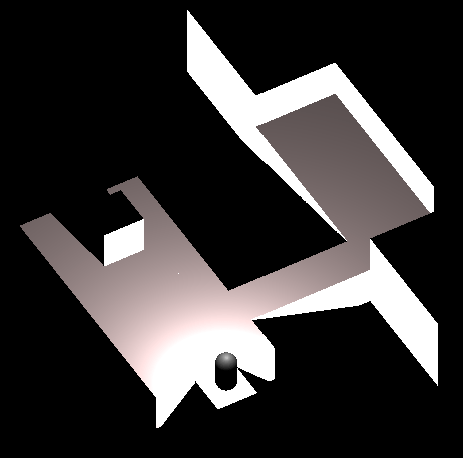
A shot from one of our earliest POCs

That’s exactly how Where Shadows Slumber started. I came up with the idea, and I immediately spent two months or so developing a POC, a very, very basic version of the game, that would just be used to tell if the game had any merit. I showed it to Frank and a few other friends, and they liked it, so we decided to make the full game. If they hadn’t liked it, then we would have scrapped the project. I would have wasted two months, but I would have known that it was a project not worth pursuing, without wasting even more time.


Testing Design

In my opinion, the hardest part of game development is design. Programming is easy enough, once you know what you want to program. Art, on the other hand, would be the hardest part if it weren’t for Frank, but that’s just because I’m bad at art.

Once you know what you want to make, programming and art are mostly execution on that vision. Coming up with that vision is the hard part. What is your game mechanic? How does it work? How do you explain how it works to the player? What does your difficulty curve look like? On and on, there are thousands of questions like this that you can apply to game design, and they’re all important.

This is one of the main reasons we try to get as many people as possible to play our game. There are certain realizations about design that you can only get by showing it to a lot of people and getting feedback. We never would have discovered how much people dislike ‘randomness’, which is something that could have played a major part in our game, if we hadn’t shown it to a bunch of people.

But even once you’ve made all of the decisions regarding your game’s mechanics, you still need that feedback on the last giant piece of the game design puzzle: level design. If you have an awesome mechanic, but your levels are boring and easy, or way too hard, nobody’s gonna want to play.

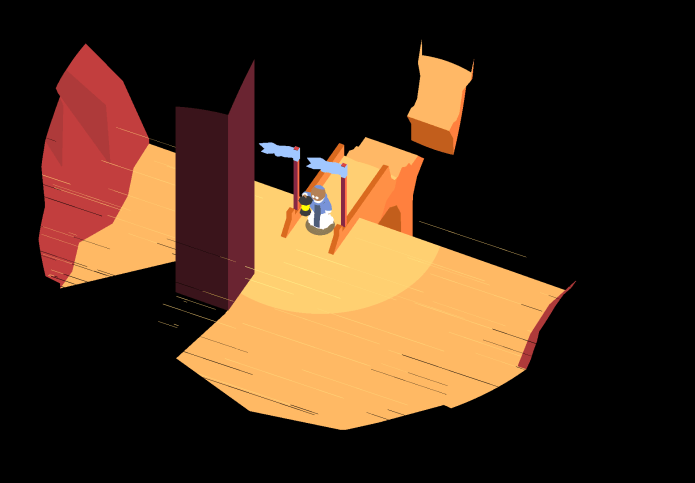
In order to prevent this, we’re doing some alpha testing! We have all of the levels designed, and we have all of the mechanics half-implemented, so we’re sending out test levels!
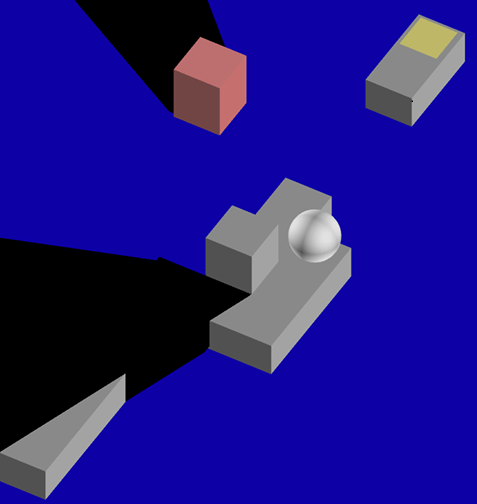
Crumble

This is what it would look like if I were in charge of the art…

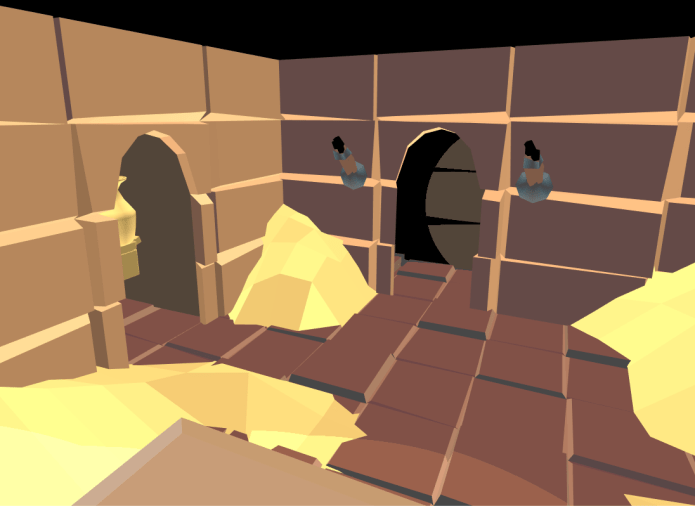
These levels are ugly – but we’re not testing the art! These levels are buggy – but we’re not testing the code! These levels just might be poorly-designed, and that’s what we want to know. Our testers will tell us what they like and don’t like about these levels, and we will update them accordingly.

The important part of this process is that it’s happening as early as possible. If we sent out fully-complete levels, and then we had to change one, we would end up either scrapping the art, which is a huge waste, or trying to change the level without changing the art, which just makes it look weird. That’s why these levels look all dull – it’s all part of the plan!


Testing Philosophy

The last thing you want is to work hard for two years on a project, only to release it and find that it’s not as great as you thought it was. In particular, no matter how great you think it is, your audience might not enjoy it. While there will always be people that don’t like your game, it’s important to make sure that your target audience does like it. And how do you ensure that will happen? Testing!

It’s not a great experience to hear someone say they don’t like your game, and it’s perfectly natural to shy away from that. However, hearing that from a dozen people and still having time to make changes is a whole lot better than hearing it from a thousand people after you’ve already released the game.

Whether it be unit tests (small tests to make sure that one part of your code works) or beta testing (sending an almost-complete game out to fans to look for small bugs and last-minute fixes), testing is an important part of development. Don’t get caught up in your own little game-dev world; make sure you find out what the people want!

As always, let us know if you have any questions or comments about testing (or anything else)! You can always find out more about our game at WhereShadowsSlumber.com, find us on Twitter (@GameRevenant), Facebook, itch.io, or Twitch, and feel free to email us directly with any questions or feedback at contact@GameRevenant.com.


= = = = = = = = = = = = = = = = = = = = = = = = = = = = = = = = = = = =

Jack Kelly is the head developer and designer for Where Shadows Slumber.

Big Changes Coming To The Game [April Fool’s Day!]

Just earlier this morning, Jack and I sent out some bare bones level from the final game. We wanted players to try them out and let us know about their design. Aesthetics aren’t important at the moment, which is why the levels look blocky and have no sound. Right now, we’re just trying to settle on the best design for the game’s first few levels. This is a critical period where players generally make up their mind about a game. Hero, or zero?

Well, Jack and I have been floored by the response we got! Almost the instant we sent out the levels, we received a tsunami of feedback. After a quick brainstorming session, we’ve mapped out our dazzling new plans for the game.


A New Way To Pay

The “premium” model is going the way of the do-do bird. People just aren’t buying it anymore, if you’ll excuse the pun. One of the biggest pieces of feedback we get constantly is to modernize our payment model to adapt to a changing marketplace.

We couldn’t agree more. That’s why we’re dropping the planned premium price of the final game all the way down to $0.00. That’s right — Where Shadows Slumber is going free-to-play!

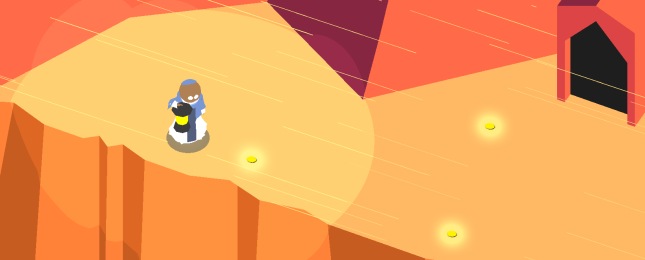
GoldOnGround.png

Our new in-game currency, Gold, can be found on the ground during levels.

After downloading the game and completing the first few levels, you’ll notice our new in-game shop module that we’ve been working all morning on. A new currency has been added to the game called Gold. Gold can be found on the ground during levels, and you collect it by simply walking on it (see image above). Of course, it can also be purchased with real money (USD or regional equivalent) if you have a credit card associated with your App Store / Google Play account.

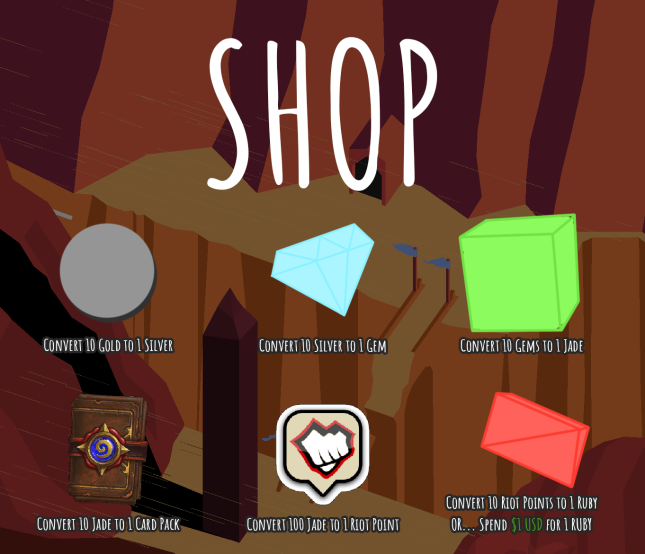
SHOP

The Shop can be pulled up at any time during the game.

The main purpose of Gold is to buy Silver. Silver is mainly used to buy Gems. Gems are used to purchase Jade, which is the only currency in the game that can get you Card Packs. Card Packs, when opened, have a chance to give you Riot Points. Riot Points are important since they can be used to buy Rubies. Rubies are the main currency the game will be using from now on, as they are used to buy Energy.


Energy – Balancing Player Anxiety and Fun

But what is Energy, exactly? Energy is a new way to play that adds gritty realism to the game. It also adds an important anxiety-checkup cycle to the game that urges players to keep checking their phone habitually to succeed in Where Shadows Slumber.

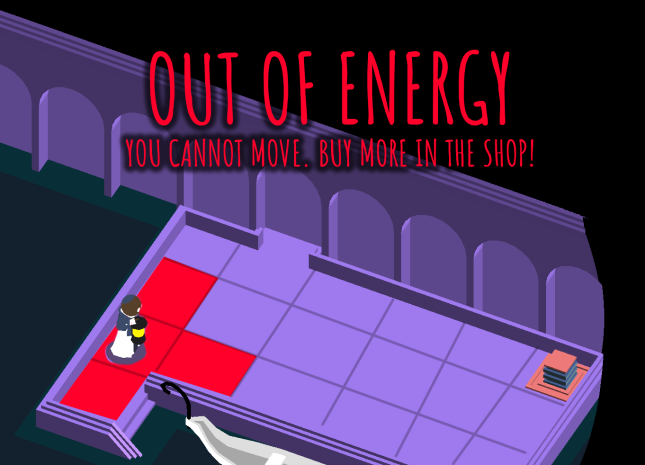
In order to move a single space in the game’s grid-like path-finding system, you need to spend 3 Energy. When solving a puzzle, you need to ration out your Energy. Spend too much time walking, and you’ll run out of Energy for the day.

OutOfEnergy

Never fear, however. Within 24 hours, your Energy bar will be refueled back up to 24, and you’ll be ready for another exciting few minutes of puzzle solving! If you’d like to speed up this process, you can buy Rubies in the Shop.


Challenge Your Friends In Multiplayer

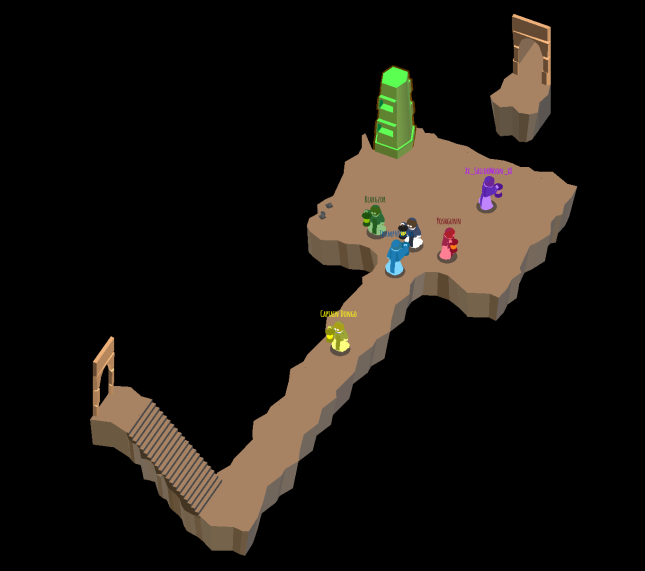
The final piece of feedback we hear constantly is to add multiplayer to the game. We think this is a fantastic idea, so we’re proud to announce that the final game will allow you to solve puzzles with friends and strangers alike! Advances in technology have allowed us to create a real-time multiplayer solution that we hope everyone will enjoy.

Multiplayer

Work with your friends to solve the puzzle, or trap them behind a veil of shadows forever! We hope multiplayer will expand the replayability of the game and the amount of money players invest. We’re also well aware of the criticism that this completely breaks everything about the game’s shadow mechanic, and we are working to remedy that.


We hope you enjoyed taking a look at our bold plans for the future. Our goal is to produce a game that appears free, but costs close to $1,000 to really enjoy. Due to these changes, we expect we’ll have to push the game’s release date back to the year 2020. We appreciate your understanding!


This post was last updated on April 1st, 2017.


= = = = = = = = = = = = = = = = = = = = = = = = = = = = = = = = = = = =

We hope you believed this satirical post! If you’d like the truth, starting tomorrow you can find out more about our game at WhereShadowsSlumber.com, find us on Twitter (@GameRevenant), Facebook, itch.io, or Twitch, and feel free to email us directly with any questions or feedback at contact@GameRevenant.com.

Frank DiCola is a professional Grongus, and the artist for Mass Effect: Andromeda.

Art Spotlight: Cutscenes, Part I

For the past few weeks, Jack and I have been working on transitioning from the Demo Version to the Final Version of Where Shadows Slumber. One of the finishing touches I’m committed to adding to our demo is a short cutscene that plays when you beat the game. Our fans are always asking us if the game will have some kind of a story. The answer is yes, it absolutely will! But the nature of mobile entertainment and puzzle games in general dictates that we tell a certain kind of story in a certain kind of way.


860e6bef748f96c0bfd4d8d5b79626a4

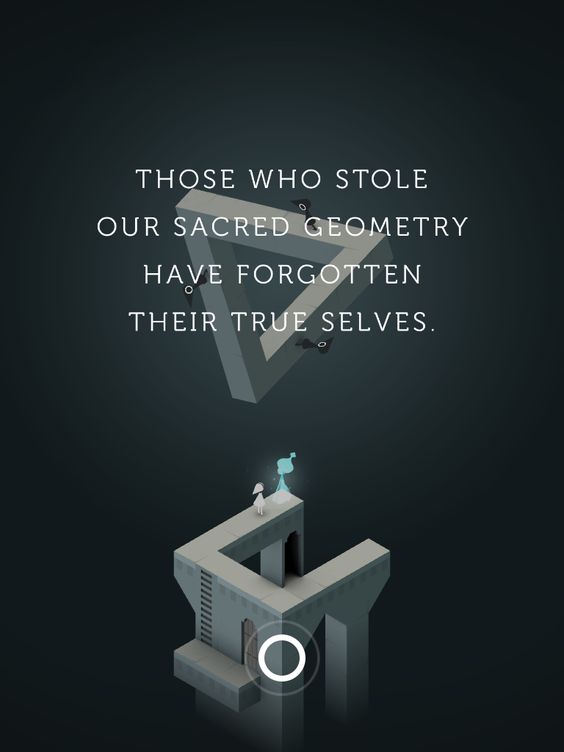
Screenshot from one of Monument Valley’s cutscenes.

Why Cutscenes?

When we decided we wanted the game to have a story, we looked at other successful mobile games (see Monument Valley, above) as well as the games Jack and I usually like to play. It seemed that short cutscenes, placed directly after the player “achieved” something notable, were the best way to hold people’s attention. Jack loves listening to all of the audio books in Diablo 3, and I loved reading entire libraries in games like Morrowind and Skyrim. However, for a casual gamer, massive amounts of text can seem like an information overload. Not to mention, that creates a lot more work for our translator – which translates into a serious cost for us.

It’s also worth mentioning that mobile gamers don’t often play games with the sound on. Clearly, investing our time in fully voice-acted content wouldn’t be worth it. Who would ever hear it? When you think about it, given these constraints, we didn’t have many options.

  1. Mobile gamers can’t hear your game
  2. Casual gamers want a story, but not an epic saga
  3. Mobile gamers play the game in short bursts
  4. The more voice over work and text we have, the more we need to translate

Since the above four points are a given, we decided to have short cutscenes at the beginning and end of every World in our game to serve as end-caps. The action in each of these animated scenes will be completely wordless and textless, and tell a story through body language alone. Sound will be present, but it won’t be important. The cutscenes themselves each tell a unique piece of the story, and may even seem disconnected. This is all by design!


3Ds

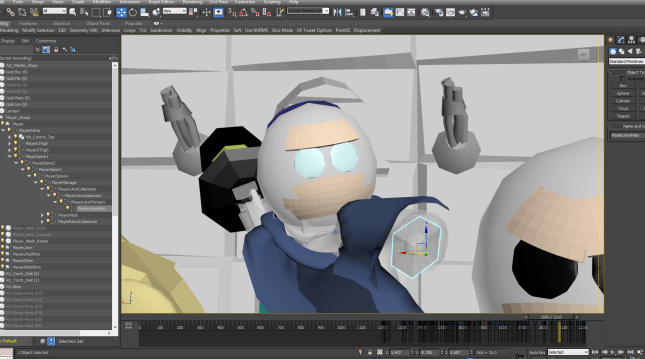
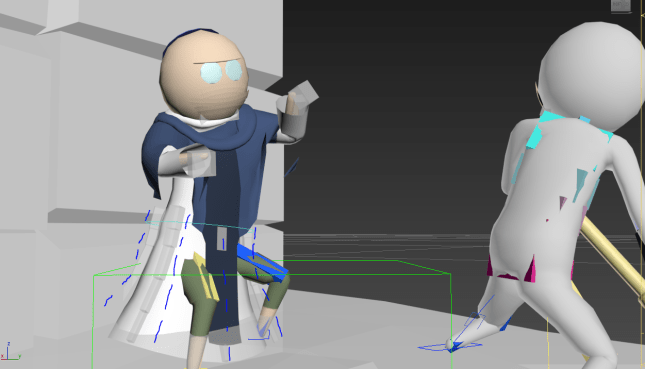
3DS Max is used to animate the actors, and the file is then interpreted by Unity.

The Technology Being Used

All of the artwork in Where Shadows Slumber is done in a program called Autodesk 3DS Max. I’ve used many studios in my years as an animator, but this was one of the first I ever tried and something about it called me back.

3DS Max is used to create characters (modelling), paint them (texturing), give them bones and animation handles (rigging), and make them move around (animation).

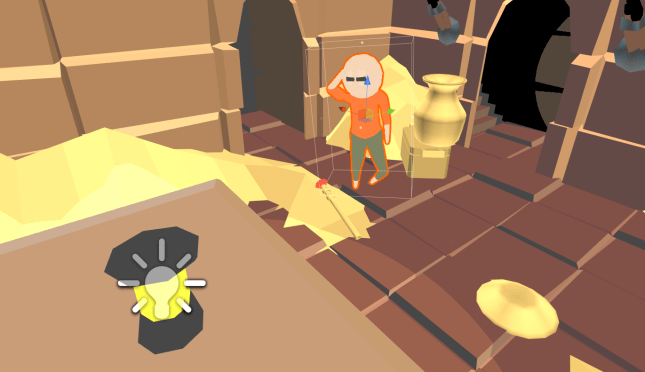
Then, these animations play in real-time within Unity. So when you’re watching a cutscene, you’re really watching the game – not something that was rendered ahead of time as a series of images and played back like a film. It was important to me that we use Unity to its full potential, and always kept players “in the game world”.


regret

Within Unity, the actors are given color and lighting.

Process: The Inverted Cone of Cutscenes

When working on a large project like this cutscene, it’s important to work in stages and have clear checkpoints. And make no mistake, even a cutscene that is 1 minute long is a large project! I have spent close to 30 hours on it so far, and I’m not even finished. The problem with stuff like this is that if you want to change something, usually you have to undo or throw out a ton of work. It’s important to make sure that doesn’t happen, and that you start with a wide range of possibilities but eventually focus in on what the cutscene is going to be.

For some insight into how a cutscene begins wide and then narrows to completion, look at this graph:

CutsceneBlog

The further you go down the inverted cone, the more work you lose if you change something.

See the arrow – I am currently at the end stage of Principal Animation. That means the actors all have their general motions and you can tell what’s going on in the scene. But it still isn’t finished! Look at all of the other stuff that has to be done.

The reason things like cloth motion and sound come last is because, should we decide to change some of the Principal Animation, we would have to throw out all of that “detail work” anyway. So it just makes sense to save it for last and only work on it when the work at the top of the cone has been checked and locked.


skirt.PNG

The player’s cassock (the white tunic) is animated using 30 individual bones!

Regrets So Far

You don’t work on a game without having some serious regrets. Every regret I have so far regarding this process has to do with time – something I did, did poorly, or did not do, that cost me precious time and made us push our deadlines back.

Giving the character cloth robes: I love robes. I love cloth. But I foolishly decided to give our main character cloth robes that must be painstakingly controlled via spider-leg-like bone tendrils. This process is maddening, takes forever, and never looks good. I regret not using Cloth simulation, something 3DS Max provides and Unity supports.

His dumb hand bones: This is something you would never know from watching the in-game cutscene, but the main character’s hand Bone (an invisible puppet-string object) is stupid, dumb, too big, and I don’t like it. I should have made them smaller. Also I think his left arm bends the wrong way. Let’s just say I ought to re-do his entire rig.

Link To World broke everything: I used a parent-child relationship to allow the characters in the scene to hold objects (i.e. the lantern, the urn, the chest, the scepter, the bowl). This worked perfectly! Except… for some reason, the first time I set up linking on my character’s IK hand setup, it wigged out and sent his hands flying off screen for every single frame of animation I had done previously. This was clearly some kind of offset error, but I never found a good solution. I ended up reanimating his hands halfway through!

People would rather have more levels anyway: The sad truth is, this is a puzzle game. People want puzzles. (“More levels!” – The Proletariat) As much as they may say they want a story, the truth is we’ll get more mileage out of working hard on puzzles instead. It may be that the cutscene is there for a different purpose. My own ego? Winning artsy indie game awards?

Everything mentioned here made me lose time and work on this far longer than I should have, making us weeks (if not months) behind schedule for a demo that was supposed to be done already. Perfect is the enemy of good enough! Live and learn, right? That’s the beauty of working on a demo first. I now know what not to do for the final game! Let’s just hope the damage hasn’t already been done by now.


Next Blog Post

By the time I have to write Part 2 of this blog, I should be finished with the cutscene. I can show it to you in full and we’ll do a bit of a postmortem on it. I can give you the short version of the postmortem now: the cutscene is a lot of work, there’s very little payoff (I assume), and the subject matter is controversial. Nevertheless, here’s a sneak peek at it to tide you over until then…


= = = = = = = = = = = = = = = = = = = = = = = = = = = = = = = = = = = =

Interested in hearing about the game, now that you’ve peeked behind the scenes? You can find out more about our game at WhereShadowsSlumber.com, find us on Twitter (@GameRevenant), Facebook, itch.io, or Twitch, and feel free to email us directly with any questions or feedback at contact@GameRevenant.com.

Frank DiCola is the founder of Game Revenant and the artist for Where Shadows Slumber.

Mechanic Spotlight: Shaders

Last week I promised I would write a more technical post. So this week, rather than talking about something I do know about, I’ll be talking about something I don’t know anything about, and then you can all tell me how wrong I am! Which brings me to the topic for this week – shaders!

Where Shadows Slumber has a relatively distinct visual style – the bright solid colors, the crisp black shadows, and the sharp line that separates them. Much of the artistic style is due, of course, to Frank’s art. However, a lot of it is also due to the custom shading that we set up.

screen_1920x3412_2017-03-20_22-04-51

Bright colors and sharp edges!

What is a Shader?

Unity describes a shader as a ‘small script that contains the mathematical calculations and algorithms for calculating the color of each pixel rendered, based on the lighting input and the Material configuration’. Basically, shaders determine how the rendering will happen, and how the look of your scene will be affected. Shaders give you a lot more control over exactly how everything will be calculated and rendered – lighting, shadows, gloss, reflections, etc. It’s a lot, and shaders get very complicated very quickly, but they allow you to craft a very distinct visual style.

Shaders are (generally) used by creating a material and specifying what shader that material should use for rendering. This allows you to use a shader for multiple materials, with potentially multiple different configurations.

Now, let me give you a quick disclaimer – I know enough about shaders to put together this one for Where Shadows Slumber, but I am definitely not an expert. So take everything I say with a grain of salt, and if you are an expert on shaders, feel free to let me know, because I’m sure there are some things I could be doing better.

I should also mention that, while I believe you can write CG shaders for some other engines, any specifics in this post will refer to shaders as they are used in Unity. Similarly, since Where Shadows Slumber uses forward rendering, this shader will also will be set up using forward rendering.


How real light works, and why that’s bad

Unity comes with something called the standard shader, which lets you get a lot of different visual effects without creating your own shader. It’s very powerful and very useful – so why not use it here?

The problem with the standard shader is that it’s too realistic. It calculates lighting based on the way that lights actually work, which is not what we want. A light in real life fades over distance, so it’s brightest at its center and much darker at the edges. While this is accurate, we want all areas that are in light to be the same brightness. Otherwise, the player would be too bright, but the edges of the light would be too dark.

shadercomparison2

The Unity standard shader (left), and the Where Shadows Slumber shader (right)

Enter our custom shader – in order to get the lighting right, we had to write our own shader, with a custom lighting model. This was a daunting task, but I’ll go through the overall steps we took to get there.


Not the most difficult shader

There are two types of shaders in Unity – Surface, and Vertex/Fragment shaders. Surface shaders are a little easier to write and understand, but they give you less control, as they do a lot of the calculations themselves (in reality, a surface shader is just a wrapper that gets compiled down to a vertex/fragment shader). Fortunately, we don’t really need to get too deep into the calculations for lighting and stuff – we’ll just let the surface shader calculate the lighting, and then we’ll use the results to determine what to draw.

So, we know that we have to make a surface shader. What exactly does that mean? How do we actually go in and start changing things? What does a shader really look like?

Drumroll please…


Our surface shader

Shader "CrispLightBasic_NoDir" {
  Properties {
    _Color("Color", Color) = (1, 1, 1, 1)
    _MainTex("Albedo (RGB)", 2D) = "white" {}
  }
  SubShader {
    Tags {
      "RenderType" = "Opaque"
    }

    CGPROGRAM
    #pragma surface surf TestForward addshadow fullforwardshadows
    #pragma target 2.0
    fixed4 _Color;
    sampler2D _MainTex;

    struct Input
    {
      float2 uv_MainTex;
    };

    void surf (Input IN, inout SurfaceOutput o)
    {
      fixed4 c = tex2D(_MainTex, IN.uv_MainTex) * _Color;
      o.Albedo = c.rgb;
    }

    half4 LightingTestForward(SurfaceOutput s, half3 lightDir, half atten)
    {
      half4 c;
      c.rgb = s.Albedo * _LightColor0.rgb * min(floor(300*atten), 1);
      c.a = 1;
      return c;
    }

    ENDCG
  }
  FallBack "Diffuse"
}

This is the simplest shader that we use in Where Shadows Slumber. It’s pretty self-explanatory, so I’ll let you figure it out.

Alright, I guess we can take a look at what’s actually happening here.

Anatomy of a shader

There are a lot of cool parts to a shader; let’s take a look at them from the top down.

  • Shader "CrispLightBasic_NoDir"

    Starting with an easy one! This just means that we’re making a shader, and giving it a name.

  • Properties {
      _Color("Color", Color) = (1, 1, 1, 1)
      _MainTex("Albedo (RGB)", 2D) = "white" {}
    }

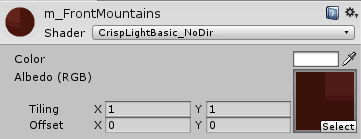
    I like to think of the properties as ‘inputs’ to your shader. When you examine a material using your shader in the Unity inspector, these are the values that you will be able to change in order to get a different look.

    shaderproperties

    A material with our shader in Unity

    The line for each property consists of a name, an identifying string (which is what you’ll see in the inspector), a type, and a default value, in order. So our color variable has the name _Color, the description "Color", the type Color, and the default value (1, 1, 1, 1).

    The possible types for a property are Int, Float, Range, Color, Vector, and 2D (which represents a 2-dimensional texture).

  • SubShader {

    This just means that we’re actually starting the real shader block.

  • Tags {
      "RenderType" = "Opaque"
    }

    Tags are a way of telling Unity some stuff about the shader we’re writing. Unlike the properties above, these are constant to the shader. So, for this shader, we are telling Unity that this shader will always have a RenderType of Opaque.

    There are a few different tags you can use, and each of them have a few different options. In the interest of shortness, I won’t go into all of them here.

  • CGPROGRAM
    ...
    ENDCG

    These directives indicate that the actual CG code is contained between them. The CG code is what does the actual shading.

  • #pragma surface surf TestForward addshadow fullforwardshadows
    #pragma target 2.0

    #pragma statements indicate which shader functions to compile into your shader.

    The target pragma indicates the shader compilation target level – higher targets allow the use of more modern GPU functionality, but may prevent the shader from working on older GPUs. 2.0 is pretty low, since we aren’t going to end up doing anything fancy.

    The #pragma surface directive indicates information about our surface shader, and is always of the form:

    #pragma surface surfaceFunction lightModel [optionalparams]

    Thus, our surfaceFunction is surf and our lightModel is TestForward (both of which we will define later). The optionalparams which we provided are addshadow and fullforwardshadows, which allow meshes using our shader to both receive and cast shadows when using forward rendering.

    This concept of ‘optional parameters’ is kind of vague. Basically, it’s just another way to give information about your shader – this time, the information is about how the actual rendering is done. There are a lot of different options that you can put here, and, unfortunately, it’s not incredibly obvious when you might need one. If you’re not doing anything funky with your shader (lights, shadows, depth-testing, etc.), you’re probably fine. If you are, you might want to see if there are any optional params here you should be using.

  • fixed4 _Color;
    sampler2D _MainTex;

    Remember those properties we declared earlier? Those guys are cool and all, but these are the real variables used by the shader. Any of the properties you declared needs a variable (of the correct type) here, so that your shader can actually use the value you provided! In this case, we’re creating a fixed4 variable for our color value, and a sampler2D variable for our main texture. The data types for these variables are kind of strange, so let’s take a look:

    float, half, and fixed – these all represent floating-point numbers, with different precisions. The precisions are (generally) 32, 16, and 11 bits, respectively.

    – float4, half4, and fixed4 – these are 4-dimensional vector versions of the above types. They’re used for vectors (duh), but also for colors, which are of the form (r, g, b, a)

    sampler2D, sampler3D, and samplerCUBE – these sampler types represent textures; 2D is a 2D texture, 3D is a 3D texture, and CUBE is a cubemap.

  • struct Input
    {
      float2 uv_MainTex;
    };

    The Input structure is yet another representation of information passed to the shader, and generally contains texture coordinates. Texture coordinates must be named uv followed by texture name, and indicate positions of pixels on your textures. There are a bunch of other values you can put here, but, once again, I’m not going to list them all.

  • void surf (Input IN, inout SurfaceOutput o)
    {
      fixed4 c = tex2D(_MainTex, IN.uv_MainTex) * _Color;
      o.Albedo = c.rgb;
    }

    Ah, finally, here we are! We have made our way to the actual surface shading! This is the surface function that we specified in the #pragma surface directive. This function, at its core, describes the properties of a surface. It takes an Input, which we defined above, and a SurfaceOutput, which actually contains those properties (color, normal, emission, etc.). For our very simple shader, we only care about the color, so that’s the only value that we will provide. Note that it’s marked as inout, meaning that it’s both input and output – it comes in, we make changes to it, and then it gets used later, with those changes.

    The inside of this function is the important part, as it’s telling us what the shader will do at any given pixel position. Fortunately, this is a pretty simply one:

    In the first line, we’re calling tex2D, a function which performs a texture lookup. So we’re saying we want the color of _MainTex at the pixel coordinate provided by IN.uv_MainTex. This should make sense – after all, we created IN.uv_MainTex as a way to point to positions within _MainTex, which is exactly what we’re doing. Once we have the pixel color from the texture, we’re multiplying it by our _Color variable, which will result in a ‘tinted’ version of the texture. Finally, we are storing the result in a fixed4 variable, or a 4-dimensional vector of fixed-precision floating-point numbers.

    In the second line, we’re simply assigning the value we just calculated to the Albedo property of the SurfaceOutput variable o. The albedo color of an object is just the color of that object without any external influences (mainly, light). Since we haven’t applied any lighting yet, this is the property we want to set.

    So this function is pretty simple – it just gets the colors from the texture and tints them with the color we provided from the Unity inspector. Note that this function doesn’t return anything – it simply sets values on the SurfaceOutput object, which is used later.

  • half4 LightingTestForward(SurfaceOutput s, half3 lightDir, half atten)
    {
      half4 c;
      c.rgb = s.Albedo * _LightColor0.rgb * min(floor(300*atten), 1);
      c.a = 1;
      return c;
    }

    When we declared our surface shader using the #pragma surface directive above, we also specified a lighting model, which I so cleverly never renamed from TestForward. This function is where we apply our lighting, and it describes how light affects things. In most cases, the surface shader will handle this for you. However, since we want to give our lighting a somewhat special look, we need to mess around in here too.

    This function takes in our SurfaceOutput object (so we can know stuff about our surface), lightDir (a vector indication the direction the light is hitting the surface), and atten (a number indicating the strength of the light at this point). It returns a vector which indicates the color of the surface after the lighting has been applied. This function will run for every pixel on the surface, which allows us to return different values for each pixel.

    Since our shader is pretty simple, the logic in this function is simple as well. We create a vector, c, which we end up returning. We set its rgb values based on the color of the surface (and some other stuff), and set its a (alpha, or transparency) to 1 (completely opaque).

    The interesting part of the lighting model (and the whole shader) is the single line of calculation here, so I’ll go through it step by step.

    • c.rgb – This is the actual color value of the variable c, which is what we want to mess with.
    • s.Albedo –  This is the value we set in our surface function. It’s the actual color of the object at this point.
    • * _LightColor0.rgb – Ah, a piece of magic! We’re multiplying the color by something here, but what? Our lighting function will be called on any pixel once for each light that hits it. These are called passes. In forward rendering, _LightColor0 represents the color of the light that this pass is applying. So, we’re just tinting our surface’s color by the color of the light.
      There are two things to note here. These lighting passes only apply to per-pixel lights. Lighting is expensive, so the Unity quality settings will max out the number of per-pixel lights you can have. In order to create our look, we needed every light to be per-pixel, so we had to increase the cap.
      The other thing is the concept of blending. Since we may have multiple lights hitting the same spot, we’ll have two different color values for that spot. Unity needs to know how to combine them, and the default behavior is additive. This means that overlap between lights will be twice as bright, which may give it a ‘washed-out’ look. I won’t cover it here, but there are ways to change the blending behavior to achieve the look you want.
    • * min(floor(300*atten), 1) – Here’s the interesting part. atten tells you how bright the light is at this point; it gets lower as you move away from the source of the light. A normal lighting model would multiply the color by atten, which would result in a nice fading look. However, we don’t want any values in between 0 and 1. We want the light to be either on or off. So, this funky piece of math basically says ‘if the attenuation is above 0.003, show the whole color. Otherwise, show a shadow’. This is how we disregard the ‘fading’ of the light without disregarding where the light actually reaches.
  • FallBack "Diffuse"

    We started with something simple, and it looks like we’re gonna end that way too. The fallback shader is the shader that should be used if, for whatever reason, our custom shader is unable to be run on the GPU. This could happen if we’re running on older hardware, we specified too high of a shader compilation target level, or we simply made a mistake in the shader code. I find that the latter is almost always the case, as writing shaders correctly is so confusing as to be near-impossible.

    screen_1920x3412_2017-03-21_08-18-43

    The beautiful color of a broken shader!

    Note that the fallback should be inside the shader block, but outside of the subshader block.

Putting it all together

Going through the shader piece by piece took a lot longer than I thought it would, so I won’t go too in-depth here. Most of the shader is boilerplate, so there’s not too much happening anyways.

Basically, we’ve built a surface shader which accepts a texture and a color. We tell that shader that it’s opaque, that it should use shadows, and that it should compile to a very low set of GPU requirements. We also tell it to use a custom surface function to describe the properties of the surface, and a custom lighting model to figure out how light affects that surface. Together, these functions will tell us exactly what color each pixel should be rendered as.

Within the surface function, we simply grab the color from the provided texture, tint it with the provided color, and pass it along. Within the lighting function, we either return the color of the surface, tinted by the color of the light (if the pixel is within the light), or return the color black (if the pixel is in shadow). In this way, everything that is at all touched by light will show up as its full color, and anything in shadow will show up as a crisp, dark black.

Additional resources

Hopefully this adventure into shader-land has given you an idea of how shaders work, and what it was like to work with them. Like I said, I’m not a shader expert, so there may be some stuff you still want to know about shaders. Here are a few links that helped me out in my travels:

There are probably a hundred other pages I ended up reading on my quest for shader mastery, but I can’t find/remember all of them now. Anyways, sorry for going on about shaders for a metric year. I hope you learned a bit about the mysterious world of shaders, and if not, I just hope you didn’t die of boredom. Either way, if you got to this part of the post, well done!

As always, let us know if you have any questions or comments about shaders (or anything else)! You can always find out more about our game at WhereShadowsSlumber.com, find us on Twitter (@GameRevenant), Facebook, itch.io, or Twitch, and feel free to email us directly with any questions or feedback at contact@GameRevenant.com.

= = = = = = = = = = = = = = = = = = = = = = = = = = = = = = = = = = = =

Jack Kelly is the head developer and designer for Where Shadows Slumber.