Going Gold

We’ve come to the part of the development cycle that no artist ever enjoys: the gold-stamping process. What is this mysterious “gold-stamping?” Why do artists despise it so? You thought it was just fixing bugs and making small tweaks, didn’t you? Well, read on to find out…


You’re reading the development blog for Where Shadows Slumber, a puzzle game coming to iOS and Android later this year. Check out our free Demo here.


LevelProgress.JPG

Gold Stamping: The Point of No Return

Every project must come to an end eventually. In order to make sure your game is ready for the whole world to see, every piece of it must be tested individually. Then, the entire game has to be tested as one unit. Before we can move on to that final testing phase, every Level, Cutscene, and Menu in the game needs to be approved by three teams: Art, Sound, and Development.

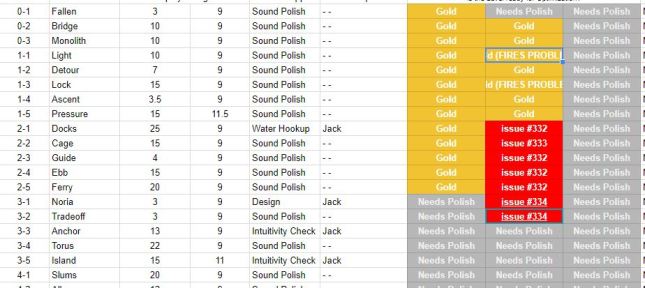
The Art team is just me – and the Development team is just Jack. Alba and Noah work on Sound together. That means we need three approvals for each Level, Cutscene and Menu. Approval means “I’m done working on this Level forever – there is absolutely nothing left to do. Put it in the game.” (See the screenshot above for a look at our spreadsheet that has each Level listed as well as the “Gold” stamps)

There’s a specific order we have to do this in, as well. I need to put my “Gold Stamp of Approval” on Levels before Sound does, because I’m in charge of the game’s visuals. If I add a blazing torch to a Level after Sound has “gold-stamped” that Level, they’ll need to come back and give that torch some kind of looping audio. Art and Sound need to gold-stamp the Level before Jack takes over, because he’s duplicating each Level in the game into a separate file and running an optimization process on that Level.

This optimization process takes time, and destroys the editability of the scene. (By way of analogy, consider what happens to a Photoshop file when you Flatten it into a JPG file. The JPG takes up less space on your computer, but you lose the editable Layers from Photoshop) Jack is able to lower the time it takes your phone to render a frame of the game by “crunching” these Levels. If your phone can render a frame faster, the game will feel smoother. Players hate lag more than they hate bad graphics or design, because it interrupts the flow of play. Everything we’re doing now is to make the game run smoothly even on older devices.

But you can see the problem: if Art or Sound has to tell Jack that they made changes to a Level, one of two things happen:

(a) We need to make that change in both the original Scene and the crunched Scene

(b) OR… Jack needs to start the optimization process for that Scene over again

Option A introduces the possibility of human error. Have you ever made a mistake copying something down by hand over to another sheet of paper? Imagine that with a bunch of tiny numbers and sliders in Unity! Unfortunately, Option B wastes time we don’t have. And since “crunching” makes these Levels unable to easily edit, there is no Option C.

In the late stages of the project, we’re in a mad dash to finish each Level and hand them off to Jack. We’re a bit on top of each other at the moment, and tensions are high. Some of our beloved changes won’t make it into the first release of the game and may have to be stealthily added as a patch later on. (Shhhh don’t tell anyone I said that, blog reader)

Those are all the downsides of gold-stamping. Enough complaining: let’s talk about why this process makes the game so much better!


HowEmbarrassing.png

iPhone X Stretching

We began working on this game long before the iPhone X was announced. Since we designed the game in portrait mode, we planned for it to work in 9:16 resolutions as well as 3:4 resolutions. The plan was simple: we would assume you had the tiniest screen there was (9:16) and make sure you could solve the puzzle using everything you saw. And then, if you had a large screen, your screen would show more of the artwork surrounding the puzzle… but not any more key information. (Our demo works this way. Download it for free on a few devices to see what I mean.)

The iPhone X dashed our hopes when it launched, since it has a very thin and tall screen. When we booted it up on an iPhone X earlier this year for the first time, we noticed that key puzzle information was being cut off! Furthermore, there were sections above and below the Scene that I never planned for human eyes to see. We had to fill those sections in with art, or iPhone X users would know the game wasn’t made for them.

Here’s another analogy: imagine if you were designing the set for a Broadway musical. You do all your work, and then a week before opening night your director comes to you and says: “Listen, we’re lowering the stage by 2 feet and extending the ceiling by 2 feet above the stage. Do you think your set will still look good?”

The correct answer is: “yes, but I need to extend the artwork so it doesn’t cut off!” It’s ok if your art bleeds over into a section that human eyes will never see. But you can’t have your screen bleed over into artwork that isn’t finished or cuts off arbitrarily!

Fortunately, Jack solved our width problem by writing a Camera Resizing script that adjusts the Orthographic camera size to the proper width depending on your hardware. (Thank God for Jack, lol. Just that script alone would take me the full 3 years we spent working on this game to complete) I am solving our height problem by extending the shadowy silhouettes on each Level where appropriate, and adding more art where it’s necessary.


TooManyVerts.JPG

Low Poly Means Low Poly

When you set out to make a low-poly game, you aren’t just deciding on an art style. You’re also setting boundaries for how much the game will need to handle. This is why you’ll see a lot of cartoony artwork on mobile games and MMOs. Both of those are situations where you want the game to run on low end devices like old phones (mobile games) or old computers (MMOs). Cartoony graphics let you show what you want without having high-resolution textures or incredibly detailed model topology. It isn’t just an artistic decision – it’s also a marketing, business, and programming decision.

However, just because I said that I would do low-poly art doesn’t mean I kept my promise. There are a lot of Levels that go wildly above our Triangle / Vertex budget. (See the screenshot above, with emphasis on the Tris and Verts) Unity counts the number of Tris and Verts that are displaying on the screen at one time. Jack wants us to be well under 100k of each. That may sound like a high number, but you’d be surprised by how even simple scenes can skyrocket to 150k. When he finds Levels that are egregiously “over-budget,” he sends them over to me so I can make reductions.

Fortunately, Tri / Vert budgets are not like monetary budgets. If Jack told me not to spend $100,000 dollars, and then I bought a yacht, we’d be $100K in the hole. (But, we’d have a boat. Jack, I urge you to reconsider this proposal.) With polygons, as long as I cut down on fatty models before the game launches, no one will ever know. Except for the readers of this blog, of course. But you’re sworn to secrecy! Don’t share this post.

There is one more thing about this I discovered: Unity’s lighting system counts polygons in a very strange way. You can’t always trust their readout. I discovered that multiple lights require Unity to count the same object multiple times. If a cube has 8 Verts and one light is lighting it up, Unity will show 8 Verts. If there are six lights on it, Unity will show 48 Verts. So there’s some Levels that Jack will reduce once he does his big crunch, since he rewrote how our Lights will work to make them all act as one super-Light. (More wizardry, I’m sure.)

We’re doing all we can to make the game run fast on your phone. If it’s still lagging, get a new phone!


TextureAtlas.png

File Formats and Compression

This is the kind of boring stuff that puts artists to sleep, but it’s important. Unity imports textures, models, and audio files according to a standard. You can set the standard somewhere, but we never did. Instead, I am going through every file in the game and asking the had question: does this really need to be as large as it is?

The answer is usually “no!” which is good. I’m crunching a lot of textures down from 1024 x 1024 to 32 x 32 pixels, Unity’s smallest maximum size for images. Noah and Alba also did a bunch of audio crunching that I can’t really explain properly. You’ll have to wait for their revealing tell-all novella (Where Shadows Is Grongus: Nightmare Stories From Development Hell) for all the juicy secrets!

One more thing about textures: it might not be super necessary for me to make these textures smaller after all. Jack is actually doing this crazy optimization thing where we have every texture on one big image called a Texture Atlas. This image is as small as I can make it and has every texture in it laid out like a grid. We have one of these for every Scene in the game (Levels and Cutscenes) and when the game wants to render an object that uses a texture, it’s going to go to this image and pick from the proper coordinates.

This is insane and Jack explained it to me once and it’s insane and I’m sure it will make the game run super fast. If I’m remembering correctly, Jack told me that the rendering system needs to pause and switch gears every time it has to render a new Material. (So if the grass is GreenMaterial and the tree is TreeMaterial, the renderer needs to pause and switch) If it never has to switch like that, the rendering process should go way faster. The way to do that is to make one Material with the Level specific Texture Atlas called “Scene-0-2-Atlas” or something and put that on each object with the right coordinates. We’ll have fewer batches to render, and you’ll never even know what’s going on under the hood!

I’m going to stop giving the layman’s explanation here before I embarrass myself by showing my limited knowledge. But look forward to Jack’s upcoming tell-all blogella (Life With Frank: The Man Who Knew Nothing) for all the juicy secrets!

 

rubber stamp APPROVED

See You In Hell

This is going to be a rough week. This lengthy process is taking longer than I would have liked, and I’ve been pulled away from animating the final cutscenes. I desperately want to get back on track so Alba and Noah have enough time to work on the audio score for the final cutscenes.

Thanks for reading this blog post – I have to get back to gold-stamping!


= = = = = = = = = = = = = = = = = = = = = = = = = = = = = = = = = = = =

We hope you enjoyed this update about the game’s development. Have a question about aesthetics that wasn’t mentioned here? You can find out more about our game at WhereShadowsSlumber.com, ask us on Twitter (@GameRevenant), Facebookitch.io, or Twitch, and feel free to email us directly at contact@GameRevenant.com.

Frank DiCola is the founder of Game Revenant and the artist for Where Shadows Slumber.

Crunch and Burn(out)

If you’ve been following the development of Where Shadows Slumber, then you know that we’ve been working on it for a while. It was early 2015 when the core concept first came to me. Three years ago this month was when I put together the first proof-of-concept to show to Frank. The demo version of the game has been out for over a year and a half.

Game development takes a long time, especially with a tiny team, little to no funding, a full-time job, and, the biggest time-waster of all, life itself. As Frank discussed in a previous blog post, we are holding ourselves to a pretty high standard for Where Shadows Slumber, which makes development even slower.

Fortunately, after all this time, we’re finally closing in on the end. As happy as that might make you, the fans of the game, there are two people who are definitely happier about it than you are: us. As frustrated as you might be about how long it’s taking, we’re even more frustrated. Frankly, as much as we love Where Shadows Slumber, neither of us can wait until the moment it’s over.

“But Jack”, you ask incredulously, “if you love it, why do you want it to be over? You’ve managed to work on it for three years – what’s another few months?”

There are two phenomena that often creep up at around the same time in the development cycle of a game (or any project, really). Here they both are, followed by something I’ve said in the past week that represents each of them:

  • Crunch – “There’s only a little bit of work left, but there’s even less time left!”
  • Burnout – “I’ve spent so long on this game, I’m just sick of it!”


Night.jpg

Crunch

I’ve discussed before the “ninety-ninety” rule, so I’ll just summarize it quickly here, since it’s relevant: not only does software development take a long time, it takes significantly longer than you think it will. This is an issue when you first start your project (“it’ll probably only take 18 months or so”), but there’s no scheduled release date or external pressure at that point. Nobody really cares yet! However, it becomes a bigger issue when dealing with shorter time periods. For some reason, people have a hard time realizing that their estimates are wrong and adjusting (at least, we do). Because of that, we’re still making poor estimates for how long something will take!

This is the reason that developers inevitably end up in the dreaded state known as crunch time. We thought there were about 6 weeks of work left, but it turns out there were 12 weeks of work left. Too bad we already gave a bunch of outside parties a solid release date! Since they’re now depending on us to meet those deadlines, we have to do 12 weeks worth of work in 6 weeks!

This is the phenomenon that leads to crazy overtime, too many all-nighters, and an incredible amount of stress. If you follow game design, you’ve probably heard about it, because it somehow ends up happening to pretty much every game. If you’re involved in game design, then you’ve probably gone through it, and you know how awful it can be.

It’s a little better for us than for bigger, more established studios – we don’t have employees to pay, stockholders to appease, or a public release date to hit. That said, we don’t want Where Shadows Slumber to turn into an indie game for which development takes forever that people are perennially waiting for. It’s now or never!


Burnout.png

Burnout

Cascading into crunch time at full speed is pretty bad, but it’s not the worst thing in the world – we’re been working on Where Shadows Slumber for a long time, and we are both willing to put in a little extra time as we reach the end. However, one of the biggest problems is that crunch time is also usually accompanied by burnout.

When you’re just starting out on a project, everything is pretty exciting. You enjoy working on interesting problems like pathfinding and game mechanics, and you don’t even mind fixing any bugs that come up. On the other hand, once you’ve been working on a game for a long time, you’re pretty much sick of it. All of the interesting stuff is already implemented, so the only things left to work on are tiny quality improvements (“does this look better when the position is 0.4 or 0.41? How about 0.42?”), annoying, subtle, or hard-to-reproduce bugs (“this was working last week, but a change to a different piece of code is somehow causing it to break, but only ~10% of the time”), and tasks that you intentionally avoided because they aren’t interesting or fun (“how many setPass calls will this scene render when running on a 6-year old Android phone? Is that too many?”).

None of these tasks are really very enjoyable – so not only has your excitement about the work decreased, but so has the objective fun-ness of the work that’s left to do. This leaves you in a state of never actually wanting to work on the project. Combine that decreased drive with the increased amount of work you have to do, and it starts to become pretty obvious why the end of development for a game tends to get pretty hairy, and why we’re looking forward to being done with it.


Tunnel.jpg

The Light at the End of the Tunnel

Don’t worry, though – it’s not all bad! We’re both still really excited about Where Shadows Slumber, because of the amount of work we’ve put into it. We’re both dedicated to the cause, and we’re not gonna let a little extra work put a stop to it (even if it ends up slowing us down).

The purpose of this blog post is two-fold. On one, more selfish hand, I want to offer up to our adoring fans an explanation for why we haven’t finished the game yet. We know a lot of you love the game, and are really looking forward to it, and many of you have shown us that by popping up and saying hi at various conventions. The past 8 months or so have been a real whirlwind, both personally and professionally, and our timeline has been shifting around quite a bit as a result. So I wanted to offer a bit of an explanation, as well as reassure you that we’re still working on Where Shadows Slumber, and we’re not gonna let it fall by the wayside!

The other reason for this post is to serve as a sort of warning, albeit a likely redundant one. For anyone working on their own game (or any project, really), it’s very important to take time management seriously. Ending up in the crunch time/burnout trap is an awful place to be. Despite this, most developers (indie and AAA alike) end up here, because it’s hard for people to grasp how time-consuming the last 10% of a project can be. So, if you take away anything from this post, I hope you do your best to allow enough time at the end of development to get your game out without ending up there. You’ll end up there anyway, but maybe by knowing about it ahead of time, you won’t be there for long.


= = = = = = = = = = = = = = = = = = = = = = = = = = = = = = = = = = = =

You can always find out more about our game and how freaking long it’s taking us to finish it at WhereShadowsSlumber.com, find us on Twitter (@GameRevenant), Facebookitch.io, or Twitch, join the Game Revenant Discord, and feel free to email us directly with any questions or feedback at contact@GameRevenant.com.

Jack Kelly is the head developer and designer for Where Shadows Slumber.

State of the Art – July 2018

Welcome to the State Of The Art, July 2018 edition! This monthly progress report is written by Frank DiCola and is focused entirely on how the game’s visuals have improved in the past month.

Before we reach the spoiler part of the article, I’ll give you a brief update about the state of the art, and how much work is remaining on the aesthetic side of things. There will be no pictures, GIFs, videos, or bulleted lists, so don’t worry about seeing spoilers! (Just don’t scroll down too fast. You’ve been warned!)

Missed last month’s State of the Art? The June edition is right here.


Spoiler-Free Progress Report

When June began, 5 out of 10 cutscenes were animated and World 7 was less than half complete.

As of July 3rd, 7 out of the game’s 10 cutscenes have been fully animated and World 7 is finished! (There’s a tiny amount of work remaining for these two cutscenes, but cut me some slack here) I also did something I don’t normally do and programmed the cutscenes to have a pause menu where you can skip the cutscenes. Does that count as “art?”

What’s next: Later today, I’ll finish the two cutscenes that are nearly complete. This month will then be dedicated to finishing the final 3 cutscenes and putting the finishing touches on the game’s artwork.

You’re all caught up. Now, if you want a sneak peek at some of the artwork I did this month, read on… but beware of game spoilers!


SPOILER WARNING: The rest of this article contains screenshots, GIFs and videos of later sections of the game. If you want to experience them in all their majesty for the first time on your mobile device when the game launches, don’t read on!


World-7-Header.JPG

Paradise is Complete

My work on World 7 is officially done! It took longer than I would have liked, but the Levels came out great and it will serve as a proper final sendoff for those who complete the game. Here are the full screenshots from the three Levels I had to finish:

SOTA-7-3.png

SOTA-7-4.png

SOTA-7-5.png

There will still be GitHub Issues to address in these Levels, so I’m not completely done. However, the same is true of every Level in the game at this point, so it doesn’t matter! I hope you like the look of these Levels. Since you’ve journeyed into spoiler-land, you may as well tell me what you think in the comments below!


Header-King.JPG

Two More Cutscenes Are (Nearly) Complete

Once I finished World 7 about halfway through June, I moved on to two more cutscenes. I do these chronologically, so check out last month’s blog if you’re trying to piece the story together through short GIFs. Here are some teasers from these cutscenes:


Cutscene-Short-Leopard.gif

Obe runs into an old friend on his way out of the Aqueduct…

Cutscene-Short-King.gif

“Can I interest you in a golden circle, by any chance?”

At the beginning of this month, I had a long sound recording session with Alba and Noah. You can read all about it here. The short version of the story is that we recorded voices for all of the characters that “speak” in cutscenes. (By speak, I mean “loud unintelligible grunting”) For the past month, they’ve been working on implementing those into the game, so the cutscenes I completed in May are going to have finished audio soon.


WilliamChyr.JPG

Back to Work

Sadly, this blog post reveals that I didn’t get as much done in June as I’d hoped. Because World 7 took a long time to finish, that delayed my progress on the cutscenes. Being behind schedule is a slippery slope!

As soon as I finish this post, it’s back to work finishing those two cutscenes I mentioned. I’ll record them and send them off to our audio team for scoring. Then, there are three more cutscenes that need my love – and one includes a full credits sequence that may just be too ambitious to put into the game. I’ll also need to take some time just to address the mountain of GitHub Issues that Jack logged as he played through the entire game. Some Levels require artistic changes to make the shadows look better. I can save those for later, but we’re running low on “later” – and I don’t want his progress to be stopped because I couldn’t take a break from cutscenes for an hour to read all these emails. Finally, there is a Level Select screen for World 7 with my name on it. Those tableaus are beautiful but each one takes a few hours to complete.

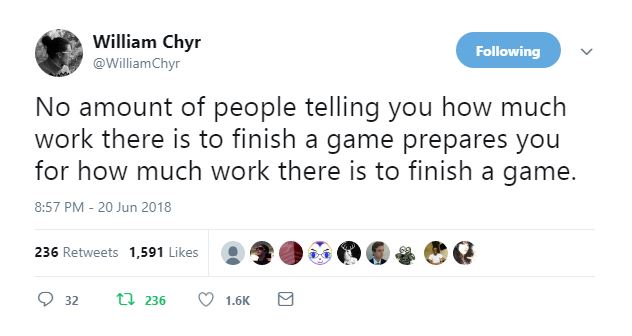
The tweet above, from William Chyr of Manifold Garden fame, is appropriate. I always expected the end of development to feel like less and less work as we neared our goal, but it’s the opposite! There is so much to do, and so little time.

Back to work!


= = = = = = = = = = = = = = = = = = = = = = = = = = = = = = = = = = = =

We hope you enjoyed this update about the game’s artwork. Have a question about aesthetics that wasn’t mentioned here? You can find out more about our game at WhereShadowsSlumber.com, ask us on Twitter (@GameRevenant), Facebookitch.io, or Twitch, and feel free to email us directly at contact@GameRevenant.com.

Frank DiCola is the founder of Game Revenant and the artist for Where Shadows Slumber.

4 Tools for Recording Your Game

Recently, a friend of ours asked us to provide him some footage of Where Shadows Slumber in action for a highlight reel he’s making. That made me realize we never blogged about the topic of recording your game. I’ve gotten pretty good at recording images and footage of the game over the past few years, so why not share my tricks? It’s just one more thing I never thought I would have to do before I started doing game development, but our experience with SkyRunner taught us a lot.

So this blog post will save you some time if you’re looking for tips: here are the programs I recommend for recording images, GIFs, and video of your game!


7-1-Ladder

Saad Khawaja’s Instant Screenshot

During the process of marketing your game, people will often ask you for a full-resolution screenshot of the game in action. To fulfill this request, you need to get the dimensions of the screen exactly right. For example, our game is made for phones in Portrait resolution. If we give someone an image that is in Landscape resolution, they’ll think the game is made for computers or game consoles instead. Getting the resolution right was really important to me, and I recognized quickly that the Microsoft Snipping Tool (more on that below) wasn’t going to give me the high quality screenshots I wanted.

After trying out a few plug-ins on the Unity Asset Store, this is the one I came away with: Saad Khawaja’s Instant Screenshot. It’s free and very easy to use. You can adjust the size of the final image, or set it to the current screen size which is super useful. You can take low quality images or blast the pixels up to an insane level. (I could probably make a banner-sized image with this tool!) Once it’s in your project, you’ll see it in the “Tools” window and after you click that it comes up like any other Unity window. Trust me, you will not regret making this tool part of your routine.


SnippingTool.JPG

Snipping Tool

This one is just for Windows users, but there’s a program installed on every Windows machine called “Snipping Tool” – have you ever used it? Find it in your Search bar and save the shortcut. I keep Snipping Tool on my hotbar! That’s how useful it is.

Above, we discussed how sometimes you really need high-resolution screenshots at the exact size of the screen. However, often I need to record segments of the game for internal use. In these situations, like if I’m logging a bug in GitHub, it’s not helpful to have such a large image. My philosophy is that the image should be short and wide with the bug in the center of the picture. This way it will fit in nicely with the text of the bug report. I generally include some kind of note where I circle the problem, or draw a funny confused face. (This probably annoys Jack, but I’m sort of hoping it softens the blow of finding another bug in some far off corner of the game)

Fortunately, you can do all of this with Snipping Tool and you don’t even need to download it! Simply click the snip button, drag across a corner of your screen, draw on it with your mouse, and copy/paste the image where desired. You don’t even need to save the image to your computer if you like to live dangerously. Make Snipping Tool your go-to for capturing bug report images, and include as many images in your bug reports as you can. It will really help your team!


Cutscene-Short-Wolf

ScreenToGIF

The image above is a GIF, and it was recorded using ScreenToGIF. The best way to explain the GIF file format is that it’s basically a digital flipbook. I may be dating myself here, but did you ever have those little Disney flipbooks as a kid where you could flip through them with your thumb and see the animation play out across a hundred tiny pages? That’s a GIF. They are all over the place, they’re great for advertising your game in motion, and the Internet loves them.

Before ScreenToGIF, I found it really difficult to make my own GIFs. I forgot what program I was using – who cares, it didn’t get the job done! Download this program for free here, and I promise you that you will not regret it. There’s a ton of settings you can tweak to get the image size, file size, and quality you want. It’s extremely user friendly. You can delete frames after you’re done recording too, which is such a nice feature. I’ve never had a problem posting these animated images to Facebook or Twitter. I’m not being paid off to say this: use ScreenToGIF!


Open Broadcaster Software

I wish I had a better option for recording video of our game, to be frank with you. (Note: I am always Frank with you, dear reader.) This program Open Broadcaster Software (OBS) was the main way I streamed on Twitch a while back when I used to do that. I then realized that it didn’t just stream your image to the Internet – you could also just record footage and save it to your computer. Neat!

Download OBS for free here. It’s not bad, but it’s not perfect either. It can record footage and capture audio too, which is helpful for progress updates like the image above. However, getting the screen resolution just right is pretty difficult. According to Alba and Noah’s finely trained ears, it does not do a good job recording sound from the computer either. But I’m willing to admit that could just be my fault… there are a ton of settings to configure, and I have no idea what I’m doing!

It doesn’t do your editing for you either: I recommend Adobe Premiere or Final Cut. Sadly, I know of no good free editing tools! You’re on your own, I’m afraid.


That’s all for now, folks. I hope this saves you a few days of frantic searching, downloading, and deleting. Thanks for reading, and happy recording!


= = = = = = = = = = = = = = = = = = = = = = = = = = = = = = = = = = = =

What programs do you use? Do you like my suggestions? Feel free to leave a comment below! You can find out more about our game at WhereShadowsSlumber.com, ask us on Twitter (@GameRevenant), Facebookitch.io, or Twitch, and feel free to email us directly at contact@GameRevenant.com.

Frank DiCola is the founder of Game Revenant and the artist for Where Shadows Slumber.