Optics

Hey, it’s me, Jack! For those of you who have been following our blog, you may have noticed that I haven’t posted in a while. You’re probably wondering what happened to me. Did Frank kick me to the curb? Did I abandon Where Shadows Slumber?

In all honesty, you probably didn’t even notice. Whatever the case, I haven’t gone anywhere! The reason I haven’t posted anything in a while is that, simply put, the stuff I’m working on isn’t all that interesting. Compared to action-packed cutscenes and beautiful artistic polish, bug-fixing and number-tweaking are pretty dull.

BugFixesCommit

An enthralling contribution

That’s why, this week, I want to talk about something that isn’t specific to Where Shadows Slumber, and has nothing to do with the work I’ve been doing this past month. Instead, I’m gonna talk about something that applies to everyone – not just in indie game development, but in any business at all!

Optics is an area of business management that is very closely associated with marketing and publicity. However, as its name suggests, it refers less to the way in which you’re introducing people to your product, and more to the way that your product is actually perceived. Optics isn’t an action that you take, it’s more of a general way in which you act about your company and/or product.

Optics – the scientific study of sight and the behavior of light, or the properties of transmission and deflection of other forms of radiation.

That’s not a very useful description, so here’s a quick example:

  • Posting on Facebook, putting up billboards, and going to conventions are all examples of marketing. Note that they’re all specific actions.
  • Deciding to be very transparent about your process, or always being snarky on social media are examples of optics. They’re more like predefined ways to act.

Let’s take a look at how thinking about optics has impacted Where Shadows Slumber.

Warning – as with any conversation about a product’s “image”, this next section may be a little pretentious.

Where Shadows Slumber‘s Optics

So, what are some ways in which we consider the optics of Where Shadows Slumber? Surely, this wouldn’t be a topical blog post if I didn’t discuss our application of the concept!

The answer to this question lies in how we want our users to think about Where Shadows Slumber. Consider the difference between a game like Monument Valley and something like Candy Crush. They’re both great, successful games, but the general public thinks about them differently. Monument Valley is artsy and represents a unique experience, whereas Candy Crush is a well-oiled time-killing machine that you can always open up and play. They’re different, and both successful, in part because they know what they are and how they’re perceived. How do we want Where Shadows Slumber to be perceived?

World-7-Paradise

Where Shadows Slumber – a beautiful, mysterious, puzzle game

Where Shadows Slumber is, at its core, mysterious. When thinking about Where Shadows Slumber, people find themselves wondering: Who is Obe? What is he running from, or to? What do his journey, his light, and his darkness represent?

Where Shadows Slumber is a puzzle game. When playing it, players aren’t simply following a path, but choosing one. They’re engaged, actively trying to figure out the puzzles. They feel a sense of agency – they are in control of the game.

Where Shadows Slumber is, for lack of a better term, art. When looking at it, people appreciate the colors and the aesthetic. They notice the attention to detail and the smoothness of the gameplay. They recognize immediately the time and effort that has gone into it.

I consider each of these things, and everything else that people think about Where Shadows Slumber, to be a part of our optics. When we’re making design decisions, we ask ourselves – “does this design continue to represent our game as an engaging puzzle game?” When choosing color palettes for a level, we wonder – “will these colors result in an image that someone would hang on a wall?” By continuously working toward our desired image with every decision that we make, we do our best to ensure that the public will view the game just as we want them to.


The Team!

Optics doesn’t just apply to the game itself – it applies to anything and everything on which a potential player might judge us. If you find out that a company has unethical business practices, you probably won’t buy their product, even if it’s the best one on the market. The optics of that company, not just the product, has affected your choice when considering it.

DREAM Team

What we want everyone to think about our team

The image that Frank and I portray as a team is just as important as the image that Where Shadows Slumber itself has. Our team optics are very carefully designed – two friends who met in a sketch comedy group in college, who love games so much that they just want to be a part of, and give back to, the indie gaming community? How can you not love that team? They sound like such cool bros! The fact that it’s actually true is just icing on the cake – now our optics include honesty and earnestness!

In fact, there are parts of our image that are purely invented for the sake of optics. Our friendship? It’s a total lie. Frank and I, after working together for nearly 5 years, simply hate each other. Why do you think we want the production of Where Shadows Slumber to be done so much? We don’t want to have to work together anymore!

Note: Sarcasm doesn’t come across very well in a pure-text format – Frank and I are actually very good friends!

17159203_1817437325174646_6524966612565150056_o

Best Friends!

Another example of optics is that note that I just made! I couldn’t let you leave, knowing the truth of our animosity! The truth is that we do hate each other – but it’s better for us if you think we’re best friends!

Note: Again, the above is sarcasm. Please disregard it!

Team

Seriously though, best friends! Frank wasn’t plotting his revenge at the moment this was taken!

As yet another example of optics, please direct your attention to that second note I just made! I have sworn a blood oath against Frank’s life! He has sworn vengeance against my family! A thousand-year feud ensues, ending only with the extinction of the human race!

Note: ……………….

This Blog!

The final thing I want to point out about the optics of Where Shadows Slumber is this blog itself! By being as transparent as possible about our process, and by connecting as much as we can with our fans and potential players, we do our best to present ourselves as a fun, interesting, and relatable team. By discussing the details of the implementation, design, and art of Where Shadows Slumber, we drive home the point that the game itself is an intricate and interesting experience. By offering tips, tricks, and advice for your own games, we give back to the community that we love so much, and establish ourselves as a part of that community.

Optics are an important part of creating any product. Without a part of your team dedicated to putting out a positive image of you and your product, it becomes the responsibility of every person on the team to actively contribute to your product’s optics. The image that you are striving to achieve should inform many of your decisions, whether they be design- or business-related.

Remember, you don’t want to just make a game – you want to look good doing it.


= = = = = = = = = = = = = = = = = = = = = = = = = = = = = = = = = = = =

I hope this little foray into the world of optics helps you to better promote your own products. I don’t hope, however, that it causes you to question everything that we’ve ever said about Where Shadows Slumber! Either way, you can always find out more about our game at WhereShadowsSlumber.com, find us on Twitter (@GameRevenant), Facebookitch.io, or Twitch, join the Game Revenant Discord, and feel free to email us directly with any questions or feedback at contact@GameRevenant.com.

Jack Kelly is the head developer and designer for Where Shadows Slumber.

Audio Update: Voice Recording

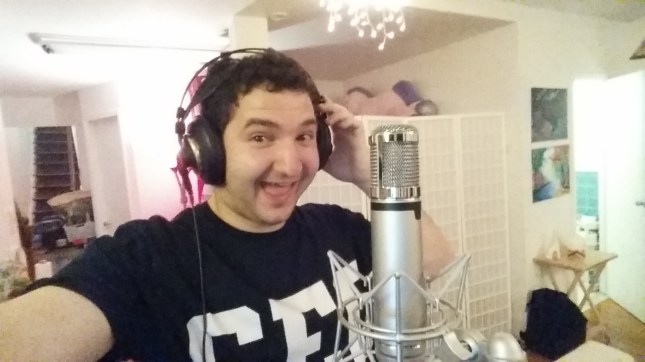
Last week, I visited Alba and Noah at their home studio in Queens to record some vocals for Where Shadows Slumber. (If you have no idea who I’m talking about, read the intro blog they wrote last year right here) They’ve been working hard on the game’s audio since we brought them onto the project in September. There’s just one hangup, though – Obe’s voice, as well as the voices for the game’s other characters, are not in the game yet.

Voices are tough to fake using synthesized instruments. You need to capture the performance of an actor who understands the emotions of the scene before them, especially when you’re scoring animated cutscenes. Fortunately, since I’m the one who made the game’s cutscenes, I know exactly what weird noises Obe is supposed to be making! I also love acting and have been involved in theatre since grammar school. I can’t say I’ve done a lot of voice work though, so this was a new experience.


SoundRecording-Both-A.jpg

The Setup

How do you record voices, anyway? Well, I made the trek out to Queens to visit Alba and Noah at their apartment to see their setup. They set me up with a microphone stand and a pop filter, with a few sound shields to block out unnecessary noise from the refrigerator. From where I was standing, I could see the cutscene video as we recorded. My goal was to match the visuals on the screen with the noises from my mouth.

On the software side of things, we recorded in ProTools for a bit until it kept crashing during sessions. Noah and Alba eventually decided to just record everything in Logic since they were going to edit the final sound in Logic anyway. It worked out great!

SoundRecording-TV.jpg

Here’s a better shot of the microphone stand, pop filter, and sound dampener:

SoundRecording-Microphone.jpg

The microphone used is a Miktek CV4.

I recorded voices for Obe, the forest guardians, and a few bit characters that are only in one cutscene. Noah showed us a crazy sound synthesizer that takes your voice in and spits out animal sounds, like a growling dog or a roaring lion. That was good, because my impression of a lion sounds nothing like a lion!

SoundRecording-Alba.jpg

Alba and Noah helped to coach me as we repeated sections of the audio.

We even received aid from the innocent creatures of the forest, as we danced in harmony together:

SoundRecording-Bunny.jpg

Their adorable bunny McFlurry mostly hid under the couch. This was a rare sighting.

The funniest part of the day was when Noah and I teamed up to record chatter sounds for the prison guards, who are chasing Obe from a distance. The game has no recognizable English words – or words in any language, for that matter – to make sure it’s easy to localize in China. (Their government is very strict about the influence of “outside” languages.) So we invented our own nonsense language and shouted like idiots for a few seconds before cracking up!

I’m sure that will sound better in post. LOL!

Here’s a transcript, for those interested in the deep lore of Where Shadows Slumber:

GUARD 1: era adbabalao at babt!!!

GUARD 2: ebbebe ebebebe ebe ebe beyhehehe!!!

GUARD 1: arbababaldlalao ehehr ehe!!!

GUARD 1 and GUARD 2: aanndna hehee!!!!

GUARD 1: wod! wod! wod! ow dow dowmee ndenebedo!!

Shakespeare must weep from the great beyond, mystified that he could never attain such beautiful prose.


SoundRecording-Frank.jpg

Thoughts About Voice-Over Work

Voice acting took a lot out of me. It’s really hard! We were focusing on the cutscenes during this session, and I was determined to do them all in one take. Essentially, for each character in the scene, I recorded their voices from the beginning of the cutscene to the end. That means doing about 90 seconds of voiceover per person per cutscene, and we did multiple takes. Additionally, we would skip around and redo certain segments (a gasp, a scream, a laugh) to make sure they came out right. Between trying to keep up with the video and trying to change my voice to match the character, I don’t know what the most difficult part of this was. All I know is that I have a newfound respect for voice actors!

Now that I think about it, screaming was probably the most challenging thing to get right, because it’s so easy for screams to sound campy. For that reason, it’s a little embarrassing to shout at the top of your lungs in front of other people. It also just really hurts your vocal cords! We should have saved that for the end, so I’ll remember that next time.

Actually wait – the hardest thing was when we recorded breathing because I almost passed out! We wanted to get some audio of Obe breathing as he’s running quickly. This would go in the game’s Levels, not in a cutscene. For some reason when you record yourself breathing it becomes really difficult to actually breathe… I got a little lightheaded as we recorded his idle breathing, running breathing, and struggling breathing. Something about keeping a steady rhythm messed up my actual breathing and I had to take a few breaks. Maybe I’m just terribly out of shape?

As you might have guessed, it’s all very challenging! I encourage you to find your favorite voice actor on Twitter or something and send them an encouraging message for all their hard work.


PHOZ.JPG

Support PHÖZ Online!

I really appreciated the opportunity to go out to Queens and hang out with these guys for a day. It was a much-needed distraction from my usual routine (wake up, stare at a computer for 12 hours, sleep). Voice acting is an exhausting endeavor, but it was exhausting in a different way than what I am used to, so I had fun!

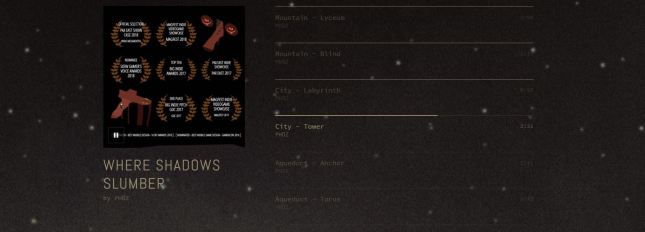
You should support their work online by going to www.phozland.com and signing up for all of their various social media accounts (Facebook, Twitter). Also, please listen to the selected songs on their website that come straight from the game! They sound so beautiful in isolation, and you’ll gain a new appreciation for all of the hard work they’ve done so far.


= = = = = = = = = = = = = = = = = = = = = = = = = = = = = = = = = = = =

We hope you enjoyed this update about the game’s audio. Have a question about sound that wasn’t mentioned here? We’ll forward it along to Alba and Noah! You can find out more about our game at WhereShadowsSlumber.com, ask us on Twitter (@GameRevenant), Facebookitch.io, or Twitch, and feel free to email us directly at contact@GameRevenant.com.

Frank DiCola is the founder of Game Revenant and the artist for Where Shadows Slumber.

State of the Art – June 2018

Welcome to State Of The Art, June 2018 edition! This monthly progress report is written by Frank DiCola and is focused entirely on how the game’s visuals have improved in the past month.

I’m going to try something new this month. Before we hit the spoiler part of the article, I’ll give you a brief update about the state of the art, and how much work is remaining on the aesthetic side of things. There will be no pictures, GIFs, videos, or bulleted lists, so don’t worry about seeing spoilers! (Just don’t scroll down too fast. You’ve been warned!)

Missed last month’s State of the Art? The May edition is right here.


Spoiler-Free Progress Report

When May began, I had just polished Worlds 5 and 6. However, all of the Levels in the game were in a “toss-up” state. There was no indication as to whether Jack could begin optimizing them. That’s a slow process that he doesn’t want to do twice, so we needed some way of determining which ones I was finished working on. (Optimized Levels are difficult to edit, sacrificing changeability for faster runtimes) As I turned my attention to animation, I realized only 2 of the game’s 10 cutscenes were animated, and none of them had any audio. I tried a weird system of putting audio cues in manually through Unity Events, but that failed miserably. World 7, the game’s final set of Levels, still looked like it did during the prototype phase. My initial artwork on those Levels came across as dated and I really disliked the look. Even worse, the toolkit I established for that World last year didn’t seem like it was going to provide a good foundation. It used way too many polys and didn’t account for the specific nature of many of this World’s puzzles. The outlook was bleak.

As of June 5th, 5 out of the game’s 10 cutscenes have been fully animated. That includes body animations, facial animations, effects, cues, intros, and outros. The SFX for those cutscenes was created independently by our audio dream team (Alba S. Torremocha and Noah Kellman), which means I was able to focus my attention elsewhere during the past four weeks. I greatly improved the World 7 toolkit and reduced the poly count while increasing the quality. That World has a really distinct look to it, one that I think is appropriate for the end of our journey together. I polished 2 of the 5 Levels in World 7, meaning I won’t return to them and I believe they are final game quality. (It also means they are ready for the last coat of audio paint before Jack’s final stamp-of-approval.) Speaking of which, we solved our “toss-up” problem by creating an online doc where I can label a Level “Gold” or “Needs Polish.” If a Level is Gold, it has my stamp of approval. Obviously, I want to get through as many of those as possible because I’ve already done a ton of work on those Levels and I don’t want to neglect the work that remains undone. This month, I “gold-stamped” Worlds 0, 1, and 2.

What’s next: To finish this game, I’ll need to animate five more cutscenes, polish three more Levels, create footprint effects for four more Worlds, and test every Level in the game on multiple iOS devices. That’s a lot of work! I’m going chonologically, so the cutscenes, footprints, and Levels remaining are all in the later half of the game. That will be my goal this month.

You’re all caught up. Now, if you want a sneak peek at some of the artwork I did this month, read on… but beware of game spoilers!


SPOILER WARNING: The rest of this article contains screenshots, GIFs and videos of later sections of the game. If you want to experience them in all their majesty for the first time on your mobile device when the game launches, don’t read on!


World-2-Footsteps.gif

Obe Leaves Tiny Footprints Behind Him!

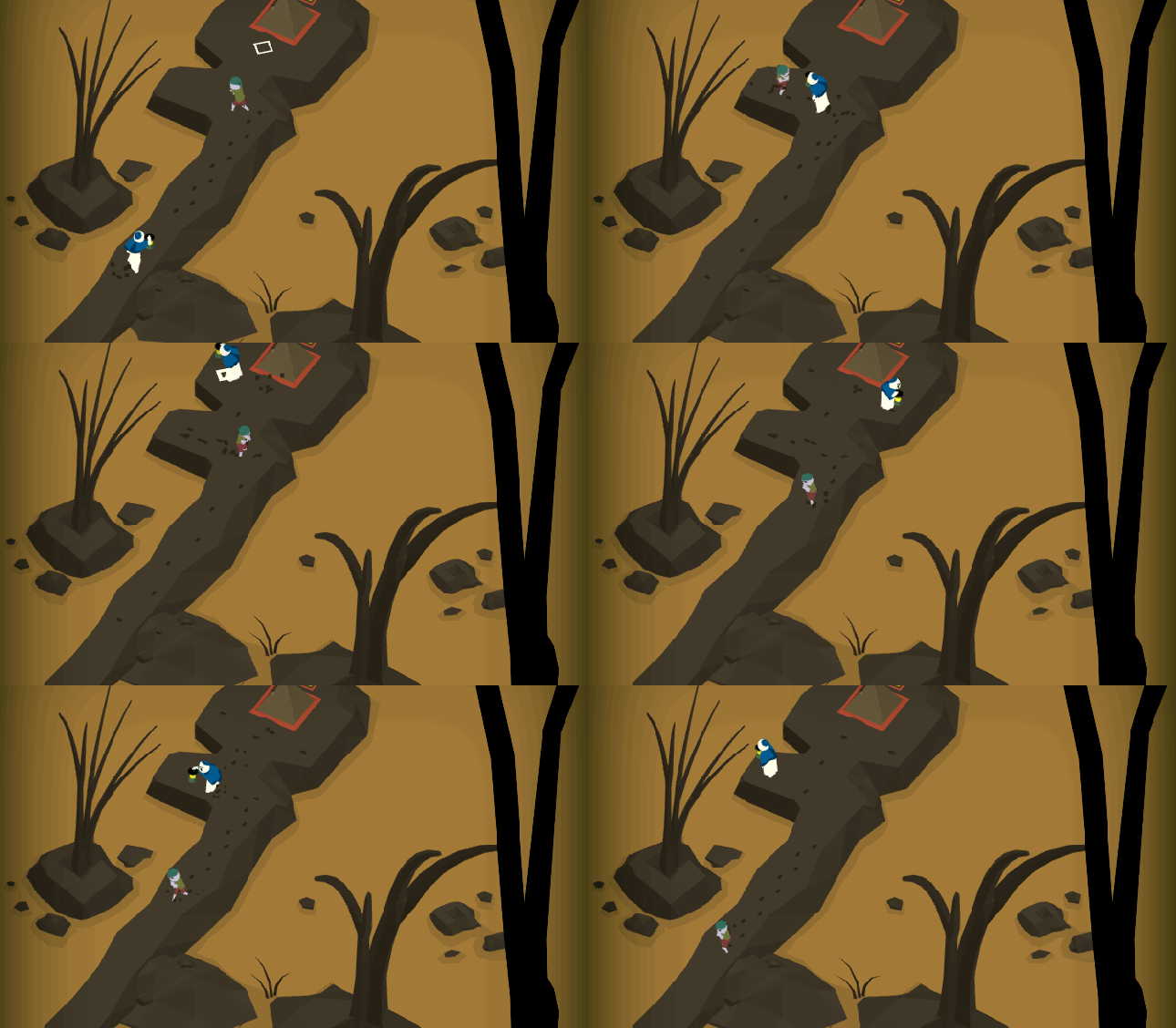
Let’s start with something fun that isn’t even much of a spoiler – Obe leaves tiny footprints behind him when he walks! On certain Worlds, when the terrain calls for it, we generate a tiny mesh and a particle burst where Obe’s foot lands. This mesh disappears over time, giving the illusion that Obe is squashing through mud or snow. If there are other characters in the scene, they leave footprints too. We don’t do it all the time though, because any effect can be taken too far. Footprints appear for the first time chronologically in Level 2-1, “Docks”, which you can see in the GIF above.

I know what you’re probably thinking: “you guys have an entire game to finish and you’re focusing on this insignificant detail!?” However, that is entirely the point of the polish phase! Now is the time to work on tiny details that will charm players and get them Tweeting & Instagramming about our game.

You see, humans are funny creatures. We tend to take a lot for granted, and make a big deal out of the smallest things. There’s so much we expect from games as a baseline that I think our enjoyment purely comes from moments where game developers go “above and beyond.” This is anecdotal, but my Twitter feed is always filled with game developers and fans who find tiny insignificant things in video games and then breathlessly announce “THIS IS WHY <game> IS THE BEST GAME EVER CREATED IN <current year>!!” My personal belief is that players gain a sense of pride and attachment when they find something in a game that they believe no one else has noticed yet. Hence, if you add in a lot of small details, you’ll create a lot of little moments in your game that create a bond between the player and your product.


Cutscene-Animation

Five Cutscenes Are Now Complete!

I cannot share all of the full video files of the game’s cutscenes with you yet, since five of them have been animated but none of them have sound. Even if they were done, I don’t think I’d want the solo cutscene videos out on the Internet like that. However, there are some things I can show you just to prove that I haven’t been goofing off all month long.

Let’s begin with a treat! Here is the game’s second cutscene, which happens just three Levels into Where Shadows Slumber. If you played a beta build at an event recently, you probably remember it as the annoying cutscene you couldn’t skip. (I’m working on that!) Obe has been thrown into a jail cell and his lantern has been taken from him. Alba and Noah sent it back to us with a first-draft of the audio dub, and it’s great:

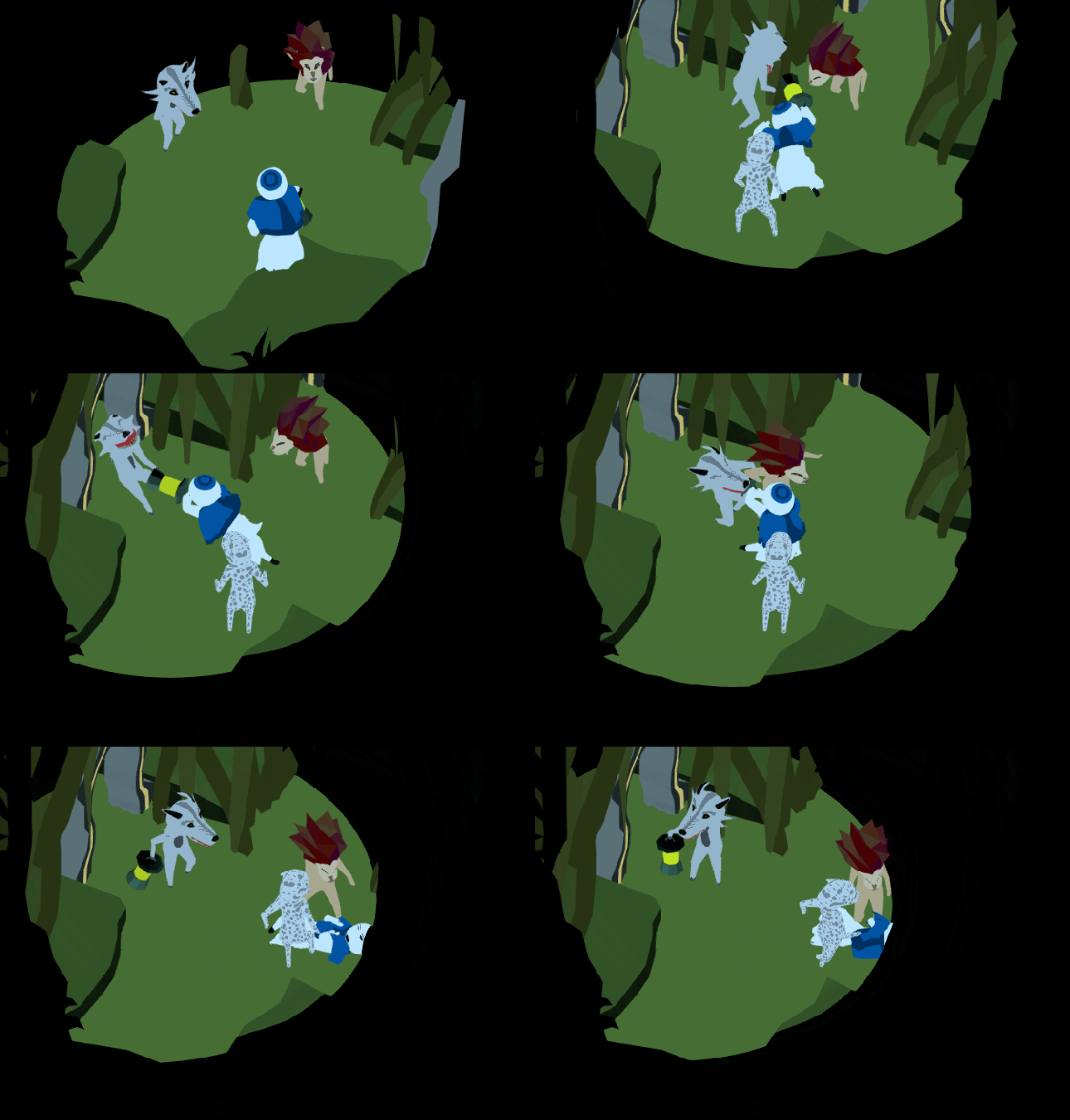
I’m so excited to see what the other cutscenes are like with audio! Tomorrow I’ll be doing a recording session with them to get some voices into the audio mix as well. We’ll never record a word of English dialogue, but our characters can still make funny faux-speech noises and grunts. Since the rest of the cutscenes have no audio, here’s some short GIFs of the animations in action to tide you over:

Cutscene-Short-Wardens.gif

Obe “meets” the Wardens in a bad neighborhood of the Forest…

Cutscene-Short-Lion.gif

He’s trapped! It was a door the whole time!

Cutscene-Short-Wolf.gif

Obe is waylaid as Christopher Cross’ “Sailing” plays in the background…

Cutscene-Short-Beach.gif

Waking up on a random beach? We’ve all been there.

That’s enough sneak peeks for you! I can’t show you the full cutscenes just yet, can I? There has to be something left for you once you buy the game…

Next, let’s discuss the World polish I did this month!


Paradise-Header.png

Welcome To Paradise

Long-time readers of this blog will recall that over a year ago I expressed an interest in modeling an entire game World after the architecture of Bermuda. I won’t go into the details, since I wrote a whole blog post about it, but you should read that and come back here!

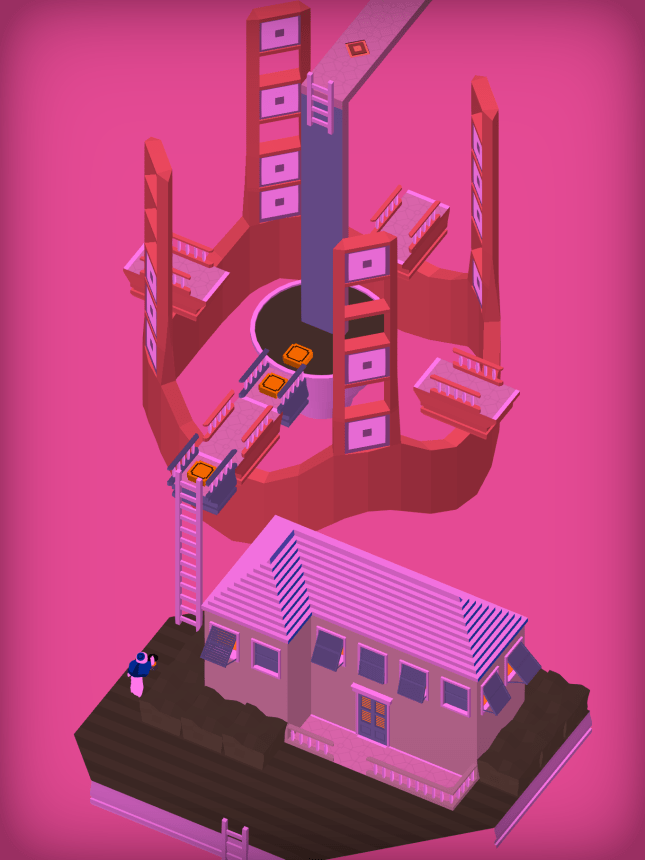
As I mentioned above in the progress report, I wasn’t crazy about how this toolkit looked when I first created it. But now I think it looks fantastic! Check out the before-and-after comparison of Level 7-1, “Ladder”, below. The first image (with the pink background) is how the Level looked up until last week. The sky was loud yet flat, the buttons looked repetitive, the house had no style, and the grass was way too dark. I didn’t even complete the ridges on the ends of this floating island! Speaking of which, why are these islands even floating?!

7-1-Old

The picture below is a polished version created using modular pieces, hyper-specific artwork, and some new cool effects specific to this Level. The gradient background and fun pastel colors pay a nice homage to our muse, Monument Valley, while the window lights seem to pop off the screen. We get a real sense that Obe has come to this place in the dead of night, as he ascends ever higher.

7-1-Ladder

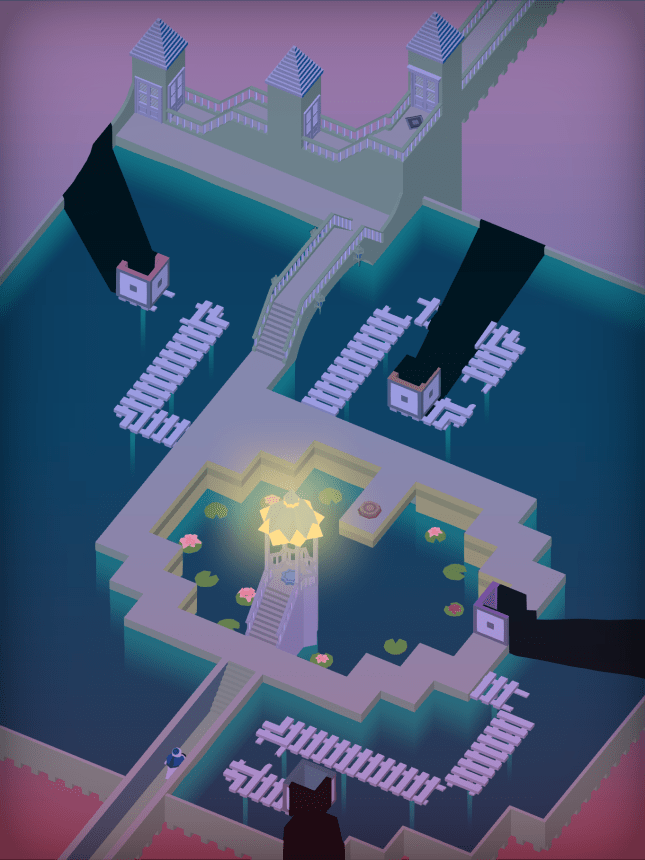
I’m not as sold on the next image, which is from Level 7-2, “Pond.” It’s always tough to tell when I’m being properly restrained, and when I’m just being lazy. Does this Level have enough going on? It seems like there is a lot of dead space. And yet, due to the constraints of the puzzle, this is not a Level I can go totally crazy with. I actually tried that once and I completely broke the Level and Jack had to put it back together. Whoops!


7-2-Feedback.png

I hope this looks like a peaceful pond, and not a run-down YMCA swimming pool. This is a really cool Level, so I want to do it justice. Please leave a comment below if you want to help me improve the artwork for this Level! I really do check your feedback and I find it helpful to have outside input. After looking at these Levels for so long, I begin to lose perspective. Help me out!


Conclusion

This month, I want to put World 7 to bed. I also want to clear the way for Jack to be able to put his golden stamp of approval on every Level. (As an added bonus, I usually find bugs whenever I’m gold-stamping Levels. The more I find now, the less stressful our final testing period will be!) If I can manage that, I’ll officially be done working on the game’s puzzles.

As for the game’s story, I won’t be able to finish every cutscene in just four weeks. I need some time for World 7 polish, and cutscenes tend to take one week each. Progress on those will be slow, because animation is tedious. The good news is, it’s very easy to put in fake cutscenes when we need to do builds. (It’s just a Unity file that says “go to the next Level in 5 seconds, this cutscene isn’t done yet!) That means we can do a lot of testing even as I work on the remaining animations.

But silver linings aside, there is still a mountain of work left to do on this game. The game is nearly complete, but my trek through animation hell is just beginning…


= = = = = = = = = = = = = = = = = = = = = = = = = = = = = = = = = = = =

We hope you enjoyed this update about the game’s artwork. Have a question about aesthetics that wasn’t mentioned here? You can find out more about our game at WhereShadowsSlumber.com, ask us on Twitter (@GameRevenant), Facebookitch.io, or Twitch, and feel free to email us directly at contact@GameRevenant.com.

Frank DiCola is the founder of Game Revenant and the artist for Where Shadows Slumber.

Inside Animation: The Process

As I descend further into the depths of animation Hell, I thought it would be good to expose my animation process to the world. At this stage of the project, I’ve completed half of the cutscenes in the game. I’m able to tackle one cutscene every week. I have a good sense of the workflow and I’m getting “in-the-zone”, so I feel ready to talk about the steps I take to bring these scenes to life.

Long time readers of this blog (all three of you) may remember the first time I did this. Last year, when I was still animating the Demo, I wrote two articles about my process. Here are the links to that old article, parts one and two. Enough has changed since then that it warrants a new piece.

( NOTE: I won’t go into detail about how I animate the character’s faces, since last week’s blog was a deep dive into that system. Feel free to check that out. )

Now, how do we make the cutscenes in Where Shadows Slumber? To make this process more concrete, I’m going to focus on a relatively innocuous cutscene that I just got finished animating this week called Beach.
 

Cutscene-Writing.jpg

Step 1: Write A Story

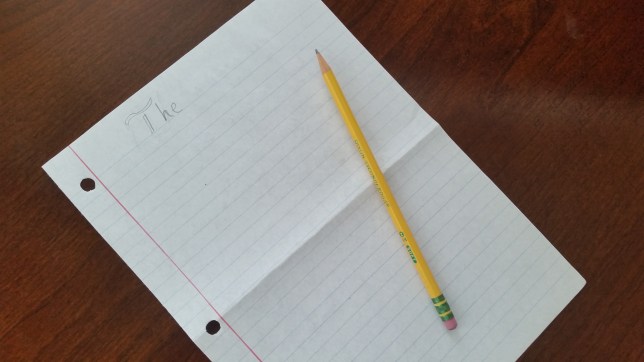
You may not have expected this to be the first step on our journey, but it is! Writing is the most important step, by far. Before any work begins on a cutscene, Jack and I have to agree on the game’s story and how it will be told to the player during the game. This process took place a long time ago, at the beginning of 2017, when we locked ourselves in a room and did not emerge until the game’s narrative was pinned down.

Cutscene-Script-Beach

Before we named the character, “Grongus” served as a funny temporary name.

The original script was revised two times (officially) with some extra cuts happening unofficially in conversations between the two of us. Our original idea was to have a lot of cutscenes – I think 15 or 16 cutscenes in total – in the entire game. Since there are 8 Worlds, we wanted an intro cutscene to each World and a “finale” cutscene after the player completed all the cutscenes in that World. I agreed to this not only because I loved animation, but also because I vastly underestimated the scope of the work.

However, we eventually decided to eliminate a lot of the intro scenes. They weren’t really necessary, and it was jarring for players to watch two cutscenes in a row (a finale for one World, and an intro to the next) when they really wanted to get back to the gameplay. We only kept intro scenes for moments where the Player would be genuinely confused without them. The best example is the cutscene called Escape which takes place very early in the game. Prior to this cutscene, Obe is captured by human-like animals in a finale cutscene, and his Lantern is taken. In the very next Level, he’s freely walking around a volcanic prison with his Lantern in hand. Without a cutscene like Escape, players might wonder what happened to the animals, how the Lantern returned, and why Obe is not still in some kind of cell.
Cutscene-Script-River.JPG

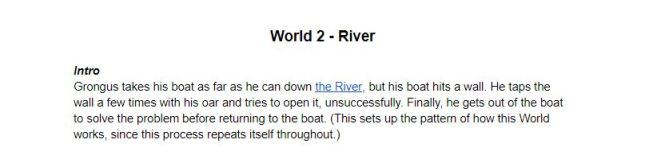
Not only was this intro cut from the game, but this World’s puzzles don’t even operate the way we indicate in this script. This is why it’s good to leave cutscenes for the very end of the project!

Therefore, the Beach scene is a bit of a relic as far as cutscenes go. It’s one of just two intro cutscenes left in the game, taking place at the beginning of World 3, the Aqueduct. I felt it was important to show the transition between the River World and the Aqueduct World because they are quite different, and the River finale doesn’t hint at the Aqueduct in the slightest bit.

Here’s the short version: The scripting process is important, because if we can’t agree on whether or not a cutscene should be in the game, I can’t go forward and spend 40 hours creating it!


Cutscene-Sketch-Header.jpg

Step 2: Sketch the Scene

Execution begins with sketching the scene on pen and paper. There is a long gap between the writing process and the actual execution of the cutscene. For reference, I began this cutscene 1 week ago on May 22nd 2018, but the story was written in January of 2017. That’s over a year! As I mentioned above, one reason for this is because puzzles are more important to the game than cutscenes are. Puzzles get top priority! Also, since edits to the script happen sporadically as the game evolves and our scope shrinks, it’s good to sit on the script for a while. That’s why I’m doing cutscenes last.

There’s one more good reason, though! Since cutscenes happen after the game’s art has been completed, the sketching process is a lot easier. Most of the game’s artwork is done using a modular set of puzzle-piece 3D models that can be arranged along a grid to form pathways, bridges and obstacles. I’ve also created a bunch of materials for each World. That means when it’s time to lay out how a cutscene is going to look, I have a wealth of building blocks to work with. Really, all I need to do is draw a few pictures to determine the camera’s position, and I’m good to go.

Cutscene-Sketch

When I sketch a scene, I’m trying to make it look just like the puzzles. My goal for cutscenes is that you never even feel like you’ve left the game. The camera is in the same position and rarely moves, just like the game. I use the same models, colors, camera effects, and even some ambient audio, to keep that feeling of similarity. So when I draw a picture of the scene, I’m trying to get everything in one shot. I need it to work in portrait mode on an iPhone, with room for superfluous art on the sides that only iPad users can see.

That’s why for Beach I composed the scene with the outlet pipe near the top of the scene. I know Obe is going to wake up, walk to it, and climb in. Arranging the scene this way avoids a messy camera transition, and lets us focus on the stillness of the moment.

With a good picture to work from, we’re ready to set things up in Unity 3D.


BurnedLaptop


Step 3: The Unity Smoke Test

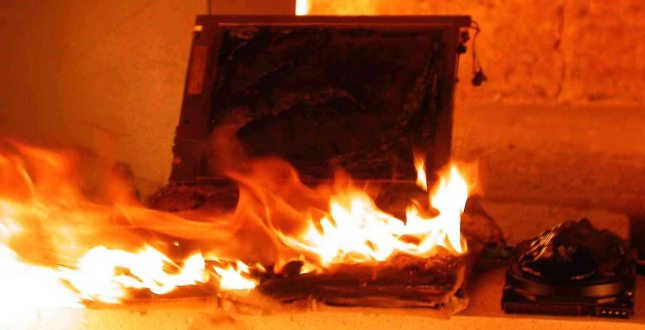
You were probably expecting Step 3 to be “model everything in the scene” or “begin animation” – but I don’t dive into that right away. I’ve gotten into the habit of doing a smoke test whenever possible, before beginning a large amount of work. This is an old phrase from computer programming that refers to plugging in a machine and seeing if it starts to smoke, or light on fire. It’s also known as a sanity test.

As the picture above indicates, the modern version of a smoke test is when I douse my computer in gasoline, light it on fire, change my name and move to Mexico. (Wait, that’s not a smoke test. That’s Operation: Secret Grongus. Whoops! Jack, please remind me to delete this paragraph before I hit Publish)

The modern version of a smoke test is when you intentionally do placeholder work just so you can test it and see if something is going to function correctly. After all, if it doesn’t work now, it won’t magically work later. It’s especially important when making a transition from one tool (3DSMax) to another (Unity). The game’s cutscenes will be animated in 3DSMax, but they’ll be viewed by the player in a build of the game generated by Unity. We need to make sure that pipeline works before we dedicate 40 hours of work to something.

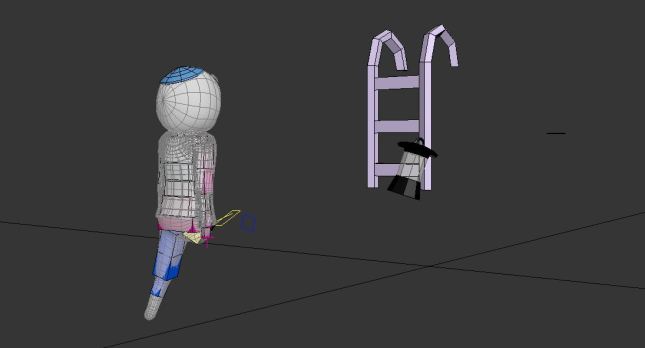
First, I create a scene in 3DSMax to work with. I import (3DSMax calls it “merging”) Obe’s character model, and the models of any other characters that are in the cutscene, into the file. I also merge in a few models that I know I will need. For example, in Beach, I know I need to use my ladder pieces so Obe can climb into the pipe.
Cutscene-SmokeTest.JPG

Will Obe, his Lantern, and my modular ladder make it into Unity properly?

I give Obe some basic placeholder animations. Really, it’s just a few frames that will all be deleted later. I make Obe wave his hands, move in a T-pose, do jumping jacks, or something silly. My goal is to make sure the animations are properly translating over to Unity. I do a similar process for objects in the scene and other characters. Obe is animated separately from them because I’m using the same Unity prefab that is used in the real game. This adds another step, but it’s worth it in case there are crucial last-minute changes to his prefab. Along with that, there’s a lot of little things to do – Animation Controllers for each FBX file, setup in the scene, camera positioning, light adjustments, and much more. Anything could go wrong, so I’d rather find out before I’ve done a few grueling hours of animation.

Cutscene-SmokeTest-2.JPG

Every cutscene needs its own Unity scene, FBX files for Obe and the rest of the cutscene, and Animation Controllers for Obe and the rest of the cutscene.

I have a small checklist of things I go down:

  • Can I animate Obe?
  • Can I animate his Lantern separately from him?
  • Can I animate his Lantern if he’s holding it and it follows his hand?
  • Are Obe’s hands, feet, and pelvis “Linked to World”?
  • Can I animate other characters?
  • Can I animate other characters holding objects?
  • Can I animate objects on their own?
  • Do other characters require their body parts to be “Linked to World”?
  • Is there a light? Is that light attached to the Lantern?
  • Is the Lantern flickering properly?
  • Does the camera need to be re-positioned, or zoomed in?

When I’m confident that Obe’s animations and the animations of everything else in the cutscene are working well, I can begin modeling the scene in earnest. Now I’ve made sure there won’t be any surprises during the next step.


Cutscene-Model-3DSMax.JPG

Step 4: Model Static Objects

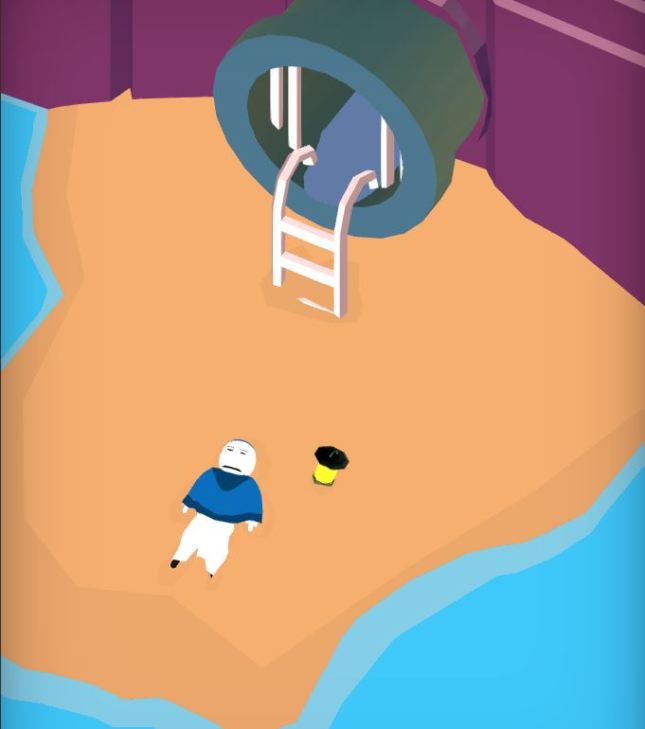
We’re ready to bring my ink sketch to life by creating the scene in 3DSMax. This is done by using modular building blocks wherever possible, and also creating new 3D models. Beach is a bit of a hybrid in this regard. The ladder, for example, is the same model and material used throughout the game whenever Obe climbs a ladder during a puzzle. The water is the same rig we use during Levels, albeit with a special material. But other specific objects, like the sandy beach, the wall, and the outlet pipe are unique to this scene. I gave up the strictly modular approach a little while ago, and I think the game is better for it. (Above, the scene in 3DSMax. Below, the same scene in Unity.)
Cutscene-Model-Unity

Now that the models are in place, and nothing is going to change, I can go forward with confidence. I place Obe in an initial pose that matches the terrain, and begin animating the scene by hand.


Cutscene-Animation.JPG

Step 5: Keyframe Animation

Recently, when I was at PAX East 2018, someone asked me if the cutscenes in our game were animated using motion capture technology. I took this as a compliment, because I think most people assume motion capture animations are an indicator of high quality. Thanks, random person!

For those unfamiliar with motion capture, think of the character Gollum in Peter Jackson’s Lord of the Rings trilogy. Gollum was animated in 3D, but not by hand – rather, the actor Andy Serkis dressed up in a silly motion capture suit and performed the role himself. Later, computer imagery was placed on top of the scene using data captured from his performance. This technology has also been used to great effect in the Uncharted series of games. As it grows in popularity, there are boundless examples to use. I can’t name them all!

However, that is not how animations are created for Where Shadows Slumber.

Motion capture is the proper tool to use when your resulting animation is intended to be life-like, gritty, and serious. Characters like Joel and Ellie from The Last of Us work well because they are intended to be portraits of real people, so it makes sense to have actors play them. Motion capture also requires a financial investment that only AAA studios can afford. If you’re using motion capture, that means you’re paying actors some money, purchasing a large studio room to perform in, purchasing high-speed cameras, and purchasing (or creating) software to bring it from the stage into the virtual world. We don’t have the resources to afford that, and I don’t want to work that way anyway!

Cutscene-Animation-Frames.png

By setting key frames at 600 (Obe takes a step) and 605 (Obe slips a bit in the uneven sand) the trivial frames between (601, 602, 603, 604) are filled in by the computer program.

Animation for Where Shadows Slumber is done the old fashioned way – by mouse-and-click keyframe setting. I’m fairly certain Pixar does this as well, albeit with more complex tools than the 3DSMax Animation Timeline. If you’ve ever seen a documentary on how Walt Disney created those first frames of Mickey Mouse by hand on cell sheets, you get the idea – the lead animator sets a pose for one period of time, and then sets a different pose for a different period of time. His subordinates fill in the gaps, and the result is the illusion of animation.

I don’t have any subordinates, so 3DSMax fills in the gaps for me. Sometimes I work with it, and sometimes I have to fight it because it filled in the gaps wrong. You need a lot of key-frames, but animation frames are just a fraction of a second ( 1/30th a second, in our game ). That means an hour of work may get you just 3 quick seconds of animation. The process is painstaking, and easily takes the longest amount of time in the cutscene creation process. Beach, a relatively simple 50 second cutscene, required 7.5 hours of animation to complete. The previous cutscene, Wolf, which is a very involved fight scene that lasts 100 seconds, required 48.5 hours of animation!


Cutscene-Footprints

Step 6: Special Effects

We’re not even close to done yet. Animating the characters in a scene is not enough to bring it to life! Every cutscene needs some kind of special effects, whether it’s footprints in the sand or the drip-drip-drip of a leaky pipe. This never takes as long as actual animation, but it can still be a painstaking process. For example, in the Wolf scene I mentioned above, every time an object fell into the water I had to trigger a particle burst to make it seem like the objects were splashing. That was as fun as it sounds!

To achieve my special effects, I wrote a script called Cutscene Manager. This thing will fire off effects based on the time of the animation, and I save it only for things I can’t animate by hand. Here’s two examples to show you the difference:

Example 1: Footprints in the sand

These footprints can be animated by hand, so I don’t need to use my script. Notice how they appear after Obe touches his feet to the ground – what’s happening here? Well, they are actually just hiding under the sand! I triggered their animations using keyframes, just like anything else in the scene. Above, you can see one that I have selected that is still burrowed under the ground, waiting to rise up.

Example 2: Obe’s Lantern light grows, and then shrinks

We use the solid color black a lot in this game. It represents total darkness, which makes it handy for scene transitions. Every Level and cutscene begins with the world in total darkness, and then a light grows somewhere and the animation begins. I think this helps focus the attention of the player, and it makes transitions less jarring. However, since Lights are a Unity component, their Range values can’t be animated in 3DS Max. 3DS Max has no idea they even exist! Instead, my Cutscene Manager script knows to change the Range of a specific Light at a specific speed at a specific point in the animation. It may seem like a crude solution, but it’s the best we came up with. At the end of the scene, the Light gets another trigger to shrink down to zero – pitch black.

You can see why special effects necessarily need to come after principal animation. So many of these things require specific timing! If the underlying animation changes, they’d have to change, too. It’s better just to wait.


Step 7: Recording for Alba and Noah

Recording the cutscene is my final step, although the cutscene is not done yet. Using OBS, I record my screen with the animation playing. I mute the sound in the game, and I talk during the cutscene to tell our audio engineers what is happening. Some things are obvious, and I don’t need to say them (e.g. he’s walking in sand, which sounds like the sound of someone walking in sand). Other times, a noise comes from off-screen and has no visual representation. Without my direction, Alba and Noah couldn’t possibly guess at what is happening in the scene. My recording is set to be the exact same time-frame that it will be in the game, which means they can “score” this video as if it was a short film. From the work they’ve done so far on earlier cutscenes, I can tell the cutscene audio is going to be incredible.

I briefly flirted with the idea of using a high-quality recording of the cutscene in the game, instead of having people view the cutscenes in real-time. However, I don’t trust Unity’s ability to play videos across multiple iOS devices and countless Android platforms. I also wanted to avoid including 10 large MP4 files into the game’s databanks, for fear it would clog up the game. The last reason is that our final cutscene transitions seamlessly into the credits, which need to be translated into multiple languages. This would result in 15 different movie files! I prefer to have that done on the fly using Jack’s JSON file setup.

Once Alba and Noah score the cutscene, I’ll put that file into the game and the audio will play in-sync with the animation, all in real time! Players can pause the cutscene from a top menu, go to the level select screen, skip the cutscene, or resume the animation seamlessly.


I don’t exactly know how Alba and Noah score these cutscenes, so I’ll leave that for another blog post. I invite them to share their knowledge with you, dear readers, whenever they feel the desire to do so. (Maybe I’ll interview them about it?)

That’s all for now. I need to go back to the animation mines and make more cutscenes… I’ll see you back here next Tuesday for the June State of the Art. Don’t miss it!


= = = = = = = = = = = = = = = = = = = = = = = = = = = = = = = = = = = =

We hope you enjoyed this look at the cutscene animation process. You can find out more about our game at WhereShadowsSlumber.com, ask us on Twitter (@GameRevenant), Facebookitch.io, or Twitch, and feel free to email us directly at contact@GameRevenant.com.

Frank DiCola is the founder of Game Revenant and the artist for Where Shadows Slumber.