What We Learned From Testing At AwesomeCon 2017

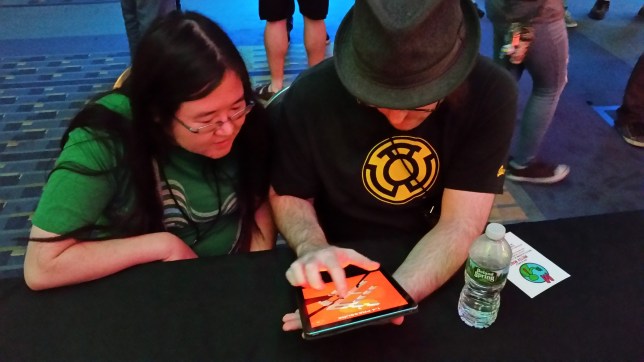
Hey everybody, it’s Frank! I just got back from a trip to Washington D.C. for AwesomeCon 2017, a comic convention that’s expanding its selection of gaming exhibits. We were invited by the wonderful team that hosts the MAGFest Indie Videogame Showcase to take part in their giant indie booth – thanks to Lexi Urell and her team for allowing us to take part in such an awesome con!
 

20170617_211819

Why Did Frank Go To AwesomeCon?

That’s kind of a weird question, right? Is there ever a reason not to go to a convention? Besides, we were invited! Do you even need to ask?

Now that the Game Revenant official coffers are looking a little emptier, it’s important to evaluate every large expense. Travel is certainly one of them. While I’d love to go to every show on planet Earth that’s even remotely related to gaming, we don’t have that kind of cash to spend. Besides that, there’s the time cost involved. If I’m standing at a table showing off Where Shadows Slumber for 3 days straight, that’s 3 days I’m not spending doing animations or environment art for the game. Was it worth it?

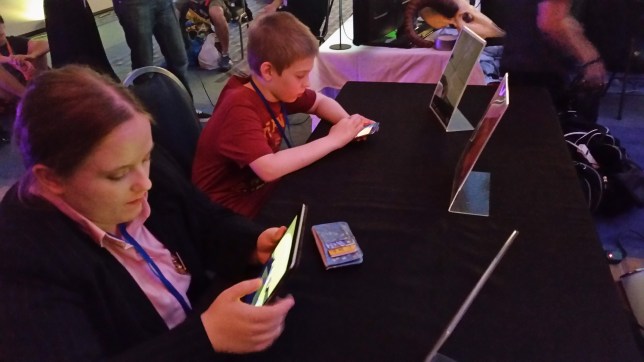
We decided that the best way to get a return-on-investment for our time and money was to focus on one very specific thing during AwesomeCon 2017 – testing. Conventions are a great way to show your game to a lot of people. It may seem like this is purely a marketing activity where indies promote their game, but that’s a shallow view of what conventions can do for you. When you’re given the opportunity to sit down with nearly 100 people and focus on your game, that’s a great time to ask them critical questions about your work and get their honest feedback.

So before I left, Jack created a build of our Where Shadows Slumber alpha that had all 17 of our test Levels in it, along with a basic menu for easy navigation. I resolved to show this early alpha to as many people as possible, with a specific focus on these key issues:

  1. If I don’t tell Players how to play the game, what will they do?
  2. What do Players think of the first three Levels, which are meant as a tutorial?
  3. How far will Players go before they get stuck or bored?
 

20170616_182723

My Testing Procedure This Time Around

As you test your game at a convention, you begin to find a consistent testing method that works. Halfway through the first day (Friday), I had a pitch ready to go once people sat down at the Where Shadows Slumber table.

I was really straightforward with people. I told them that I wasn’t going to teach them how to play because I wanted to see how they performed on their own. (No one seemed to mind!) Then I told them that they could ask me questions if they got really stuck. I told them that the game’s artwork was a placeholder. The only information they were allowed to know was that it was a puzzle game called Where Shadows Slumber. With that, I just watched them play through Level 0-1 and noted their progress. This pitch accomplished a few key things.

This Is Only A Test: Setting up expectations right away is key. By telling people that the game is being tested (and not them) it put them in the proper mindset. They weren’t here to be entertained – they were here to break the game if possible, and try to beat it. I think that increased people’s enjoyment actually, and definitely led to finding some serious bugs.

Ask Me Questions: Getting people to talk while they play is really hard, but it’s very important. You can only glean so much from watching people. I didn’t give anyone that much information, but allowing them to ask questions is helpful. After all, if they ask a question, it means they don’t understand something. That “something” is what Jack and I have to go back and add to our tutorial.

Don’t Tell Me The Art Sucks: It’s important that you tell people what you don’t want to hear. Setting up this expectation decreased the amount of people who would complain about the art. Seeing this alpha next to screenshots of our beautiful demo was probably  a bit jarring, but once I explained it to testers it wasn’t an issue anymore. When you’re testing, you don’t have much time with each person so you need to make it count. Make sure that people know what you already know, so they focus on different issues.


20170616_173920

The Results

To my surprise, people loved the alpha! I only say I am surprised because this is the first time I’ve seen people play it with my own eyes. And although the artwork is all just placeholders and the Levels are brand new, people gave it glowing reviews:

Thor

Having said that, not everything is sunshine and rainbows. We found a few bugs over the weekend, and there are some Levels that may need to be redesigned or cut from the game entirely. Here are all my notes from AwesomeCon 2017:


  • People don’t realize they can’t drag something if the Player is in the way. Draggable objects should smack into the protagonist to give them feedback on this matter.
  • Someone suggested a mechanic where torches (lights) are only on for a fixed amount of time before they shut off.
  • Someone requested a Reset button (which our demo has, but the alpha does not – even though you can just re-select the current Level from the menu).
  • MAJOR ISSUE: People didn’t realize they could drag red objects. Many suggested that they “shimmer” when they are dormant to encourage dragging. Perhaps there should be a handle on the Draggable object to indicate that it is interactive, and show the direction it moves. They should glow when they are being dragged as well.
  • Someone suggested a UI indicator that shows how a Draggable moves, since some objects rotate but others slide across the floor.
  • When the Player is following closely behind a Walker, he stutters and stops, producing an awkward floating animation.
  • The protagonist’s light should grow out from him and stop at the predetermined radius needed to solve this Level.
  • MAJOR ISSUE: Every single Player (with few exceptions) dragged-to-move if I didn’t tell them the controls. Our game is tap-to-move, so dragging is not an optimal way to play. People assume the controls are bad, but they’re just doing it wrong. Without a way to correct them, they make it harder on themselves.
  • Someone suggested charting a path (like in StarCraft) when you drag-to-move, a possible solution to those who find that way more comfortable. This would basically be like connecting the dots between every space you dragged over.
  • IDEA FOR A LEVEL: Level 1-3’s “Lock”, but the Light Switches are connected to some of the Rotating Draggable blocks.
  • MAJOR ISSUE: People tried to drag the purple blocks, but couldn’t. This stopped them from trying things in the future.
  • Glyphs are really just buttons that can be pressed infinite times, right?
  • Draggable Light Switches need to be turned off when they’re off. They still appear on, which is impairing people’s understanding of the light mechanic.
  • The age when players seem able to understand the game is 12 – younger children could trudge through it by trial and error, but with limited understanding.
  • MAJOR ISSUE: “Why is there a shadow?” People do not realize the main character has a lantern with a massive radius and it’s the only light in the scene. This is understandable because our game is super weird. We need to find a way to show this constantly, or they’ll think the shadows have a mind of their own.
  • Someone suggested a mechanic where the main character’s lantern is a spotlight, instead of a point light, for a few Levels.
  • Someone suggested a mechanic where the main character can lower their lantern’s light radius and then reset it, for a few Levels.
  • A businesswoman with knowledge of the Indian market suggested that we lower the price from $5 for that particular market. She felt strongly that Indian mobile gamers wanted free games or something much cheaper.

Here are my notes that are specific to each Level in the alpha.
 

0-1.PNG

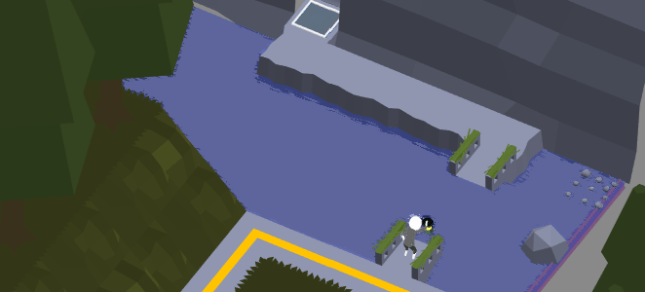
Level 0-1, Fallen

There’s a bug in this level where there bridge (which should fall after you press a trigger) stays exactly where it is. Players who drag-to-move skip right over the trigger, and they never trigger the bridge sequence, so basically they miss the puzzle.

The Draggable box on this level doesn’t have much weight to it. People fling it around like crazy. They also really want to drag it down (onto the dirt path), up (onto the dirt path), or onto the bridge to drop it into the water as a makeshift bridge. None of that is possible but there’s no feedback for that and they don’t know how shadows work yet so it doesn’t register.

Half of the people who play this Level don’t quite understand that the shadow makes the bridge appear.

It’s possible to walk past the Goal Space, and go to a spot on the Level that is beyond the door.

This level is not idiot-proof, like the first Level in our demo.

I think this is our weakest Level. I suggest cutting it and replacing it with a walking tutorial similar to the first Level in the demo. This Level is just throwing way too much at Players all at once.


0-2

Level 0-2, Bridge

An excellent Level. This serves as a perfect introduction to 3 key mechanics: walking, shadow revelation, and dragging.

The Rotatable bridges here should probably wobble after a while to indicate they can be dragged. I can also make a circular pivot point in the center, cut into the stone. That would be a good indication that these are on a swivel.

Draggables can also have parts on them that suck in when Players hold them down. Having parts of the stone depress inward is a good sign that you’re controlling the object with your finger.
 

0-3.PNG

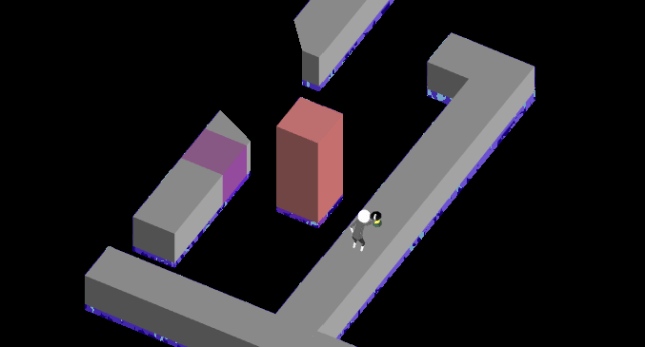
Level 0-3, Monolith

This Level is perfect teaching. It’s a great gateway – you will never beat this if you do not understand how shadows work in our game.

“The purple box moved!” We need to make sure people don’t think the shadows merely move things. They make things appear and disappear… the visual style of the purple box makes it seem like it’s jumping around.

Why can’t Players make the farthest purple block appear if they are standing all the way at the entrance of the Level?

The Draggable Block here should be on some kind of a flagpole so that the vertical movement appears to be a natural fit to Players. (Many tried to move it horizontally.)


1-1

Level 1-1, Recovery

The name of this Level ought to be “Protection” or even just “Light”.

Why is the Light Switch casting a shadow? Does that shadow do anything? That may be a visual error.


1-2.PNG

Level 1-2, Detour

This Level can be broken to make both Goal Spaces appear at the same time. Players usually move the Draggable Block back and forth so rapidly that it causes both to be visible. However, the fake Goal Space does not work. If we can’t fix this bug… we should make it work! Why not reward Players for their trickery?

If there was a Light Switch near the space where the Goal Space is revealed, this Level would be a bit harder. You’d have to make sure the Light Switch was off. That may make it more interesting for the Players who figure it out in two seconds – and it keeps the World’s atmosphere consistent, since we use a lot of lights here.

The shadow needs to change more of the Level when it swipes across the screen, to give Players a clue that something weird is going on.

There ought to be two Shadow Eyes on the Draggable Block.


1-3.PNG

Level 1-3, Lock

Let’s make the sides of the Rotating Blocks sloped here, or at least spiked. People consistently try to walk on the sides of them when they are down, but that would break the Lights. It must appear unwalkable.
 

1-4.PNG

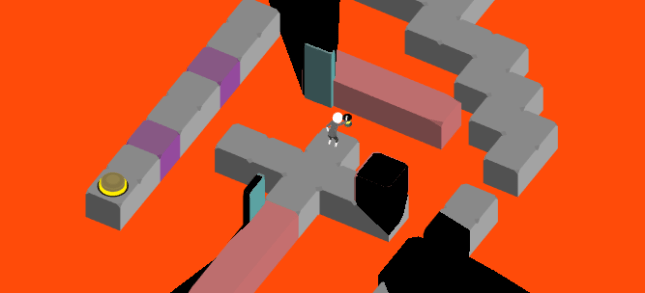
Level 1-4, Pressure

Extremely hard Level. That’s a good thing to have at this point in the game.

“I didn’t know I could stand on the box and rotate it.” Are we being consistent with when Players can do this and when they cannot?

How will Shadow Eyes work here? How can we align them with the object they are changing?

Someone found a bug where both buttons were pressed and they beat the Level, but they could not walk on the green path. (This is a soft crash I guess, since the Level is broken but the game still works fine.)


1-5.PNG

Level 1-5, Wolf

This Level should be renamed to something that indicates how to solve the puzzle, like “Doors” or “Black” or “Pitch”.

People don’t know they can drag these pillars.

The effect of pressing a Button here was not always obvious. I need to make an animation and we ought to have a clear sound attached to it.

On the iPhone, there was a bug where the sliding pillars could not be dragged. We had to reset the Level. I suspect Glyphs have something to do with this.


2-1.PNG

Level 2-1, Docks

Literally every tester thought the Walkers would hurt them and everyone called them “zombies”. My use of the color green was foolish!

We should start this Level with a Walker coming toward you that you can’t avoid, so people see that they aren’t bad.

People LOVE the reveal with the pillar sweeping across the Level. We should do more.

People tried to reverse the reveal and they couldn’t do that, which upset them. I think they wanted to see it more than once. When we get it set up properly, let’s consider this. It’s about consistency and Players enjoying the game for its toys rather than its puzzles.


2-2.PNG

Level 2-2, Test

We can call this Level “Elevator” or something. Maybe “Switch”, because you press a switch, but you also need to change places with the Walker.

Walkers flip around when you rotate Draggable Bridges, and this really annoys Players who are trying to guide his path. Also sometimes the Walkers float, breaking immersion.


2-3.PNG

Level 2-3, Guide

Pressed Buttons really ought to look pressed. I need to redo the art and then I’ll need help setting the states properly. We can also drain them of color once pressed.

For some reason I think buttons should be octagons. Why did I write this?
 

2-4.PNG

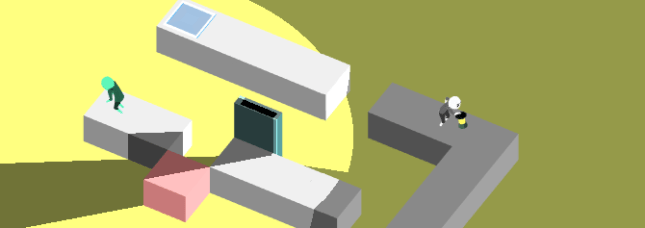
Level 2-4, Ebb

These Walkers cast a light, but they don’t have an obvious light source. I can make them holding torches, but what happened to their little light bulbs? Did I delete them?


3-2

Level 3-2, Tradeoff

The main light in this Level looks like it’s off because it’s so dark. The Player’s lantern doesn’t always need to be the brightest light in the scene! This sliding light is way more important to the mechanics of the Level. We can dim the Player’s light in favor of the other one.


3-3

Level 3-3, Anchor

Rectangles can pass through each other.

The right side Button node was briefly unwalkable, due to a multiple reality error.

After leaving a node, the state of a Button was still pressed. This made the Level unbeatable.
 

3-4.PNG

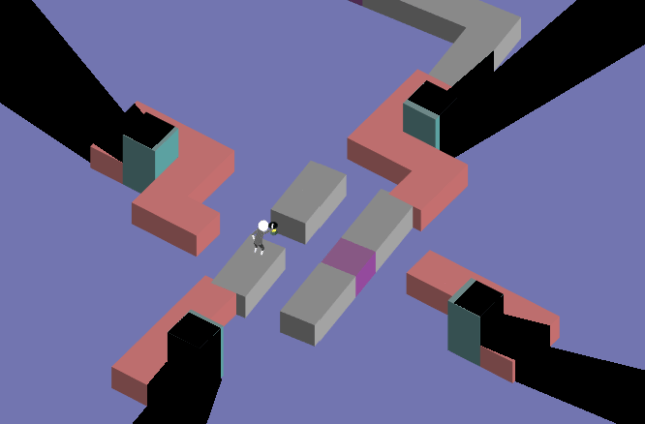
Level 3-4, Torus

“Is that it?” Torus looks more intimidating than it is. Can we bring up the difficulty on this one somehow? I think people are disappointed that you don’t need to find a way to navigate back and forth using the rotating segments. It is solved quite easily.
 

3-5.PNG

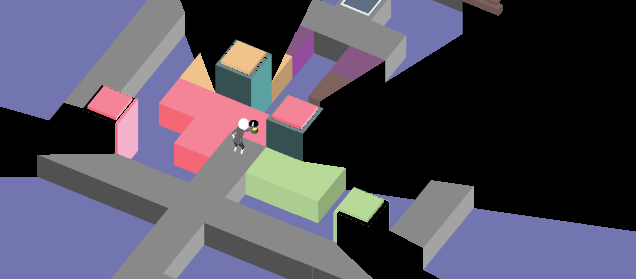
Level 3-5, Island

This Level can be broken by drag-dashing back and forth until the pillars remain upright. Then, walk into the island, the pillars lower, and you beat the puzzle without really solving anything.


It’s incredible how much insight you can get from just a few days of testing! These kind of testing moments are hard to come by, so it’s important to make the most of them. I hope you appreciated seeing how your feedback will impact the game, and this gave you an insight into what indie developers are looking for from testers.

We’ve got a lot of work cut out for us this month, so expect to see these changes reflected in my post at the end of June where I update you on the state of the game’s artwork.


= = = = = = = = = = = = = = = = = = = = = = = = = = = = = = = = = = = =

We hope you enjoyed this insight into our testing methods. Do you have any feedback for us about the game’s alpha? You can reach out to us at WhereShadowsSlumber.com, tweet at us on Twitter (@GameRevenant), message us on Facebook, leave a comment on itch.io, jump into chat on Twitch, and email us directly at contact@GameRevenant.com.

Frank DiCola is the founder of Game Revenant and the artist for Where Shadows Slumber.

Monument Valley 2 and Its Implications

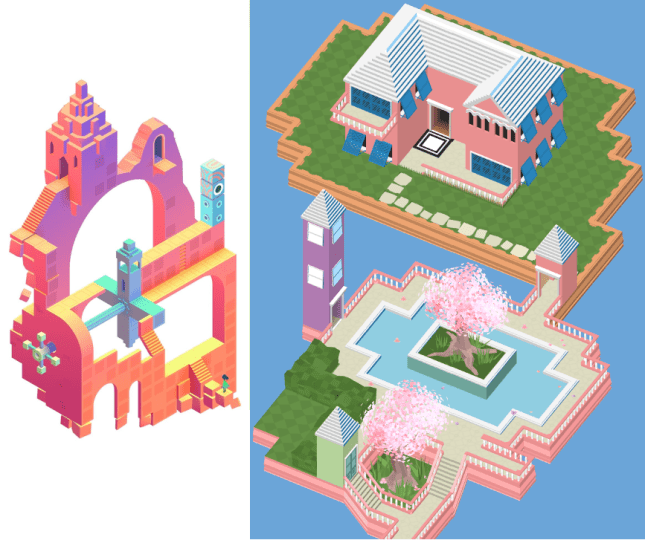
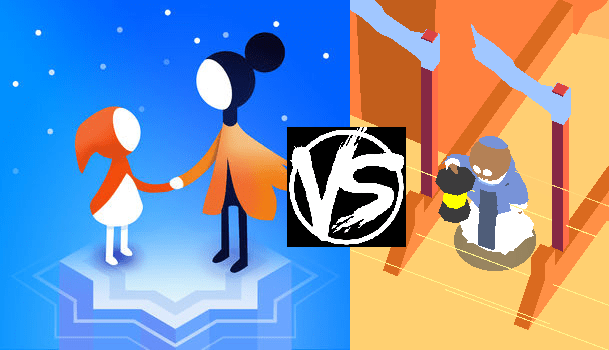
On Monday, Apple and ustwo games nonchalantly made an announcement that could forever change the development of Where Shadows Slumber. If you haven’t heard (or figured it out from the title), then I’m glad I get to be the one to tell you – Monument Valley 2 has just been released for iOS devices, with Android coming “soon”!

If you’ve ever played the original Monument Valley, then you’ve probably noticed that it was a big inspiration for Where Shadows Slumber (in fact, you might remember that I mentioned something to that effect in my first blog post). Monument Valley is one of my favorite games of all time, and I’m super excited to be able to return to that world for another round!

As awesome as this announcement is, it’s also a little bit scary. Monument Valley 2 is gonna make a big splash, and people are going to be paying attention to it. The development, production, and eventual release of Where Shadows Slumber will all be happening in its wake, and so this announcement is very important to the future of Where Shadows Slumber.

How does this announcement affect our development, you ask? Well, let’s take a look!


There Can Only Be One

Monument Valley was awesome. I mean, it changed the face of mobile gaming as we know it. It was genre-defining and laid a lot of ground for future games like Where Shadows Slumber.

The problem with using a game as inspiration is that your game becomes pretty similar to that game. Since Monument Valley was such a hit, that’s not really a bad thing. Until you consider the fact that two very similar games are inherently competitors. We feel pretty confident in Where Shadows Slumber, and we felt that four years would definitely be enough to set us apart. A new Monument Valley game really changes the equation, for a number of reasons.

screen_263x350_2017-06-06_08-24-37

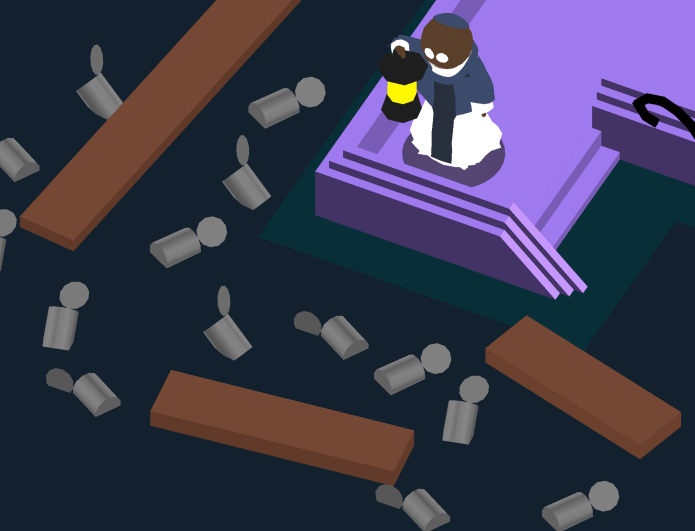
Ro vs. Grongus: Deathmatch

The first reason is pretty obvious – there are only so many people buying puzzle games. A giant like Monument Valley 2 takes up a lot of that demand. If Joe Puzzlegamer pulls up to the App Store and wants to get an artsy puzzle game, he’ll have a lot of choices. Even if he only had two choices, which would he choose – Where Shadows Slumber or Monument Valley 2?

Monument Valley 2 has a pedigree. It has a wildly successful predecessor. It was made by a studio with a real budget, decently-sized teams, and the know-how to bring a successful game to market. Where Shadows Slumber is awesome, but we’re just two random guys with little money and even less experience. Even if that’s not how we see it, that’s how everyone else will. Monument Valley 2 is the clear choice for the random outside observer.

In addition to losing out on potential sales, there are other things we could lose to Monument Valley 2. For a team without a large advertising budget, one of the best ways for us to get publicity is through conventions and awards. With Monument Valley 2 crowding the beautiful Unity-based puzzle genre, we could also lose chances to attend conventions and win awards. Again, people will have to choose between us and them. Will Unity invite us to represent them at an event? Will Apple shower us with promotions? Will we be anyone’s pick for best puzzle game? Probably not, if they can get Monument Valley 2.


Puzzle Mania

While there are some negative takeaways to Monument Valley 2, there are definitely quite a few positives (in addition to the fact that we have another awesome game to play). As they say, a rising tide lifts all boats.

When Monument Valley first hit the mobile gaming scene three years ago, it made quite a big splash. People absolutely loved it, and they clamored for more – I know when I finished Monument Valley, I wished for nothing but more levels. Imagine if we had been able to release Where Shadows Slumber 8 months or so after that – just when people are done with Monument Valley, but still want a similar experience, we provide them with exactly that!

Monument-Valley-2-Main-by-Ustwo-games

Bringing people back to puzzle games

We’re hoping for a similar situation to unfurl here. People will play Monument Valley 2, and it’ll get their brains working. They’ll (presumably) love the puzzles, the art, the brooding atmosphere. They’ll be all warmed up to the genre, and they’ll be on the lookout for anything similar. We’ll be ready to pounce on that crowd, and hopefully it’ll help us release into a bit more hype than we might otherwise.

Basically, we’re hoping that Monument Valley 2 will revitalize the moody puzzle game market. Not to sound too utilitarian, but we plan to use Monument Valley 2 as a sort of springboard to success!


Timing

There are a few things about this announcement that could be bad for Where Shadows Slumber, as I mentioned, but I think that there is an important factor worth mentioning, and that is the timing. We’re planning on releasing Where Shadows Slumber in early 2018. So, all things considered, I think this timing is just about perfect for us. If Monument Valley 2 had to be released sometime soon, now is probably the best time.

timing

Perfect timing.

If Monument Valley 2 were to be released a month or so after Where Shadows Slumber, we wouldn’t even stand a chance. As soon as people were starting to get excited about our game, a much more acclaimed game would come along and steal all our thunder! A similar story plays out if we release shortly after them – our release simply goes unnoticed.

So why is this the best time? Wouldn’t it be better if they had released a long time ago, to keep our release as far away from theirs as possible? While that makes a lot of sense, I think that Monument Valley 2 will inspire more interest in puzzle games overall, and eight months seems like a pretty good timeframe for the MV2 hype to die down, but for the puzzle fever to still be strong.

Additionally, the fact that Monument Valley 2 has been released in a different calendar year from Where Shadows Slumber works in our favor as well. A lot of awards are of the form ‘game of the year‘, and Monument Valley 2 is a shoo-in for many of those awards. With our biggest competitor releasing in a different year, we won’t have to compete directly with them for ‘of the year’ awards. Not that we expect to win these awards, but it’s always nice to feel like you have a chance.


Changes To Development

So how does this actually change our development plans for Where Shadows Slumber?

Since the timing of Monument Valley 2 is working in our favor, we’ve decided that we’re going to stay the course. We’re still aiming for an early 2018 release, which we feel puts us far enough away from this release. If Monument Valley 2 announced their release in early 2018, we would have no choice but to push our release back a few months. As of now, we aren’t making any changes to our schedule, but we’re definitely keeping our eyes open – if they release an expansion of some sort in early 2018, we might have to reconsider our own release date.

Since Where Shadows Slumber was so inspired by the original Monument Valley, we’re also looking at this as an opportunity to be inspired again. People have, and will continue to make comparisons between our game and Monument Valley, but now they’ll have a newer, sleeker version to compare us to – we have to try and keep up! We get to see another take on the Monument Valley style of puzzler, and we get to see a bunch of new mind-bending puzzles. Perhaps some of them will strike inspiration in our hearts, and help us make Where Shadows Slumber that much better!

inspiration

Can you feel the inspiration?

On the other side of that coin, we’ll also be playing Monument Valley 2 and looking for anything that’s a little too similar to Where Shadows Slumber. If we find that one of our levels is very similar to one of theirs, we may have to change it – even though we didn’t steal it from them originally, that’s what it will look like to the outside observer. We want to be similar to Monument Valley, but not too similar.


Takeaways

Most of the above musings on the implications of Monument Valley 2 are pretty specific, and overall, they’re pretty far beside the point. This is one of the most exciting announcements I’ve heard in a long time, and I can’t wait to get my hands on the new game! That’s the biggest takeaway you should have from this post – no matter what the implications, I’m super excited, and you should be too!


= = = = = = = = = = = = = = = = = = = = = = = = = = = = = = = = = = = =

If you finish Monument Valley 2 and are looking for more puzzle-y goodness, you can always find out more about our game at WhereShadowsSlumber.com, find us on Twitter (@GameRevenant), Facebook, itch.io, or Twitch, and feel free to email us directly with any questions or feedback at contact@GameRevenant.com.

Jack Kelly is the head developer and designer for Where Shadows Slumber.

3 Ways Our Art Changed In May 2017

Last week, Jack wrote a general progress update about the game. We hadn’t done one in a while, and we’re trying to get our audience more informed about the process of game development. Inspired by his post, I’ve decided to dedicate the last post of every month to an update about the visual aesthetics in our game. We’ll review everything that got done in the previous month, with a small glimpse of the road ahead and how it relates to the larger goal of completing the game.


Getting The Ball Rolling On Five Worlds

Our game will feature 8 different Worlds by the time we’re done. Completing the artwork for all of those will take a while, so it’s never too early to get started. I had hoped to get more done this month, but I am glad to report that five of these Worlds have been started. They may never really be “finished” because I’m a perfectionist. Even when the game launches, I’ll still want to change things. But I might as well get them to a place where Jack can say “Frank, stop working! Step away from the computer!”. I’ve included some Work In Progress shots of each World below.

World-0-Forest

World 0 – Forest. This kit needs a lot of work. The bushes are too high-fidelity, and the trees are too low-fidelity. This is a screenshot of the game’s first Level.

World-1-Jail

World 1 – Jail. This kit exceeded my expectations. I wanted to convey the feeling of a claustrophobic, harsh volcanic prison. The brutalist-inspired walls really pull the aesthetic together.

World-2-River

World 2 – River. Inspired by the river styx, this is designed as a swampy, foreboding, gross river. Rickety wooden plank bridges contrast with log-cabin style barricades.

World-6-Summit

World 6 – Summit. One of the toughest to apply modular asset creation to so far. Blurring the grid lines was key to pulling this wintry, icy art kit together.

World-7-Paradise

World 7 – Paradise. This kit is complete, and looks gorgeous. I won’t actively work on it anymore unless something is missing in a Level we’re designing.

Please note that the screenshots included here don’t always reflect actual Levels in the game. Sometimes, to show off how pieces of artwork interact, I design fake Levels in the spirit of the game. Hopefully it gives you a good idea of my progress, and what needs to be done. I also decided to pawn off water effects onto Jack, so that’s why the fluids in these Levels just look like flat planes. (I built them with flat planes) Water will come later. Also coming later – the Worlds I haven’t started yet!

Expect to see screenshots of Worlds 3, 4, and 5 during next month’s update.


TwoHeads

Character Faces

One of the barriers I’ve been trying to break through is my Character Design issue. Every humanoid model I’ve created for Where Shadows Slumber so far has been hastily created for an upcoming deadline. The result is a slipshod model that looks nice from 1,000 feet away, but performs poorly when I need it to do something. In a previous blog post about cutscenes, I lamented at how terribly the Demo protagonist handled when I needed to animate him. His clothing had to be key-framed by hand, and his arms were bent out of whack.

But one of the biggest problems was his face. I modeled it the quick and easy way, and as the saying goes, you get what you pay for. I found it impossible to give him good facial expressions when the situation called for it.

HeadAnimations

The protagonist’s new head uses Morphs to smoothly transition between preset facial poses.

Flash forward to this month: I’m taking a new approach where I model character heads separately from their bodies so I can focus on facial animations using Morphs in 3DS Max. As long as no one notices that these heads are disconnected from their torsos, the effect works. Morphs allow me to model facial animations (frowns, smiles, surprise, anger) and move a slider from 0 – 100 to set the Intensity of the animation. How sad are you? Are you 35 sad, or 100 sad?

So far I modeled the main character’s head, along with a mysterious Wolf that no one knows about. The main character’s facial animations are done. In the future I’ll model two other mysterious figures that need facial animations… but I won’t give them away now!

Expect to see more character head animations during next month’s update. I’ll also do a more in-depth blog post about Facial Animation Using Morphs.


EveryUI.png

Main Menu User Interface

This piece of artwork is still in the planning stages. Unfortunately, I ran out of time this week and had to resort to paper-planning. I would have preferred to mock this up in Photoshop, but my computer died on me before I got around to it (more on that below).

HammerUI.png

Left: The main menu splash screen you see when loading up the game on your device. Right: The Settings and Junk page you see when you press the hammer button on the splash screen.

The plan for the UI is to make it as minimalist as possible, and refrain from using unnecessary text. To that end, I’m currently envisioning a bare bones splash page that just has the protagonist relaxing by a campfire and two buttons on it – a hammer and an arrow. The hammer is meant to indicate “Settings and Junk”. When pressed, it takes you to a side page where you can toggle various togglers™, such as the game language, in-game sound, and auto-skipping cutscenes. Team credits will be displayed there as well. An “X” at the bottom represents “go back” and I’ll try to keep that consistent throughout the whole game.

20170530_143221.jpg

Left: A screen of World 0. Center: A screen of World 1. Right: Half of a screen of World 2, which is locked and cannot be accessed.

The World menu is more involved. Pressing the arrow moves the camera to the right, where we see a 2D view of the first World, Forest. From there, players can swipe left and right to see the other Worlds. Worlds that they aren’t ready to play yet will be locked behind a padlock icon. (No need to reinvent the wheel there) When you’re looking at a World, I want the sounds of that World to play quietly in the background.

20170530_143238.jpg

Tiny overworld map of World 0, which begins with a cutscene “Level” and then has three real Levels. Some are blocked by the shadow.

Pressing the big juicy button with a number on it will take you to the Level Select menu for that World. This will look like a top-down map, with little circles representing the levels each connected by solid black pathways. As you beat more Levels, this map floods with more light. Pressing on a circle will take you to that Level.

That’s the flow I have in mind for the game’s menu. This doesn’t even cover menus that appear INSIDE the game’s Levels, such as when you press the pause button. But in any event, I believe I’ve covered everything the outer menu needs. I just hope this isn’t too much fiddling for a casual audience that isn’t used to games. Getting casual players over these hurdles is always a struggle!

Expect to see a digital version of this UI during next month’s update.


DAxOPKeVoAAK6FY

And now his watch is ended.

Tempus Fugit: Memento Mori

Normally in these blog posts, I showcase my cheery optimistic attitude. But not this time.

Late last week, my laptop suffered a blue screen crash and would not reboot to Windows when I tried turning it back on. I’ve been having rolling blue screen crashes for a while, but it usually restarted afterward. Now my computer is in the repair shop, and I’m getting the impression that it doesn’t look good. Probably because the technician told me “this doesn’t look good.” That’s what I get for ignoring the crashes all this time and refusing to pay for cutting-edge anti-virus software.

As I write this blog post on my old college ASUS laptop, I have mountains of artwork to do and very little time to do it. This laptop crash is going to set me back. The worst part is, it’s a waste of time that didn’t need to happen. Fortunately, no artwork was lost because everything is always on GitHub. I’m mostly worried about losing time.

My next update may be a little scarce, but hopefully it will include good news about my computer’s physical (and mental) health. Always back up your work online, kids! You never know when your next blue screen of death will be your last.


= = = = = = = = = = = = = = = = = = = = = = = = = = = = = = = = = = = =

We hope you enjoyed this update about the game’s artwork. Have a question about aesthetics that wasn’t mentioned here? You can find out more about our game at WhereShadowsSlumber.com, ask us on Twitter (@GameRevenant), Facebook, itch.io, or Twitch, and feel free to email us directly at contact@GameRevenant.com.

Frank DiCola is the founder of Game Revenant and the artist for Where Shadows Slumber.
Object Pooling

Alright, it’s finally getting a little bit warmer around here as spring comes and goes, so let’s celebrate by jumping into the pool! That’s right, today we’re going to be talking about an ever-important pattern in game development, the concept of Object Pooling. Object Pooling is a design pattern which involves creating a set of objects – a ‘pool’ – and reusing those objects, rather than creating/destroying objects throughout a game.

pool

Object Pooling involves recycling objects

This is a very important concept in game development, and it’s the first topic we’ve reached that is almost entirely associated with the optimization of a game. For mobile game developers, resources are limited, so it’s important that we don’t waste anything. Object pooling helps us save resources, and is less of a mechanic, and more of a general design pattern. We used it in Where Shadows Slumber, but it isn’t even one of the more defining features of the game. However, it’s still an incredibly important concept.

So, without further ado, let’s dive in!


Why do we need Object Pooling?

Unity is a pretty cool system, and it gives you some pretty cool toys to play with. Two powerful toys it gives you are Instantiate() and Destroy(), which allow you to create a new instance of a GameObject, and to get rid of an instance of a GameObject, respectively. I assume that other game engines provide similar functions. If you’ve played around with some simple stuff in Unity, you might have seen how useful these functions can be.

The problem with Instantiate() and Destroy() comes when we try to use them a lot. You see, every time you call Instantiate(), Unity goes into your memory, finds a chunk of memory big enough to store the new object, and allocates it. Conversely, every time you call Destroy(), Unity finds that object in memory, clears it out, and marks that memory as ‘available’. This whole process is aided by the use of a garbage collector, which runs occasionally, making sure that deleted things were actually deleted.

Those of you familiar with computer science may see where I’m going with this. Basically, this isn’t great. Calling Instantiate() or Destroy() every once in a while is fine. But when you call them all the time, Unity starts to slow down. Memory allocations and deallocations are somewhat expensive, meaning the garbage collector will be running a lot, sucking valuable power away from your game! Every time the garbage collector runs, your game might lag a tiny bit. This is doubly true for environments where resources are limited (say, on a mobile device).

So, our clever brain gets to work. ‘Hmm’, it says, ‘if calling these functions is bad, let’s just not call them!’ Brilliant, brain, as usual! Surprisingly, in this case, the first idea that pops into our head is actually pretty good – we just won’t use Instantiate() or Destroy(). Problem solved!

The only remaining question is how to maintain the functionality we had before. We were, for example, using a gun, and every time we fired, we would instantiate a bullet. Every time the bullet hit something, we would destroy it. How can we get that same functionality without using Instantiate() or Destroy()?


Object Pooling

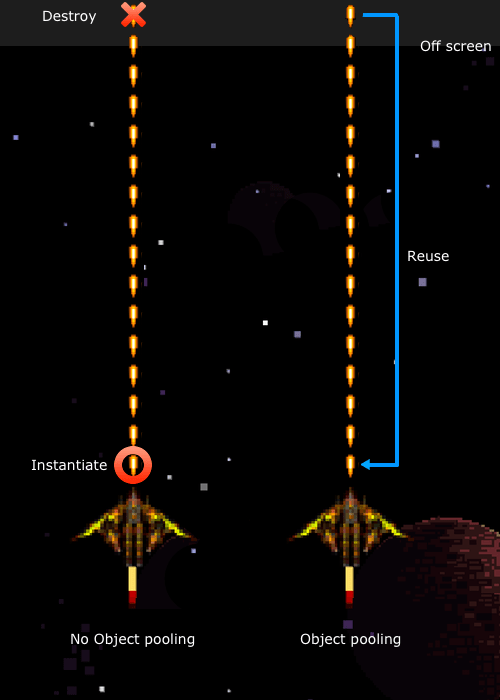
The answer to the above questions is, obviously, to use object pooling. The concept is pretty simple – rather than creating a new bullet every time we fire our gun, and then destroying every bullet individually, why don’t we just reuse the bullets? They all look the same, so no one will know the difference!

NonVsPooling

Object pooling in a space shooter (image credit: raywenderlich.com)

This is the idea behind object pooling. Rather than creating and destroying a bunch of bullets every frame, which can get expensive, we simply create a bunch of bullets at the beginning of the game, and reuse them. We store all of the bullets in a ‘pool’ – they’re all deactivated and unmoving, so they have no effect on the game. Then, every time we fire the gun, we grab a bullet from the pool, change its position and velocity so it looks like it’s coming from the gun, and enable it. The bullet flies through the air, and then strikes a wall, or moves off of the screen. At this point, we simply disable the bullet and return it to the pool to be used again!

If this seems a little weird, think of it like extras in a TV show or movie. In the first scene, we need a crowd, so we hire a bunch of actors to be people in the crowd. The next scene is in a different city, but still needs a crowd. Do we fire all of the extras we already hired, and then spend more time hiring different extras? Well, nobody was really paying too much attention to the extras in the first scene – let’s just use them again for the second scene! This is pretty common in TV and movies, and there’s no reason we can’t do the same thing here.

“I gave a very memorable performance as the nurse, and now, suddenly, I’m the waitress? That’s gonna confuse my fans!”
– Phoebe Buffay, Friends

Using object pooling, we can avoid the need for our expensive allocation/deallocation functions (other than at the beginning/end of a level, where slowness is more acceptable) by reusing all sorts of objects. There is a tradeoff here – using an object pool means that, whenever we need a bullet (or any object), we have to be sure that there will be one in the pool. This means that we actually need to store more copies of the object than we ever expect to use. While object pooling makes it easier for the CPU to keep up with what we’re doing, it uses up more memory.

This is called the space-time tradeoff, and it’s pretty common in computer science. The idea is that, in order to optimize for time (make your code run as fast as possible), it generally uses up more space (in the form of RAM). In this case, time refers to time spent in the CPU – saving time means less lag, which makes for a better game. In general, on mobile platforms at least, saving time it more important, so this is a tradeoff we’re happy to make by using object pooling.


Where Shadows Slumber

So, how did we use object pooling in Where Shadows Slumber? We don’t have any bullets, so what else can object pooling be used for?

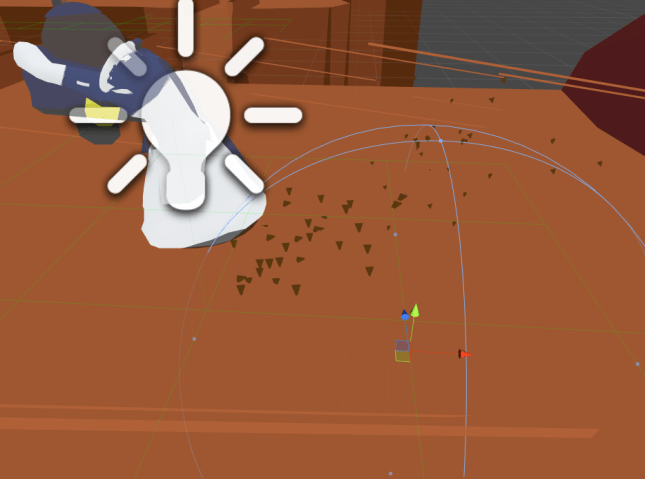
Honestly, object pooling wasn’t incredibly important to the core game – all of our levels are pre-made and we don’t have any projectiles or anything else flying around. Where we did use object pooling was in ‘special effect land’. Every time the main character takes a step, a small sound plays, and in some levels you can see a puff of sand behind him. These are what we have taken to calling footfalls, and they’re one of the main things we used object pooling for.

Footfall

This group of particles is a footfall, and was pulled from a pool rather than instantiated!

In fact, sometimes you may have used object pooling without even realizing it! You see, one of the primary uses for object pooling is within particle systems. A particle system may emit a burst of hundreds of particles at once. Imagine trying to instantiate that many object in the same frame – your game would lag for sure! However, if the particle system uses object pooling, it will simply enable all of those objects, and your game will keep running without a hitch. This allows you to get high-quality particle effects without having to worry too much about the impact on performance.

Hopefully this quick conceptual intro to object pooling helps you out, and saves you many CPU cycles! I should mention that I got an image from this blog post on object pooling, which coincidentally is a very good resource if you want to get a good look at an implementation of object pooling.


= = = = = = = = = = = = = = = = = = = = = = = = = = = = = = = = = = = =

If you have any questions or comments about object pooling (or anything else), you can always find out more about our game at WhereShadowsSlumber.com, find us on Twitter (@GameRevenant), Facebook, itch.io, or Twitch, and feel free to email us directly with any questions or feedback at contact@GameRevenant.com.

Jack Kelly is the head developer and designer for Where Shadows Slumber.