Summer Tour 2018!

The month of May is nearly 50% complete. Where does the time go? As we’ve been hard at work finishing Where Shadows Slumber for all of our patient fans, I’ve begun planning a summer tour of interesting game conventions. People always ask us if we have any shows coming up, so hopefully this blog post will serve as a good link I can toss at them. Note that none of these shows are confirmed yet – we’re just considering them. (Or, in the case of PAX, they are considering us!)

Maybe we’ll see you at some of these events?


https3a2f2fcdn-evbuc-com2fimages2f442174722f52294315602f12foriginal

Playcrafting’s Demo + Play Showcase (June 12th)

We’re considering signing up for Playcrafting’s free Demo + Play showcase next month as a way of getting some last-minute testing in on the game’s final few Levels. Since this event is free for developers, we wanted to mention it here in case anyone reading this blog is also a game developer. You should come to this! Playcrafting always does a great job with these free events. The fee for customers is really cheap, so you’ll meet a lot of large families and get the chance to test your games with players of all age groups and skill levels.


RockHall

Returning to Play NYC (August 11th – 12th)

Now that submissions are open for PLAY NYC, Jack and I will of course be applying again. I have a call scheduled with Dan Butchko, the CEO of Playcrafting, set for later this week. From his website:

“Play NYC is New York’s premiere dedicated game convention for creators and players alike. Featuring the latest releases from studios large and small, and from developers old and new, Play NYC celebrates every facet of gaming in a way that only the Big Apple can.”

Play NYC was a blast last year! They had their inaugural show at Terminal 5 in the city last August. I liked the trendy look of the space, but it was obvious that they were going to need more room for future shows. Now they’ve moved to the Manhattan Center for the next 3 years, which should give them plenty of room to grow. Jack and I are so excited to see Play NYC doing well. This might even save us money in the long term, because every convention within walking distance of Hoboken saves us an expensive cross-country trip to a place like California or Texas. Everyone in the Tri-State area should support Play NYC!


3z1a2219_hdr

PAX West (August 31st – September 3rd)

This was one of the first PAX events I ever went to, all the way back in 2015 for Mr. Game! PAX West is a super cool show in a really unique convention space in Seattle, WA. I’ve been to Seattle twice now, and I enjoyed it both times, although the city does have its obvious problems.

We’ve submitted our BETA build to the PAX 10. Every year, the PAX crew judges the games that have been submitted and chooses ten that they went to spotlight. (If you remember when we were part of the PAX East Indie Showcase, it’s a similar setup) Those selected get a free booth at the show, which makes the trip way more affordable for struggling young indies. I saw last year’s gallery and recognized a few friendly faces, notably Keyboard Sports and our friends at Tiny Bubbles. We definitely belong in the PAX 10, so I hope the judges like our BETA build! Jack and I would like to thank everyone who helped test it at SXSW and PAX East.

If you also want to be part of the PAX 10, you had better hurry. Submissions end TODAY!


PAX-AUS.JPG

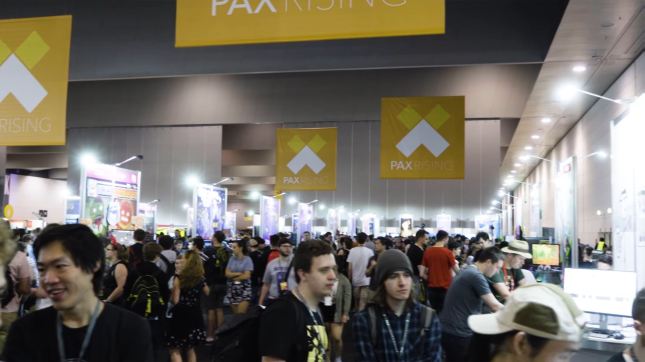
PAX Australia 2018 (October 26th – 28th)

Yes, you read that correctly – we’ve thrown our hat in the ring for PAX Rising at PAX Australia (PAX AUS for short) because… well, why not? Submissions for PAX Rising were open, so I decided to fill out the form. The show is held every October in Melbourne, Victoria. Their mission statement:

“PAX Rising showcases engaging digital games developed by smaller teams. The folks at PAX believe these titles have a chance to rise above their modest beginnings, by growing as a company, establishing a fan base or pushing the industry.”

My wager here is that since a trip to Australia is so difficult, there won’t be much competition for the PAX Rising selection, meaning we have a better chance. But who can say for sure? The guidelines for PAX Rising are quite vague, so I have no idea if mobile games are even eligible. Whether or not we can go on this trip will also depend on if our game can generate the money to pay for the trip. So if you want us to go “down under” to PAX AUS, you better buy our game when it launches!

Check out a video of 2017’s PAX Rising stars on their YouTube channel here.


= = = = = = = = = = = = = = = = = = = = = = = = = = = = = = = = = = = =

We hope to see you on the road! Let us know in the comments if you will be attending any of these events. You can find out more about our game at WhereShadowsSlumber.com, ask us on Twitter (@GameRevenant), Facebookitch.io, or Twitch, and feel free to email us directly at contact@GameRevenant.com.

Frank DiCola is the founder of Game Revenant and the artist for Where Shadows Slumber.


The Triangle of Truth

Hello again, everyone! It’s Frank again. I know you are all eagerly reading our weekly updates to find out when the game will be finished, but this week you may be disappointed. Rather than announcing a launch date, I’m going to explain to everyone the project management principles behind why Where Shadows Slumber has had such a long development cycle. We’re going to discuss the Triangle of Truth!


triangle

The Triangle, Explained

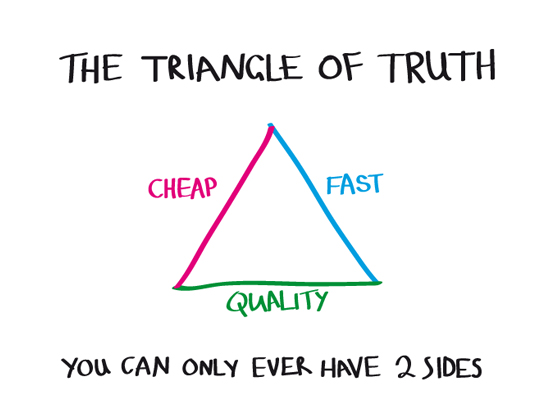
The “Triangle” refers to a project management principle that has gone by many names, visualized in the image above. This diagram has been used to describe everything from project strategies and economic models to government healthcare systems and construction projects. It’s one of those mantras that just always seems to hold true, no matter the circumstances. When you are creating something, such as a mobile video game, you’d ideally like for it to be as good as possible for the cheapest cost and have a fast development cycle. Sadly, the edicts of being demand that you must sacrifice one side of the triangle to achieve the other two. As the desired two metrics increase, the sacrificed metric must decrease. Let’s define these bolded terms first, and then talk about Where Shadows Slumber.

Good: The product stands out among the crowd as something special. We want quality to be as high as possible.

Cheap: The cost incurred creating the product. (Not to be confused with the price a consumer pays for the final product) We want our cost to be as low as possible.

Fast: Time is money, so the sooner the project is done, the better. Life is short! We want our development cycle to be as short as possible.

When you see how Where Shadows Slumber lands on this diagram, everything will start to make sense.


We Chose “Good” and “Cheap”

Jack and I are two recent college graduates who teamed up together to make video games. The development of Where Shadows Slumber is not too dissimilar from the development of SkyRunner, our previous mobile game. We decided not to spend a truckload of money on the game, so that it could be as good as we can muster at the lowest personal cost. Essentially, we decided to spend time on the game rather than cash. This is because we have no money, so it was an easy decision.

That’s not to say that I’ve spent $0 on this game! It’s fair to say tens of thousands of dollars have gone toward the development of Where Shadows Slumber, easily. But our budget is a pittance compared to large indie studios and AAA development houses. The sides of the triangle have been chosen: we want a good game, and we can’t spend a lot of money, so we’ll just have to spend as long as it takes to get the job done.

What would Where Shadows Slumber look like if we sacrificed a different portion of the triangle? Let’s analyze where we are now, and then look at the others. Right now, we’re sacrificing time.


SACRIFICE: TIME  / /  GET: QUALITY, LOW COST

Time: We’ve been working on the game since the spring of 2015, and we’ll continue to work on it over the next few months. That’s a 3 year development cycle!

Cost: Game Revenant has spent ~$25,000 to pay our audio engineers, travel to conventions, and equipment. We work from our apartments and meet in coffee houses, so we don’t spend money on rent or utilities. Jack has a full-time job and I mooch off my generous, loving and forgiving family.

Quality: The game is superb, beautiful, and time-tested. We even created a free Demo that went through extensive user testing and has stood the test of time. This informed our approach to the final game, but it took a while to get to this point.


SACRIFICE: QUALITY  / /  GET: TIME, LOW COST

Quality: We always knew we wanted Where Shadows Slumber to be an awesome, premium mobile game. But if for some reason we decided to release a poorer quality version, we’d be done by now. What would happen if we sacrificed quality by having fewer puzzles, no meaningful story, and low-quality audio produced by Frank making noises with his mouth?

Time: We already created a rudimentary throwaway version back in 2015 when we first begun work on the game. We could have cut it off right there! Also, our Demo has been available for download since November 2016, so that gives you an idea of how much time we could have saved.

Cost: Obviously you don’t need to spend a lot of money if you don’t care about the final result. Jack and I could have just created a shorter, worse game and it only would have cost us a few app store developer fees (Apple, Google Play) and the cost of buying development devices for building and testing.


SACRIFICE: MONEY  / /  GET: QUALITY, FAST DEVELOPMENT

Cost: It is possible to get investors for indie games, either by getting a loan from the bank or by appealing to groups like Indie-Fund. Jack and I briefly considered this a year ago, but by that point we had put in so much of our own time, we felt like reaping the full benefits. (Remember – investors don’t give out money for free, they want a cut of the sales!) We could conceivably have gotten $500,000 – $1,000,000 to work on this game if we put our own money in and also got some investments. If we did…

Quality: Along with our personal efforts, we could have hired a small team of veteran developers to aid me and Jack. Veteran programmers would help Jack organize his code, and veteran artists would produce work superior to mine. With Jack and I to guide their efforts, we could take a management / visionary role and let the experts do the hard work. I think the quality would be the same it is now, but it would have gotten there faster. Speaking of which…

Time: My work would be cut in half if we paid an Animator / Character Gui* to handle all of the cutscenes and humanoid animation in the game. That would free me up to work purely on environments with Jack. On the development side, we could hire a full-time Quality Assurance Gui to test the game on various devices. A full-time Marketing Gui would handle our social media efforts, press relationships, and business travel. We could have also brought Alba and Noah into the fold a lot earlier, meaning most of their work would be done by now. Every gui we hire is another hat Jack and I don’t have to wear!

*Gui is a gender-neutral version of “guy” that we used to use in Off Center


2305701220_0fc3d01183_b

There Is Always A Drawback

It should be stated that when you sacrifice a portion of the triangle, you don’t get it back. There is always a cost. If you spend money, it’s gone. If you sacrifice quality, your game suffers. And if you spend three years working on a game, you suffer.

I’ve lived in isolation for a period of three years ( ! ), all the while neglecting personal relationships with friends and families, turned down jobs, rejected business opportunities, let my body grow fat, and forgone other personal life goals in order to work on Where Shadows Slumber for as many hours a day as possible. (Imagine my surprise when I discovered that women are not eager to date a man who spends 10 hours every day in front of a computer and rarely leaves the house. Shocker!)

Jack has been working his fingers to the bone every day at not one, but TWO tasks: his full-time work at a startup in NYC and his passion project Where Shadows Slumber. He’s written about this before on our blog, and I encourage you to read his past writing. I was particularly mortified at the mention of how he has to find small scraps of time throughout the day (30 minutes in the morning, 25 on the train, 45 between arriving home from work at night and making dinner) just to work on the game. I have no right to complain – in light of his sacrifice, my life is a breeze. What kind of person would lead their friend into this kind of a life?

I don’t mean to be dramatic, but the point of this blog post is that the toll is real. Choose your sides of the triangle carefully, because the side you scorn will stop at nothing to seek revenge.


MiyamotoQuote.png

Where Shadows Slumber: Eventually Good

Miyamoto’s famous quote that “a delayed game is eventually good, but a rushed game is forever bad” may not be true anymore in a world where games can be patched and DLC can be sold. In a world where software is now a service, rushed games might eventually become good, given time.

However, this is also an industry where you live and die by your first impressions. Users don’t ever return to write a second review, and journalists move from game to game quickly. Jack and I are making a sacrifice of time to ensure that Where Shadows Slumber makes a splash when it hits the market. We can’t spend money we don’t have, but we can always put in just a bit more work.

Are you a game developer, artist, musician, writer, or creator working on a passion project? Feel free to share this blog post with your friends and family, especially if they have ever asked you “gee, when are you going to be done with this darn thing?” Let me know what they say in the comments below!


= = = = = = = = = = = = = = = = = = = = = = = = = = = = = = = = = = = =

This has been a project management blog from the creators of Where Shadows Slumber. Have a question about aesthetics that wasn’t mentioned here? You can find out more about our game at WhereShadowsSlumber.com, ask us on Twitter (@GameRevenant), Facebookitch.io, or Twitch, and feel free to email us directly at contact@GameRevenant.com.

Frank DiCola is the founder of Game Revenant and the artist for Where Shadows Slumber.

State of the Art – May 2018

Welcome to State Of The Art, May 2018 edition! This monthly progress report is written by Frank DiCola and is focused entirely on how the game’s visuals have improved in the past month.

It’s hard to believe the past month was just 30 days – everything feels so long ago, from our hilarious April Fool’s Day post to my trip to PAX East. As we wrap up production on the game, I find we have more work to do, not less. Not what I expected, but Jack and I are up to the task!

Missed last month’s State of the Art? The April edition is right here.


SPOILER WARNING: This post contains screenshots, GIFs and videos of later sections of the game. If you want to experience them in all their majesty for the first time on your mobile device when the game launches, don’t read on!


LevelSelect-5-6.gif

More Gorgeous Menus

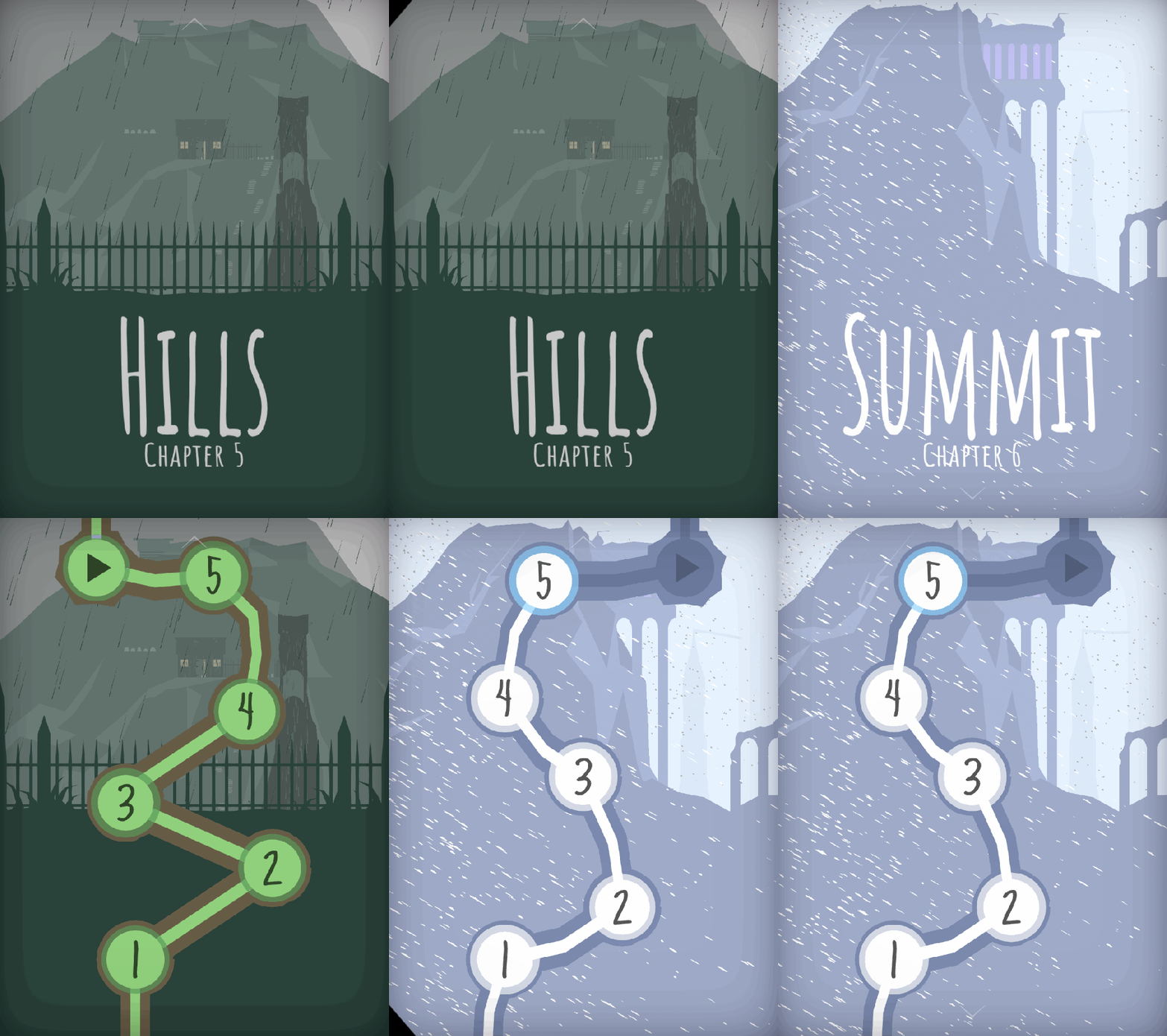
The GIF above is a little teaser of what I have for you in this update: two more Worlds have been polished and are now App-Store-ready. As I hinted at last time, I completed World 5 (the Hills) and World 6 (the Summit). Check out their Level Select menus! I know it seems weird to show these off, but I always love how they come out. It’s so cool for me to get an opportunity to visualize the game world from a different perspective. This 2D view allows you to appreciate the scale of Obe’s journey as he climbs to the top of a massive mountain towards the game’s end.


SOTA-April-Hills

The Rainswept Hills

These two Worlds posed a unique challenge to me because they take place in the wilderness. Up until this point, I tried to stick with my modular tool-set for as much of the game’s artwork as possible. However, sometimes you just can’t do that. When it comes to mountains, valleys, and rocks, they demand a jagged unevenness that just can’t be achieved by cookie-cutter pieces. Every Level in this World has a custom ridge that is 100% unique!

Jack will kill me if I show off every Level in this World, so I’ll have to settle for my two favorites. Level 5-2 has always looked great, but now that it’s raining like hell the Level has really come to life:

Then, towards the end of the Hills, we transition to a snowier climate. Obe is getting to the top of the mountain. He sees a cottage at the edge of the cemetery where he can rest for the night. Here is the last Level in this World:

I love doing weather effects because they really challenge me to think of how every tiny thing in the scene ought to change. Leave a comment and let me know what you think of “the Hills!”


SOTA-April-Header

The Forgotten Castle at the Summit

Obe is making his way through a blizzard to a lonely, abandoned castle at the top of the mountain. Once again, I got the opportunity to polish the weather effects here and I think they look incredible. I can’t show off everything, so here’s a quick look at two different Levels.

The first is Level 6-1, “Pass.” Obe is making his way through the snow as he attempts to cross this old bridge. Thanks to Jack’s terrain setup, Obe will actually use different animations depending on what terrain he is standing on. Notice how he interacts differently with Buttons and bridges.

In the shadows, another kingdom is revealed. Are we looking into an alternate dimension? Perhaps the shadows are a window to the past? The future?

Level 6-4 takes place inside the castle. Now, a snowstorm rages outside as a lonely sentry patrols the entrance.

This World does some amazing things with shadows, so I don’t want to give too much of it away. It looks a million times better than where I left off a few months ago, so I appreciate the chance to come back and punch it up.


SOTA-April-Cutscene.JPG

Next Up: Cutscenes, Cutscenes, Cutscenes

Rather than move on to the final World of the game, I’m going to take the next few weeks to animate the game’s remaining story cutscenes. World 7 needs a bit of love right now, so Jack is going to spruce it up a bit before I make my glorious return to polish. Cutscenes are tough because every minute of animation is roughly 40 hours of work ( ! ) so I’m going to be nerding out in my room for a few more months, it seems. Two of the cutscenes have been animated and shown off at festivals, but they need sound. The other eight have not been started, although their scripts were written long ago.

At some point I may enlist Alba and Noah to help me input the sounds into the animation, because I think we can cover more ground that way. But as far as character animation goes, it’s just me and the keyframes. Some people at PAX East asked me if I ever use motion-capture for these short films. The answer is: No way! We don’t have a crazy setup like that at Game Revenant (read: at my apartment or Jack’s apartment). It’s all animated by hand, baby.

Wish me luck as I make my descent into animation hell. See you next month!


= = = = = = = = = = = = = = = = = = = = = = = = = = = = = = = = = = = =

We hope you enjoyed this update about the game’s artwork. Have a question about aesthetics that wasn’t mentioned here? You can find out more about our game at WhereShadowsSlumber.com, ask us on Twitter (@GameRevenant), Facebookitch.io, or Twitch, and feel free to email us directly at contact@GameRevenant.com.

Frank DiCola is the founder of Game Revenant and the artist for Where Shadows Slumber.

Unity’s Performance Debugging Tools

Last week I discussed some of the basics of how rendering works in Unity. As I mentioned, all of that was setup for this week’s blog post. Since I’m working on rendering optimization now, I figured it would be a great time to go over the debugging tools Unity provides in order to aid rendering performance. Online resources can be a little scarcer for rendering than they are for other aspects of coding, so hopefully anyone who’s working on their own game might glean some useful information from this post. And even if you’re not working on anything right now, I hope you follow along and maybe learn a bit!

Unity is a nice little game engine, and, as such, it does a lot of the work for you. For the most part, when making a game, you don’t have to worry about the nitty-gritty stuff like rendering. When building for mobile, however (especially when you have specific graphics/lighting customization), you might have to descend into shader-land. Fortunately, Unity provides a few tools that can help you to deal with optimizing your rendering pipeline.


4-24-Profiler.JPG

Profiler

The first step in fixing rendering performance issues is to know about them. The best way to do that is with the Profiler window (Window -> Profiler). While you’re running your game, the Profiler keeps track of a lot of incredibly useful information, like how long each frame takes to render, split up by category. For instance, the Profiler will tell me that a frame took 60 milliseconds to run, 40 of which were due rendering and 15 from script execution, etc. This is the first place you should check when trying to improve performance – there’s no point in optimizing your rendering if it’s actually your scripts that are running slowly!

profiler

So much information!

For the purposes of rendering, there’s an entire Profiler section! The Rendering Profiler keeps track of the number of batches, setPass calls, triangles, and vertices in each frame. Looking here for inconsistencies, spikes, and just high numbers in general is a good way to get an idea of why your game is taking so long to render. The Profiler also has a lot of other info that’s useful for diagnosing and debugging performance problems. I really recommend profiling your game and thoroughly looking through the results to get as much information about how your game is running as possible.


android_debug_bridge

Android Debug Bridge

While profiling in the editor is pretty useful, it doesn’t tell us much – of course our game will be fast on a great big computer, but how does it run on a crappy phone?

The is where ADB, or the Android Debug Bridge, comes in. ADB allows your computer to communicate with your Android phone about all sorts of stuff. Specifically (for our use cases), it allows you to profile your game while it’s running on a device. If you plug your phone into your computer, build the game directly to your phone, and open the profiler, you should see some results. This is the information we want, because it tells a much truer story about how your game runs on a phone.

Where Shadows Slumber, for instance, runs at ~200 fps in the Unity editor. When I plug my phone (the Google Pixel 2) into the profile, I get a framerate of ~60 fps. This is pretty good, so I know our game can run on newer devices. However, when I plug in my old phone (a broken HTC One M8), I get closer to ~12 fps. Looking at the profile during this run will give me much more useful information about what I should fix, since this is the device where performance is actually suffering. If you’re making any big decisions or changes based on profiler results, make sure those results come from your actual targeted device, and not just from the editor.

ADB usually comes with the Android SDK – if you have the Android SDK set up with Unity (which allows you to build to Android devices), then you should be able to use ADB with the profiler pretty painlessly.

I should also mention that there might be an equivalent tool for iOS debugging, but, as I do all of my development on a Windows machine, and all of my testing on an Android phone, I wouldn’t know what it is. Sorry!


4-24-Header

Frame Debugger

The next most important tool for rendering performance is the Frame Debugger (Window -> Frame Debugger). While the Profiler tells us a lot about what’s happening during rendering as a whole, it still treats the rendering process as a black box, not letting us see what’s actually happening. The is where the Frame Debugger comes in – it allows us to see, step by step, exactly what the GPU is doing to render our scene.

As I mentioned last week, the GPU renders the scene through a bunch of draw calls. The Frame Debugger allows us to see what each of those draw calls is drawing. This allows us to determine which materials/shaders are causing the most draw calls, which is one of the biggest contributors to rendering lag. It also provides a bunch of information about each draw call, such as the properties passed to the shader or geometry details. The important thing that it tells you is why this draw call wasn’t batched with the previous draw call.

frame debugger

All of this happens in a single frame

Batching is Unity’s first defense against rendering lag, so it makes sense to batch as much stuff into a single draw call as possible. Because rendering is such a complex process, there are a lot of reasons why draw calls can’t be batched together – certain rendering components simply can’t be batched, meshes with too many vertices or negative scaling can’t be batched, etc. The frame debugger will tell you why each draw call isn’t batched with the previous one, so you can determine if there are any changes you can make that might reduce the number of draw calls, thereby improving rendering performance.

For example, in Where Shadows Slumber, we re-use meshes in certain places. Sometimes, if we require a “mirrored” look we’ll reuse a mesh, and then set the scale to -1. This was before we really looked into rendering performance, and, unfortunately, it causes problems – a mesh with negative scaling can’t be batched with a mesh with positive scaling, so this ends up creating multiple draw calls. Rather than setting the scale of the object to -1, we simply import a new, mirrored mesh and update the object, allowing these draw calls to be batched and improving performance.


4-24-Stats.JPG


Stats

That’s it for the heavy-hitters; between the Profiler, Frame Debugger, and ADB, you should be able to get a pretty good idea of what’s going on in render-land. Unfortunately, digging through them can take a while – sometimes you just want a quick indicator of what’s going on in your scene. Enter the Stats window.

The Stats window (click “Stats” in the Game View) is a small overlay in the game view which gives you a quick rundown of various rendering indicators in real time. It’s not as in-depth, but it gives a much quicker picture of performance.

stats

That’s a lot of batches!

While it sounds like the stats window doesn’t add much – after all, the Profiler can give you the same information – I’ve found it to be very useful. The Profiler is probably better when you’re actively debugging rendering performance, but the stats window allows you to notice places where rendering performance might take a hit, even when you’re doing other things.

When I’m testing some other part of the game on my computer, I’m not going to notice any rendering lag, because my computer is so much more powerful than a phone. I’m also not going to be looking at the Profiler or Frame Debugger, because I’m not worrying about rendering at the moment. However, if I have the stats window open and I notice that the number of draw calls is in the hundreds, then I know something is going on. At that point I can get out the Profiler and see what’s happening – but I wouldn’t even have known there was anything amiss if it weren’t for the stats window.
 

4-24-SceneView.JPG

Scene View Draw Mode

As we get further and further down the list, we’re moving from “debugging all-star” to “it’s useful, but you probably won’t use it much”. Scene View Draw Modes fall into this category, but they’re still good to know about. You can access different Scene View Draw Modes by clicking the drop down menu at the top right of the scene view window.

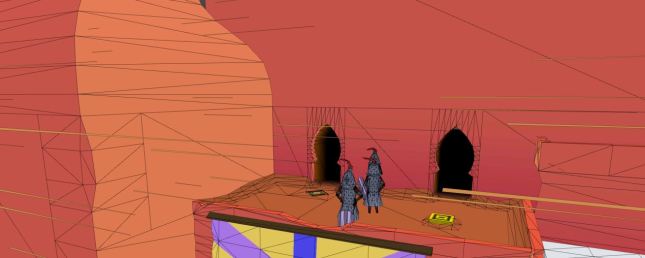
The Scene View in Unity is one of the main windows that you use to make your game – it shows everything in the scene, allowing you to move around through the scene and select, move, rotate, scale, etc., any game objects. Usually the Scene View just displays the objects exactly as they would be displayed in the game. However, it has a bunch of other modes, and some of them are actually pretty useful. The two that I find the most useful when considering rendering concerns are listed below, although they’re all worth checking out:

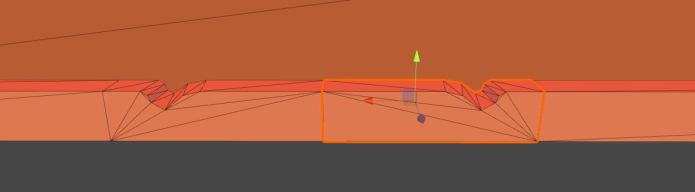
Shaded Wireframe: This is my default draw mode, as it looks pretty similar to the normal shaded mode. The difference is that it also shows all of the triangles and vertices that you’re drawing. This is useful because certain shader operations are performed once for every vertex. Decreasing the number of vertices in your scene can give you a bit of a performance boost, and the shaded wireframe draw mode helps you see when you might have too many vertices.

3-4toomanytris

The shaded wireframe shows that there are too many polys.

Overdraw: This mode draws each object as a single transparent color. This makes it very easy to see when multiple objects are being drawn in the same spot on the screen. Since the GPU has to draw every pixel of each object (even if that pixel will be overwritten later), it ends up wasting some calculations. Areas that are very bright will waste even more calculations. Switching to this draw mode every so often lets you know if there are any places where you might want to remove some meshes.


161004-worst-hacks-history-feaure

The Internet!

It should pretty much go without saying, but one of your best resources for debugging performance is the internet. Unfortunately, when it comes to rendering in Unity, the information out there is pretty scarce. Unlike with normal imperative coding, where you can simply Google “how to pathfinding” and get 30 implementations, you have to work a bit harder with rendering stuff. I find it’s best to do what you can and only resort to the internet with very specific questions. That said, there is still a lot of helpful information out there. You just have to know going in that only one of every three stack overflow questions makes any sense, and only one of every four Unity forum threads are using the most recent APIs. It’s like “Googling: Nightmare Mode”!

For anyone reading this post who is actually working on rendering stuff – I’m very, very sorry. I hope that this post and the tools I discussed help to shed at least a little bit of light in the dark underworld that is shader-land, and I hope you can achieve your rendering goals and make it back to the mortal realm before your soul is forever lost.

For everyone else who hasn’t done any rendering stuff, I hope you learned a bit, and that maybe I inspired you to get involved with some rendering code! It’s really not that bad, I promise!


= = = = = = = = = = = = = = = = = = = = = = = = = = = = = = = = = = = =

If you didn’t already have a working knowledge of rendering, I hope this post helped! If you do know about rendering stuff, I hope you don’t hate me too much for my imprecision! You can always find out more about our game at WhereShadowsSlumber.com, find us on Twitter (@GameRevenant), Facebookitch.io, or Twitch, join the Game Revenant Discord, and feel free to email us directly with any questions or feedback at contact@GameRevenant.com.

Jack Kelly is the head developer and designer for Where Shadows Slumber.